

- Find out what I'm doing, Follow Me :)
Showing posts with label Google. Show all posts
Showing posts with label Google. Show all posts
Thursday, February 2, 2012


Thursday, November 24, 2011
Set a permanent formatting style for composing messages in Gmail
Gmail gives a lot of formatting options for formatting emails. You can change the color of text, change font size, color and more. Some are pretty comfortable with the default formatting in plain style but some may want to change the formatting of text with text colors, font etc. But if you prefer a certain formatting style and want it to use the same style for every email you compose, changing the formatting style every time can be a bit nagging. But with Gmail, you can easily set a default formatting style using a Labs feature.
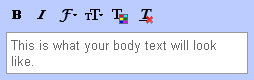
To set a permanent formatting style for your emails, go to Mail settings on Gmail from the settings button at the top right corner in Gmail. Now click on the Labs tab and Enable the Default Text Styling feature. Now save the settings.
Now go back to the General Tab and you will see the Default Text Style section. You will see the text “This is what your body text will look like.” in the box. Using the buttons for Bold, Itailc, Underline, Text Color, Font, Text Size you can set a formatting for the text. Now save the changes.
 Now click on the Compose button and type in something; you will see the formatting by default. You can revert back to the default formatting style by clicking on the Remove Formatting button on the toolbar while creating a new email message.

To set a permanent formatting style for your emails, go to Mail settings on Gmail from the settings button at the top right corner in Gmail. Now click on the Labs tab and Enable the Default Text Styling feature. Now save the settings.
Now go back to the General Tab and you will see the Default Text Style section. You will see the text “This is what your body text will look like.” in the box. Using the buttons for Bold, Itailc, Underline, Text Color, Font, Text Size you can set a formatting for the text. Now save the changes.
Now click on the Compose button and type in something; you will see the formatting by default. You can revert back to the default formatting style by clicking on the Remove Formatting button on the toolbar while creating a new email message. Saturday, October 1, 2011
Reports: Microsoft Anti-Virus Erasing Google Chrome
 Mighty funny timing, Microsoft. Reports say that Google’s Chrome browser was threatening to overtake Firefox in the coming months thanks to soaring usage rates caused, in large part, by FF and IE defectors. Then, this morning, Internet forums are awash with rage because a new update to Microsoft’s Security Essentials and ForeFront AV software began calling Chrome a Trojan and erasing it from users machines. Coincidence? Yeah, it probably is. But that still doesn’t change the fact that users are pissed.
 Both ZDNet and The Register are reporting that they’ve received numerous complaints about the critical false positive. The AV programs are identifying Chrome as part of the ZeuS Trojan, and users who try to reinstall the browser are finding that the antivirus program won’t let them, citing “PWS:Win32/Zbot” as a severe threat. Register readers are reporting that the beta version of Chrome isn’t affected, nor are browsers that are configured to not send Google any information. Nobody’s saying anything official at the moment – both Google and Microsoft have been mum on the matter.
So, has any of you been affected by the bug? Chime in with your experiences in the comments! I've got Chrome and MSE installed on my laptop, and nothing fishy has gone on yet.
Tuesday, September 13, 2011
Google Fun – Go Inside Search & Explore Google Services In A Whole New Way At The Playground
 You wouldn’t use words like snazzy, flashily stylish, or even showy with Google’s almost barebones effectiveness. Recent changes though have helped to dress up Google and readied it for the Web 2.0 party. We have seen that Google and its interlinked maze of products can be whole lot of fun. You can check out the links on our site, but right now let’s click on a link that will take us inside Google Search and into the Playground.
The Inside Search Playground is a slight detour in the maze of Google services. But it’s here that you can – feed your curiosity, test your search skills and explore topics in a whole new way – as Google itself says. It’s difficult to exactly define what it is, except to say that it’s packed with features that give you several new ways to play around with Google Search. Oh yes, it is ‘flashily stylish’ too.
Find Out What Do You Love

What Do You Love is a search engine in itself, but it’s like a meta-search engine which brings in results from most of Google’s web services, from news to mobile search, to answer your search query. What you get is your own Google mini-portal for a particular search. All that’s left for you to do is to dive in and start feeding on the information that’s out there.
A Doodle Timeline

Take a Stab at Google Trivia

I have the most fun here. A Google a Day is a trivia game, and a tough one at that. You are asked a trivia question and you can ‘cheat’ by using any of the Google services. If you think it’s easy, it’s not as you have to go against the clock. If you are a slowpoke, then play normally. But it’s the best way I know of learning how to search Google using the advanced search operators (check the Tips & Tricks section).
Choose a Champ at Demo Slam

Demo Slam is like a head-to-head between Google projects. Sounds boring? Nah…just try it out! Google white coats submit most of the demo projects, but you, me, and Irene can join in too and vie to become the champs. Browse through the site and tell us your favorite demo project. Mine is the Road Trip on Route 66. You can click on the gallery too and see the whole lineup. Tech demos are fun again.
Look at a Day’s Worth of Google Searches around the World

You are not the only one who is searching on Google. What does the world look like with all those people tapping away at their keyboards – the cool Search Globe shows you. You can also scroll down and look at the very interesting Life of a Query which reveals interesting facts about how Google Search operates. Keep scrolling down for few more tidbits rendered appealingly. For instance, you can go under the hood and learn how Google conducts its experiments. Each factoid is presented as you splash the ‘chemicals’ on the page.
The Google Globe wasn’t rendering for me at that precise moment. It could be a temporary glitch. I used the image from the Official Google Blog.
Help Your Parents Be Friends with Google

Are you the resident tech expert? If family, friends, and the dog are turning you into the local professor, just point them to the how-to videos hosted here. The beautifully organized site handholds them through the basics to an advanced stage where they can even create a FAT32 hard-drive partition. You can send the videos packaged as like a ‘gift’.
Make Your Own Search Stories

Make Your Own Search Stories is a fun video creation tool that lets you go all wild, crazy, and imaginative with your Google searches and stitch them together into a story backed up with music. Parisian Love is one of the well-known ones. Watch it and many more to get your own ideas.
Is This The Google Search Engine We Know?

Here, you get a different looking search engine which takes you through the paces of a search by scrolling with the arrows or clicking on the little colored dots. It’s a neat tool to explore all the facets of Google Search quickly without looking at any help file.
The Playground is a fun place to be if you are new to Google or just don’t about all its power yet. Heck, I am a veteran, but I still found the trivia and demo slam rounds to be fun. It helped me know my favorite search engine a bit better. What about you? Does the slew of pages here make you appreciate that it’s a whole lot more than juts typing in a search? Tell us…
Saturday, September 10, 2011
Google Android 4.0 'Ice Cream Sandwich' Expected to Arrive Soon
 Finally we hear from Google about the release date of the new version of Android operating system, Ice Cream Sandwich. In an interview with SalesForce.com CEO Marc Benioff, Google's Eric Schmidt disclosed that next iteration of Android would come in the October-November timeframe.
“We have a new operating system, internally known as Ice Cream Sandwich for some reason, which is being released in October/November, which everyone’s really excited about,” says Schmidt in the interview held at Safeforce’s Dreamforce conference.
Ever since Google unveiled Ice Cream Sandwich, several rumours have floated around the Internet about the timing of its release. However, it was widely expected that the new Android operating system will come in the final quarter of this year.
Some of the reports claim that the Ice Cream Sandwich will be officially announced when Google's senior official Andrew Rubin visits AsiaD Conference, slated to be held from October 19-20.
To remind you, the upcoming update to the Android OS has been designed to unify the user interface across the Android phones and tablets. The Ice Cream Sandwich will be numbered as Android 4.0 and will have elements from both Honeycomb and Gingerbread. It's notable that the Honeycomb update provided support for the larger screens as found on the tablets, while previous versions were only designed for mobile. Stay tuned for more update on Ice Cream Sandwich.
Thursday, September 8, 2011
Update Yoast’s Google Analytics for WordPress Plugin v4.1.3 – XSS Scripting Vulnerability Fixed
A while ago I started seeing some very odd links appearing, ones that looked far too natural, it appeared as though the majority of them had the Google Analytics for WordPress plugin, developed by Joost de Valk, with the “Track outbound clicks & downloads” selected.
So I started to wonder if some how these sites had been hacked using a vulnerability somewhere in the plugin. I had a look through the code until I got to the function in charge of tagging the outbound links, although I could read the PHP code, I don’t really have much knowledge about XSS and SQL injection and stuff like that, so I asked James to have a look (the guy that likes to break things).
So James started having a look and after a bit of time studying the code he told me he had put a comment on my blog (I was running the Google Analytics for WordPress plugin with the track outbound clicks option selected). So I go to my blog and I see this:
On clicking the link, the javascript simply displays you the cookies you have for the site in question – not exactly dangerous, but it could be modified to cause much more mayhem I’m guessing.
The code James used was this:
We let Joost know, James suggested a fix and Yoast got it sorted almost immediately, you can download the latest version here (version 4.1.3). If you haven’t used the Google Analytics plugin by Joost (Yoast), I’d highly recommend trying it out. I’ve currently got it running on my personal site and it tags all out going clicks, which is great for tracking affiliate clicks and seeing where the visitor came from, amongst other things.
So I started to wonder if some how these sites had been hacked using a vulnerability somewhere in the plugin. I had a look through the code until I got to the function in charge of tagging the outbound links, although I could read the PHP code, I don’t really have much knowledge about XSS and SQL injection and stuff like that, so I asked James to have a look (the guy that likes to break things).
So James started having a look and after a bit of time studying the code he told me he had put a comment on my blog (I was running the Google Analytics for WordPress plugin with the track outbound clicks option selected). So I go to my blog and I see this:

On clicking the link, the javascript simply displays you the cookies you have for the site in question – not exactly dangerous, but it could be modified to cause much more mayhem I’m guessing.
The code James used was this:
Hi this is an http://www.google.com']);alert(document.cookie);return false;//" rel="nofollow">interesting link don't you think?We let Joost know, James suggested a fix and Yoast got it sorted almost immediately, you can download the latest version here (version 4.1.3). If you haven’t used the Google Analytics plugin by Joost (Yoast), I’d highly recommend trying it out. I’ve currently got it running on my personal site and it tags all out going clicks, which is great for tracking affiliate clicks and seeing where the visitor came from, amongst other things.
Wednesday, September 7, 2011
Yahoo data in Bing Webmaster Tools
People have started noticing the data appear in their accounts, similar to Google Webmaster Tools, you can see the number of impressions, clicks and the CTR by keyword – but with a difference, you can see which are on Bing and which are on Yahoo.
Today we logged into the Dave Naylor Bing Webmaster Center account and found the following graph

Sadly there really isn’t many impressions for the keywords for it to be statistically significant, with Dave (who gets a shed load of organic traffic) having his top keyword as “msnlive” with 442 impressions, hardly worth shouting about.

This is no doubt going to be very helpful to those of you based in the US, perhaps less so to those based in the UK where Google still have over 90% share of the search market.
Today we logged into the Dave Naylor Bing Webmaster Center account and found the following graph
Sadly there really isn’t many impressions for the keywords for it to be statistically significant, with Dave (who gets a shed load of organic traffic) having his top keyword as “msnlive” with 442 impressions, hardly worth shouting about.
This is no doubt going to be very helpful to those of you based in the US, perhaps less so to those based in the UK where Google still have over 90% share of the search market.
Tuesday, September 6, 2011
Using Gmail, Calendar and Docs without an Internet connection
The great thing about web apps is that you can access all of your information on the go, and we’ve introduced ways to use Google Apps on a variety of devices like mobile phones and tablets. But it’s inevitable that you’ll occasionally find yourself in situations when you don’t have an Internet connection, like planes, trains and carpools. When we announced Chromebooks at Google I/O 2011, we talked about bringing offline access to our web apps, and now we’re taking our first steps in that direction. Gmail offline will be available today, and offline for Google Calendar and Google Docs will be rolling out over the next week, starting today.
Gmail Offline is a Chrome Web Store app that’s intended for situations when you need to read, respond to, organize and archive email without an internet connection. This HTML5-powered app is based on the Gmail web app for tablets, which was built to function with or without web access. After you install the Gmail Offline app from the Chrome Web Store, you can continue using Gmail when you lose your connection by clicking the Gmail Offline icon on Chrome’s “new tab” page.

Google Calendar and Google Docs let you seamlessly transition between on- and offline modes. When you’re offline in Google Calendar, you can view events from your calendars and RSVP to appointments. With Google Docs you can view documents and spreadsheets when you don’t have a connection. Offline editing isn’t ready yet, but we know it’s important to many of you, and we’re working hard to make it a reality. To get started using Google Calendar or Google Docs offline, just click the gear icon at the top right corner of the web app and select the option for offline access.
IT administrators can deploy Chrome Web Store apps to users en masse by setting up organizational policies for Chrome.
Today’s world doesn’t slow down when you’re offline and it’s a great feeling to be productive from anywhere, on any device, at any time. We’re pushing the boundaries of modern browsers to make this possible, and while we hope that many users will already find today’s offline functionality useful, this is only the beginning. Support for offline document editing and customizing the amount of email to be synchronized will be coming in the future. We also look forward to making offline access more widely available when other browsers support advanced functionality (like background pages).
Gmail Offline is a Chrome Web Store app that’s intended for situations when you need to read, respond to, organize and archive email without an internet connection. This HTML5-powered app is based on the Gmail web app for tablets, which was built to function with or without web access. After you install the Gmail Offline app from the Chrome Web Store, you can continue using Gmail when you lose your connection by clicking the Gmail Offline icon on Chrome’s “new tab” page.

Google Calendar and Google Docs let you seamlessly transition between on- and offline modes. When you’re offline in Google Calendar, you can view events from your calendars and RSVP to appointments. With Google Docs you can view documents and spreadsheets when you don’t have a connection. Offline editing isn’t ready yet, but we know it’s important to many of you, and we’re working hard to make it a reality. To get started using Google Calendar or Google Docs offline, just click the gear icon at the top right corner of the web app and select the option for offline access.
IT administrators can deploy Chrome Web Store apps to users en masse by setting up organizational policies for Chrome.
Today’s world doesn’t slow down when you’re offline and it’s a great feeling to be productive from anywhere, on any device, at any time. We’re pushing the boundaries of modern browsers to make this possible, and while we hope that many users will already find today’s offline functionality useful, this is only the beginning. Support for offline document editing and customizing the amount of email to be synchronized will be coming in the future. We also look forward to making offline access more widely available when other browsers support advanced functionality (like background pages).
Monday, September 5, 2011
Google’s Organic Search Results Get A Space Consuming Facelift
Well as if it wasn’t hard enough to get your site onto the first page of the Google search rankings, things have just taken a whole new twist, the online search engine giants opting to increase the amount of space that a sites ‘sitelinks’ take up on the page.
With former sitelinks only filling a small area of the page up in the form of smaller text links, an alteration to the way in which Google want to present the links has now left websites that are looking to achieve first page rankings with a whole new obstacle.

As you can see from the images above, the sitelinks of a number of authority sites have been increased in not only font size but now also include a miniature version of the meta description as well as the URL of the page that the search giants believe are relevant to the user’s search.
Now as with anything, there are always two versions to every story and that means that if you are in fact one of the sites that are lucky enough to feature such exposure, your online presence will increase significantly on the page in which you are situated.
On the other hand, as I have already pointed out, if you are trying to overcome a competitor that has sitelinks, your struggle to get onto the same page as that site becomes a whole lot harder, simply due to the spacing needed for Google to present what they describe as ‘relevant’.

Investigation into the sitelinks used on many sites on the search engine’s organic results shows that not all sites that have them have been ‘promoted’ to the bigger, more space consuming version of the links, so whether this is something that Google are trialling with some of the more authority rich sites is still to be seen but they have certainly made competition for places a whole lot more competitive.
Now I’m not someone who likes to ‘sit pretty’ when I have achieved results and this will spark me to want to battle against many of the competitors to obtain the number one spot in the rankings, after all, you need something to challenge you in order to prevent you from being complacent.
With former sitelinks only filling a small area of the page up in the form of smaller text links, an alteration to the way in which Google want to present the links has now left websites that are looking to achieve first page rankings with a whole new obstacle.
As you can see from the images above, the sitelinks of a number of authority sites have been increased in not only font size but now also include a miniature version of the meta description as well as the URL of the page that the search giants believe are relevant to the user’s search.
Now as with anything, there are always two versions to every story and that means that if you are in fact one of the sites that are lucky enough to feature such exposure, your online presence will increase significantly on the page in which you are situated.
On the other hand, as I have already pointed out, if you are trying to overcome a competitor that has sitelinks, your struggle to get onto the same page as that site becomes a whole lot harder, simply due to the spacing needed for Google to present what they describe as ‘relevant’.
Now I’m not someone who likes to ‘sit pretty’ when I have achieved results and this will spark me to want to battle against many of the competitors to obtain the number one spot in the rankings, after all, you need something to challenge you in order to prevent you from being complacent.
Friday, September 2, 2011
How to Disable Animated .GIFs in Google Chrome
This very brief tutorial will guide you through the steps required to disable (most) Animated GIFs in the Google Chrome web browser.
The second method uses the script Stop gif animations on escape. The difference between this method and the first is that you have to hit the escape key on your keyboard to stop the GIF animations from playing. However, I have found that this method/script works on animated GIFs that even Paused! can’t stop. Drawbacks: you have to hit the escape key to stop the animations.
You can try one (or both) of the methods mentioned above to see which works best for you – the instructions are below.
Background
There are a number of extensions that ‘disable’ Animated GIFs in Chrome. In this guide I will explain how to install and use 2 of them. These are the two best ways to disable Animated GIFs in Chrome, in my testing (different versions of Chrome on both Windows and OS X).Disabling Animated GIFs in Chrome
The first method uses the Chrome Extension Paused!, which will stop animated .gif files from playing without any interaction on your part. Drawbacks: Paused! isn’t perfect. If the .GIF file is hosted on a domain other than the one the web page is using, the GIF file may still animate. Although I haven’t experienced it yet, I have also read reports that Paused! can sometimes cause CAPTCHA’s not to display correctly.The second method uses the script Stop gif animations on escape. The difference between this method and the first is that you have to hit the escape key on your keyboard to stop the GIF animations from playing. However, I have found that this method/script works on animated GIFs that even Paused! can’t stop. Drawbacks: you have to hit the escape key to stop the animations.
You can try one (or both) of the methods mentioned above to see which works best for you – the instructions are below.
Method 1: Paused!
- To get started, visit the Paused! page on the Chrome Web Store. Click the large Add to Chrome button.
- Click Install when prompted.
- Chrome will likely notify you of the successful installation. You can close this notification window.
- Now visit a page that has Animated GIF’s (if you’ve previously visited the page, you’ll need to Refresh it). They (the GIFs) shouldn’t be ‘playing’.
- Again, Paused! isn’t perfect. Some if the images it should stop from animating will still play. If you find that Paused! doesn’t work well enough for you, you can uninstall it by opening your Extensions list. To do so, click the “Customize and control Google Chrome” button (upper-right corner of the Chrome window), select Tools -> Extensions and then scroll down to the Paused! entry. Click the uninstall link.


Method 2: Stop gif animations on escape
- Head over to the Stop gif animations on escape userscripts page. Click the Install button.
- If a ‘warning’ message pops up, click Continue.
- Click Install when prompted.
- Chrome will likely notify you of the successful installation. You can close this notification window.
- Now visit a page that you know has some Animated GIFs on it. Hit the escape key on your keyboard, and the GIFs should stop ‘playing’.
- If for any reason this script doesn’t work for you, or you just decide you don’t want to use it anymore, it’s very easy to uninstall. Click the “Customize and control Google Chrome” button (upper-right corner of the Chrome window), select Tools -> Extensions and then scroll down to the Stop gif animations on escape entry. Click the uninstall link.


Sunday, August 14, 2011
Phones Running Google's Android are Prone to Hacking: Experts
 A mobile security expert says he has found new ways for hackers to attack phones running Google Inc's Android operating system.
 Riley Hassell, who caused a stir when he called off an appearance at a hacker's conference last week, told Reuters that he and his colleague Shane Macaulay decided not to lay out their research at the gathering for fear criminals would use it attack Android phones.
He said in an interview he identified more than a dozen widely used Android applications that make the phones vulnerable to attack.
"App developers frequently fail to follow security guidelines and write applications properly," he said.
"Some apps expose themselves to outside contact. If these apps are vulnerable, then an attacker can remotely compromise that app and potentially the phone using something as simple as a text message."
He declined to identify those apps, saying he fears hackers might exploit the vulnerabilities.
"When you release a threat and there's no patch ready, then there is mayhem," said Hassell, founder of boutique security firm Privateer Labs.
Hassell said he and Macaulay alerted Google to the software shortcomings they unearthed.
Google spokesman Jay Nancarrow said Android security experts discussed the research with Hassell and did not believe he had uncovered problems with Android.
"The identified bugs are not present in Android," he said, declining to elaborate.
It was the first public explanation for the failure of Hassell and Macaulay to make a scheduled presentation at the annual Black Hat hacking conference in Las Vegas, the hacking community's largest annual gathering.
They had been scheduled to talk about "Hacking Androids for Profit." Hundreds of people waited for them to show up at a crowded conference room.
Hassell said in an interview late on Thursday the pair also learned -- at the last minute -- that some of their work may have replicated previously published research and they wanted to make sure they properly acknowledged that work.
"This was a choice we made, to prevent an unacceptable window of risk to consumers worldwide and to guarantee credit where it was due," he said.
A mobile security researcher familiar with the work of Hassell and Macaulay said he understood why the pair decided not to disclose their findings.
"When something can be used for exploitation and there is no way to fix it, it is very dangerous to go out publicly with that information," the researcher said. "When there is not a lot that people can do to protect themselves, disclosure is sometimes not the best policy."
Hassell said he plans to give his talk at the Hack in The Box security conference in Kuala Lumpur in October.
Tuesday, August 2, 2011
How to automatically post Google+ updates to Facebook or Twitter
Most bloggers set their Facebook pages to automatically post updates from their blogs. There are lots of applications on Facebook that let you automatically post updates from your blog to Facebook. If you have become an ardent Google+ user, you might want to post your Google+ updates to Facebook and Twitter. This can be done with a combination of a couple of applications.
Facebook applications like RSS Graffiti, Sendible etc. let you push updates from your blog to Facebook pages or your profile page via the RSS feeds of your blog. Plusfeed is a tool that gives you the RSS feeds for any Google Plus profile. We had covered Plusfeed on Techattitude recently. Your feed URL will look like this: “http://plusfeed.appspot.com/1072221639248386151157″.
To post updates to Facebook, go to RSS Graffitti application on Facebook and authorize it to publish updates to your profile. You will see the pages you admin on the left hand menu; select the page you want to post updates to. After authorizing, click on the Add Feed button and add the RSS feed URL of your Google Plus profile onto it. Preview the Feed and finally save it. You can change the settings for the feed like its source name, source URL, Feed style, post type etc. You can also add filters to the feed, schedule it and more.
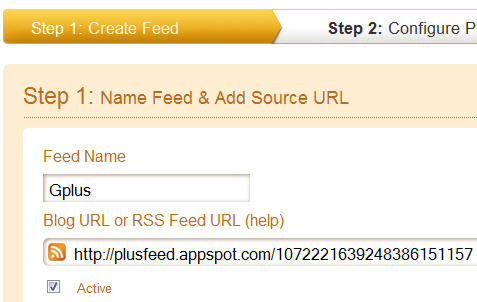
To post Google Plus updates to Twitter, you can use the famous Twitterfeed application. Twitterfeed lets you post updates to Twitter through a feed URL. Sign up for an account on Twitterfeed. Go to the Twitterfeed dashboard and click on the “Create New Feed” button at the top right corner. Now give a name for your Feed(Google Plus for instance) and enter the Google plus feed URL into the RSS feed URL box. Click on the Advanced Settings button to configure options for update frequency, post content and more.
Now go to Step 2 and select Twitter(You can use Twitterfeed to post updates to Facebook as well but it has lesser options and doesn’t post images either). You will need to authenticate your Twitter account. Once your account is authenticated, click on the Create Service Button. Now whenever you post anything to Google Plus, it will automatically be posted to your Twitter account as well.
Thus, using RSS Graffitti and Twitterfeed, you can easily post Google Plus updates to Twitter or Facebook.
Facebook applications like RSS Graffiti, Sendible etc. let you push updates from your blog to Facebook pages or your profile page via the RSS feeds of your blog. Plusfeed is a tool that gives you the RSS feeds for any Google Plus profile. We had covered Plusfeed on Techattitude recently. Your feed URL will look like this: “http://plusfeed.appspot.com/1072221639248386151157″.
To post updates to Facebook, go to RSS Graffitti application on Facebook and authorize it to publish updates to your profile. You will see the pages you admin on the left hand menu; select the page you want to post updates to. After authorizing, click on the Add Feed button and add the RSS feed URL of your Google Plus profile onto it. Preview the Feed and finally save it. You can change the settings for the feed like its source name, source URL, Feed style, post type etc. You can also add filters to the feed, schedule it and more.
To post Google Plus updates to Twitter, you can use the famous Twitterfeed application. Twitterfeed lets you post updates to Twitter through a feed URL. Sign up for an account on Twitterfeed. Go to the Twitterfeed dashboard and click on the “Create New Feed” button at the top right corner. Now give a name for your Feed(Google Plus for instance) and enter the Google plus feed URL into the RSS feed URL box. Click on the Advanced Settings button to configure options for update frequency, post content and more.
Now go to Step 2 and select Twitter(You can use Twitterfeed to post updates to Facebook as well but it has lesser options and doesn’t post images either). You will need to authenticate your Twitter account. Once your account is authenticated, click on the Create Service Button. Now whenever you post anything to Google Plus, it will automatically be posted to your Twitter account as well.
Thus, using RSS Graffitti and Twitterfeed, you can easily post Google Plus updates to Twitter or Facebook.
Wednesday, July 13, 2011
Do Posting To Facebook From Google+ Account
This tutorial will walk you through the steps required to view your Facebook stream right from within Google+
For this feature to work, you’ll need to use either Google Chrome or Firefox as your web browser – though it doesn’t matter if you’re using Windows or OS X.
Keep Surfing Borntohack (Shaify Mehta : Hacker , Programmer , Cracker)
For this feature to work, you’ll need to use either Google Chrome or Firefox as your web browser – though it doesn’t matter if you’re using Windows or OS X.
- The installation will be slightly different depending on which browser you’re using. I’ll outline both. If you’re using Firefox, skip down to step #6 below. If you’re using Chrome, keep reading.
- Start out by heading to this web site (link will open in a new window or tab). Click the Get Google+Facebook >> button.
- The ‘warning’ message will appear in the Extensions bar at the bottom of your browser. Click the Continue button.
- Click the Install button when prompted.
- Now that you’ve installed the Extension in Chrome, jump down to step #9 get it up and running.
- Firefox users – head over to this web site (link will open in a new window or tab). Click the Get Google+Facebook >> button. A ‘warning’ window will quickly pop up telling you that Firefox blocked the installation of the add-on. Click the Allow button in that ‘warning’ window (see image below).
- Now Firefox will prompt you to install the add-on. Click the Install Now button.
- Finally, click the Restart Now button to finish the installation.
- Head over to Google+ and sign in. You’ll now see a “Facebook” button in the navigation section (see image below). Click it.
- Click the Connect with Facebook button.
- Click the Allow button when prompted by Facebook.
- Now once you click that same “Facebook” button in your Google+ navigation section, your Facebook News feed will be displayed!
- You can even update your Facebook Status from within Google+ now. Click the What’s on your mind? box at the top of the page.
- Enter your status update and then click the Share button …
- … and your update will appear on Facebook.
- There are still some limitations to the features that this Extension/Add-On adds – for example, you can’t include image or other attachments to your Status Updates. Also, you can’t see or reply to any comments on your friends posts. You can click the link below their update, and be taken to it directly on Facebook itself, however. Have fun!


Keep Surfing Borntohack (Shaify Mehta : Hacker , Programmer , Cracker)
Sunday, June 5, 2011
AndroidLost Gives You Remote Access To Your Lost Android Phone

The private data that you carry around with yourself on your smartphone can really hurt you if your phone gets misplaced and lands in the wrong hands. AndroidLost is a free app for Android phones that, in combination with a web interface, allows you to remotely sound an alarm on or send a popup message to your misplaced Android phone from your computer, view your phone’s location on a map, lock it with a pin code of your choice, read its status (battery, temperature etc.), toggle WiFi and/or GPS, send SMS, read received SMS, forward incoming calls to a number of your choice, wipe your phone’s SD card or order it to execute a factory reset via web or SMS commands sent from another phone. The app is in beta as of this writing.
To begin using AndroidLost with your Android phone, you must first install the app from the Android Market (link provided at the end), launch it from your app drawer and select Request Administrator Rights > Activate (If, after this , you wish to uninstall the application, you will have to revoke its administrator rights from Menu > Display hidden keys > Remove Administrator Rights.o uninstall it). The app automatically registers online with your device’s primary Google account. Once that is done, open the AndroidLost website in your internet browser, Sign In (top-right corner) with your device’s primary Google account, then navigate to the Controls page.

Friday, June 3, 2011
Download Picasa Albums With Picasa Grabber
Picasa users who upload photos to the online photo hosting service can flag them as public or private. Public photos and galleries become searchable on the Picasa website. Everyone can view and download photos directly on the website of Google’s photo hosting site. Individual photos can be downloaded in various ways. Many photos on Picasa feature a download link at the top of the screen which can be used to download the selected photo to the local system. It is also possible to right-click the photos to save them to the device. This is a core difference to Flickr which adds an invisible and transparent layer on top of photos as a basic form of protection.
While individual photo downloads are less restricted on Picasa, it is still not comfortable to download multiple photos or even a gallery of photos from the photo service.
The free Windows software Photo Grabber has been designed to make the downloading of Picasa photo galleries as comfortable as possible.
All you need is a gallery’s RSS feed link to download all of its photos to your local Windows PC. RSS links are displayed on gallery pages and search pages on Picasa. The RSS links are either displayed on the right in a sidebar on photo album pages or at the bottom right on search pages.

You can start Picasa Grabber right away after you have downloaded the program from the developer website. The application has a size of 20 Kilobytes. Its interface is as minimalistic as possible. It consists of two form fields. Paste the Picasa album RSS feed url into the first, and select a local directory with a click on destination folder in the second.
A click on go parses the RSS feed and begins the photo download.
A download progress bar is shown on the screen. You can use Picasa Grabber to download all photos of a public Picasa photo album or search results page at a time. A queue to download multiple albums one after the other would have been handy.
Still, Picasa Grabber is a lightweight portable program for Windows users who like to download photo albums from Picasa. The program worked fine on a PC running a 64-bit version of Windows 7 Professional, it should run fine on other Windows systems as well. Download of the program is offered at Google Code.
Sunday, May 29, 2011
Speed Up Detailed View in Explorer
If you like to view your files in Windows Explorer using the "Details" view here is a
tweak to speed up the listing of file attributes:
Viewing files in Windows Explorer using the "Details" mode shows various attributes
associated with each file shown. Some of these must be retrieved from the individual
files when you click on the directory for viewing. For a directory with numerous and
relatively large files (such as a folder in which one stores media, eg: *.mp3's, *.avi's
etc.), Windows Explorer lags as it reads through each one. Here's how to disable viewing
of unwanted attributes and speed up file browsing:
· Open Windows Explorer.
· Navigate to the folder which you wish to optimize.
· In "Details" mode right-click the bar at the top which displays the names of the
attribute columns.
· Uncheck any that are unwanted/unneeded.
Explorer will apply your preferences immediately, and longs lists of unnecessary
attributes will not be displayed.
Likewise, one may choose to display any information which is regarded as needed,
getting more out of Explorer.
Saturday, May 28, 2011
Friday, May 27, 2011
Very Slow Boot When Networking ???
On some XP Pro installations, when connected to a network (peer-peer in this case),
the computer boot time is over 1:40. The system seems to freeze after logging in and the
desktop may not appear or will freeze for a minute. As timed with the utility,
Bootvis.exe, the problem was with the driver mrxsmb.dll, adding over 67 seconds to the
boot time. Turning off and restoring file and printer sharing eliminated 65 seconds from
the boot time.
· Alt-click (or right-click) on Network Places > Properties.
· Alt-click on Ethernet Adapter connection > Properties.
· Un-check "File and Printer Sharing for Microsoft Networks" > OK.
· Reboot.
· If you need file or printer sharing, repeat the above, re-check the box and re-boot
again.
the computer boot time is over 1:40. The system seems to freeze after logging in and the
desktop may not appear or will freeze for a minute. As timed with the utility,
Bootvis.exe, the problem was with the driver mrxsmb.dll, adding over 67 seconds to the
boot time. Turning off and restoring file and printer sharing eliminated 65 seconds from
the boot time.
· Alt-click (or right-click) on Network Places > Properties.
· Alt-click on Ethernet Adapter connection > Properties.
· Un-check "File and Printer Sharing for Microsoft Networks" > OK.
· Reboot.
· If you need file or printer sharing, repeat the above, re-check the box and re-boot
again.
Sunday, May 15, 2011
How to Make Your Own Chrome OS Chromebook

As far as specific models go, the Samsung NC10 is a good bet, as is the Acer Eee PC, Acer Aspire, Toshiba Mini, and Fujitsu Lifebook. For more info on what does and doesn't work, check theChromium Developer Hardware list, and Hexxeh's netbook andlaptop compatibility lists. There's no reason you can't install (or dual-boot!) Chrome OS on a desktop PC, incidentally.
To perform the Chromium OS install process, you'll need a 2GB USB memory stick. Any plain, not-weirdly-partitioned USB storage device should be fine -- you'll only need it for the install, so don't worry about performance or reliability.
You now need to grab a copy of Chromium OS. The only real option, unless you want to build Chromium OS yourself, is to download an image from Hexxeh. Because Hexxeh's nightly builds are automatically generated from the latest Chromium source code, they are not guaranteed to work -- but on the flip side, Hexxeh's builds always represent the latest bleeding edge version of Chrome OS.


Subscribe to:
Posts (Atom)



