
twitter
    Find out what I'm doing, Follow Me :)
Showing posts with label Free. Show all posts

Wednesday, October 12, 2011

You can now use iCloud: Its free

Apple devices can be addictive: People buy one tiny iPod, fall in love, and end up with three or four other Apple products. Now if only they could see all their data on all those devices simultaneously.

Starting today, they can.


Thanks to iCloud, the iPhone, iPad and iPod Touch all have the same document with no work on the user’s part.

ICloud is designed to store and replicate documents, music, apps and 1,000 photos on PCs, the iPhone, iPod Touch and iPad. It also syncs contacts, calendars and email so all your machines and devices have the same data and content. It will back up five gigabytes of data, but certain types aren’t counted against that total. The best part: It’s free.

I’ve been testing iCloud’s sync ability between a MacBook Pro, iPhone 4S and iPad 3G. I also accessed and added content using iCloud.com. At first, I ran into a few hiccups with syncing photos, but an Apple spokesman explained that the company’s servers were occasionally down while they were being prepared for Wednesday’s iCloud launch. After that, iCloud worked without a hitch—well enough that I stopped thinking about which device held what since they were all updated with the same content.

On the downside, iCloud doesn’t automatically sync videos to other devices. In WiFi, it won’t sync edited photos if edits are made on a device after its camera app is closed. (This includes removing red eye, cropping and auto-enhancing images.) And document sharing on iCloud is focused on sharing with oneself, not with other people, unlike the document-sharing solutions from Google and Microsoft.

I found iCloud’s most useful feature to be Photo Stream, which automatically sends images captured by an iPhone, iPad and iPod Touch up to iCloud and replicates them on all other iCloud devices, one by one. Watching these photos pop onto the screen of my computer, iPad or iPhone was nothing short of delightful.

Photos are pushed via iCloud to the Mac and PC in their full resolution and sent to the iPad, iPod Touch or iPhone in a resolution that’s optimized for those displays.


Photo Stream sends images captured by mobile devices, such as the iPhone and iPad, up to iCloud and replicates them on all other iCloud devices,

By default, any images imported to a PC or Mac are automatically sent into Photo Stream, though this setting can be turned off. Devices need only be powered on and in WiFi to receive images from Photo Stream.

Each photo remains in Photo Stream for

Tuesday, October 4, 2011

How to disable Facebook Timeline

This is for the people who didn't like the new Facebook Timeline and want got back to the old view.


Follow the under given steps:


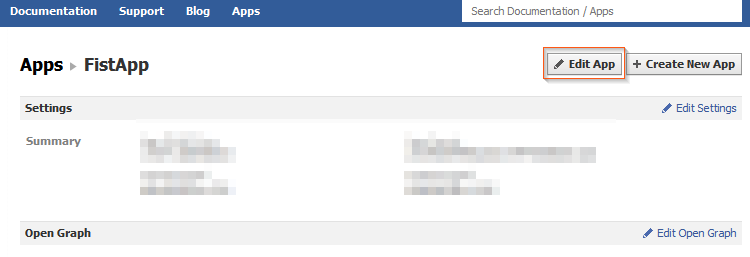
1.  Head over the Facebook developer web page, log in and click on Edit App.

Disable Facebook Timeline - Edit App

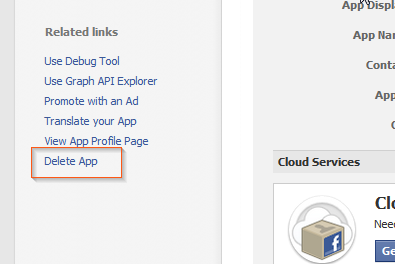
2.  On the left side of the screen, click Delete App.

Disable Facebook Timeline - Delete App

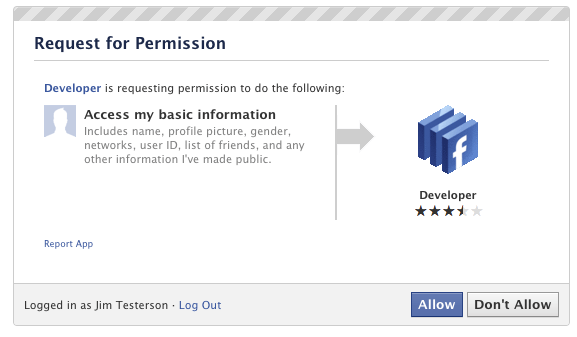
3.  In the dialog box, click

Saturday, October 1, 2011

Reports: Microsoft Anti-Virus Erasing Google Chrome

Mighty funny timing, Microsoft. Reports say that Google’s Chrome browser was threatening to overtake Firefox in the coming months thanks to soaring usage rates caused, in large part, by FF and IE defectors. Then, this morning, Internet forums are awash with rage because a new update to Microsoft’s Security Essentials and ForeFront AV software began calling Chrome a Trojan and erasing it from users machines. Coincidence? Yeah, it probably is. But that still doesn’t change the fact that users are pissed.

Both ZDNet and The Register are reporting that they’ve received numerous complaints about the critical false positive. The AV programs are identifying Chrome as part of the ZeuS Trojan, and users who try to reinstall the browser are finding that the antivirus program won’t let them, citing “PWS:Win32/Zbot” as a severe threat. Register readers are reporting that the beta version of Chrome isn’t affected, nor are browsers that are configured to not send Google any information. Nobody’s saying anything official at the moment – both Google and Microsoft have been mum on the matter.

So, has any of you been affected by the bug? Chime in with your experiences in the comments! I've got Chrome and MSE installed on my laptop, and nothing fishy has gone on yet.

How to Enable the Hidden Windows 7 Admin Account

Lead Image

Imagine you have a Windows PC with a single user account, and you just lost your password. Here’s how to enable the hidden Administrator account with nothing more than the install CD and some registry hacking magic so you can reset your password.
Normally if you wanted to enable the hidden administrator account from within Windows, you’d need access to an Administrator mode command prompt, but that won’t work if you don’t have access, right? This is a great way to quickly enable the hidden admin account so you can reset the password on your main account.
Note: This will require editing the registry which is risky. Proceed only if you know what you are doing and at your own risk.

Enabling the Hidden Administrator Account

Now prepare your Windows 7/Vista DVD and restart the computer with the DVD in the DVD Drive—you’ll want to boot from the DVD so you may need to change the boot order in the BIOS. Depending on your system you will need to press Del, F2, or F12.
After you’ve successfully booted from the DVD you’ll be presented with the language setting of the Windows setup. Click next.

Language Sellection

In the next screen click “Repair your computer” from the bottom left corner of the window. Now the setup will search for Windows installations then display them, choose the Windows you want and click next. The setup may try to search for problems and may ask you if you want to restore your computer, just click no. Finally you’ll arrive at

Friday, September 30, 2011

How to Enable Facebook Timeline just in Few Seconds

Sone days back Facebook announced Timeline, a crazy (and kind of creepy) omnibus look at everything that has ever happened in your Facebook lifespan. It’s like a story book of your life — or at least the online, documented parts.

Facebook said that Timeline would be on the way for everyone sometime in the coming weeks… which is great and all, for everyone else. You’re the type of person who reads Borntohack, and are thus likely the type of person who likes their new and shiny things right now.

That’s okay. We can make it happen.

Fortunately, enabling Timeline a bit early isn’t too difficult — but it’s not at all straight forward, either.

You see, Facebook is enabling Timeline early for open graph developers. You, too, can be an open graph developer — even if you’re just looking to dabble.

A few things to note:
 
- You probably don’t want to do this unless you’re actually a developer. Expect bugs.
- Only you will see your timeline at first (unless you decide otherwise), but it will automatically go public after a few days. My timeline was automatically hard-set to go public on September 29th.
- It seems that if you login into Facebook on another machine, Timeline gets disabled automatically on all of your machines. With that said, it seems you can get back to your timeline (but ONLY after following the steps below) by navigating to http://www.facebook.com/YOURUSERNAMEHERE?sk=timeline
- You’ll need to have a “verified” account for one of the steps, which means you need a credit card or phone number attached to the account.
Here’s how to do it:

1. Log into Facebook

2. Enable developer mode, if you haven’t already. To do this, type “developer” into the Facebook search box, click the first result (it should be an app made by Facebook with a few hundred thousand users), and add the app.


3. Jump into the developer app (if Facebook doesn’t put you there automatically, it should be in your left-hand tool bar)

4. Create a new app (don’t worry — you

Sunday, September 25, 2011

No, Facebook Will Never Demand Money from you to Get New Profiles


A completely untrue rumor that Facebook will soon start charging users is making the rounds yet again.
Ever since Facebook introduced Timeline profiles, several Facebook status updates have been spreading on the world’s social network that claim Facebook users will have to pay for the new profile changes.
Here’s one of the messages currently spreading on Facebook:
“THIS IS OFFICIAL… IT WAS EVEN ON THE NEWS… FACEBOOK WILL START CHARGING DUE TO THE NEW PROFILE CHANGES… IF YOU COPY THIS ON YOUR WALL YOUR ICON WILL TURN BLUE AND FACEBOOK WILL BE FREE FOR YOU. PLEASE PASS THIS MESSAGE ON, IF NOT YOUR ACCOUNT WILL BE DELETED IF YOU DO NOT PAY!!”
And here’s yet another:
“FACEBOOK JUST RELEASED THEIR PRICE GRID FOR MEMBERSHIP. $9.99 PER MONTH FOR GOLD MEMBER SERVICES, $6.99 PER MONTH FOR SILVER MEMBER SERVICES, $3.99 PER MONTH FOR BRONZE MEMBER SERVICES, FREE IF YOU COPY AND PASTE THIS MESSAGE BEFORE MIDNIGHT TONIGHT. WHEN YOU SIGN ON TOMORROW MORNING YOU WILL BE PROMPTED FOR PAYMENT INFO…IT IS OFFICIAL IT WAS EVEN ON THE NEWS. FACEBOOK WILL START CHARGING DUE TO THE NEW PROFILE CHANGES”
These rumors are simply untrue. “It’s free and always will be” is still in giant font on the Facebook homepage.

Tuesday, September 20, 2011

100 would be the Maximum Number of SMS you can Send Each Day

Beginning September 27, you will not be able to send more than 100 SMS in one day. Telecom Regulatory Authority of India (TRAI) has announced Per Day Per Sim (PDPS) rule under which telecom service providers have been asked to withdraw their SMS service packs that allow customers to send over 100 SMS per day. According to TRAI, the move is aimed at preventing telemarketers from bombarding your mobile with unwanted calls and SMS.
 
TRAI's latest move will certainly prompt mobile users to make phone calls instead of sending SMS. Withdrawal of SMS service packs will also hit the pockets of users who get unlimited free SMS by paying nearly Rs. 100 monthly. However, TRAI believes the capping SMS will be the best way to protect the interests of customers. "In case of prepaid users, you can monitor it on a day-today basis but for postpaid customers , you will look at the number at the end of the month," TOI quotes Rajan S Mathews , director general of COAI.

The SMS cap comes weeks after TRAI ruled that telemarketers cannot call subscribers registered with the National Do Not Call Registery between 9am to 9pm. Telemarketers cannot call subscribers, who have registered under the “fully blocked'” category. However, telecom regulator has allowed users to access information on selected sectors such as sports, real estate and consumer goods.
 
Short messages are particularly popular among the youth. Presently, all the telecom companies offer SMS service packs, which allow users to send more than 100 SMS daily. These SMS packs are popular for their ultra low prices, which are under Rs. 100. Restriction is likely to disappoint a number of mobile users, especially those who cannot afford smartphones such as BlackBerry.

Sunday, September 18, 2011

How to Dual-Boot Windows 7 with Windows 8


The Windows 8 developer preview is out for all to try, but installing it over your main Windows setup is a scary (and unrealistic) prospect. Here's how to dual boot Windows 8 with your current Windows 7 installation so you can run them both side by side.
If you've ever dual booted a machine before, this shouldn't seem too foreign. All you need to do is create a new partition for Windows 8, install it on that partition, and then edit your new boot menu so Windows 7 stays the default OS. Here's how to do it.

Step One: Create a New Partition

Before you start, make a backup of your data—you're going to be formatting drives and installing OSes, so anything could go wrong, and you don't want to lose your whole system. When you're ready, we'll need to create some space for Windows 8 on your hard drive. Assuming you have at least 20GB of space free on your drive, you're going to use Windows' Disk Management to set partition those 20GB for Windows 8. Open the Start Menu and right click on the "Computer" option. Click "Manage", and in the window that appears, click on "Disk Management" in the left sidebar.
 
Find your system hard disk in the graphical list that appears in the bottom pane. Right-click on it and then click "Shrink Volume". Shrink it down so you have at least 20GB of space left on the end of the drive, and click OK. Then, click on the "Unallocated" block of that drive that appears and click "New Simple Volume". Click Next on the next few windows until you get to the "Format Partition" window. Here, give it a volume label you'll recognize (like "Windows 8") and click Next. It should format the drive for you. Now you're all set to install Windows 8.


Step Two: Install Windows 8

If you haven't downloaded the Developer Preview ISO yet, head over to the Windows Developer Center and download it. Burn it onto a DVD using something like Windows Disc Image Burner if you don't have a DVD drive in your machine. Make sure your computer is set to boot from CD or USB, stick in your installation media, and reboot.

How to Dual-Boot Windows 7 and Windows 8 Side By SideIf you get a prompt to "Press any key to boot from DVD", then hit a key on your keyboard. You should boot right into the Windows 8 installer. It actually looks almost exactly like the Windows 7 installer, so it should seem a little familiar. Just pick your language, hit "Install Now", and choose "Custom" when asked what type of install you'd like to perform.

On the next screen, find your new

Download Windows 8 for Free

 
Microsoft has released its Windows 8 Developer Preview operating system, for PCs and tablets, to the public as a free download.

This is the same software which Microsoft gave to developers on prototype Samsung tablets this week at the company's Build conference in Anaheim.

And while this pre-beta version of Windows 8 is not close to ready for consumer consumption, and meant to be used by developers who are looking to make apps for the desktop and tablet OS, anyone can download the software -- no developer registration or anything like that needed.

The move to release Windows 8 so early on can be seen as a testament to just how much Microsoft wants, and needs, developers to get into building apps for the new OS before it is actually released as a retail product that will compete on tablets against Apple's iPad (running iOS) and Google's Android software.

Steve Ballmer, Microsoft's chief executive, made a surprise appearance at

Saturday, September 10, 2011

Google Android 4.0 'Ice Cream Sandwich' Expected to Arrive Soon

Finally we hear from Google about the release date of the new version of Android operating system, Ice Cream Sandwich. In an interview with SalesForce.com CEO Marc Benioff, Google's Eric Schmidt disclosed that next iteration of Android would come in the October-November timeframe.

“We have a new operating system, internally known as Ice Cream Sandwich for some reason, which is being released in October/November, which everyone’s really excited about,” says Schmidt in the interview held at Safeforce’s Dreamforce conference.

Ever since Google unveiled Ice Cream Sandwich, several rumours have floated around the Internet about the timing of its release. However, it was widely expected that the new Android operating system will come in the final quarter of this year.

Some of the reports claim that the Ice Cream Sandwich will be officially announced when Google's senior official Andrew Rubin visits AsiaD Conference, slated to be held from October 19-20.

To remind you, the upcoming update to the Android OS has been designed to unify the user interface across the Android phones and tablets. The Ice Cream Sandwich will be numbered as Android 4.0 and will have elements from both Honeycomb and Gingerbread. It's notable that the Honeycomb update provided support for the larger screens as found on the tablets, while previous versions were only designed for mobile. Stay tuned for more update on Ice Cream Sandwich.

Monday, September 5, 2011

ManicTime : Keeps Track of your PC Activities

If you’d have to analyze a normal work day on your computer, how would it look like? What are the common applications that you open? Which website do you spend the most time on? It can be quite difficulty to calculate those numbers manually, and it is likely that you may be way off. That’s where time tracking software like ManicTime can help. The program monitors all PC activities automatically, so that you know exactly what you have done on your PC at a specific time of the day.

The program is offered as a limited free version and commercial versions. ManicTime Free comes without program support and advanced features like password protection, categorization of applications or advanced search functionality.

The free version of the time tracking software tracks and analyzes application usage automatically, and creates charts and statistics about the general computer usage.

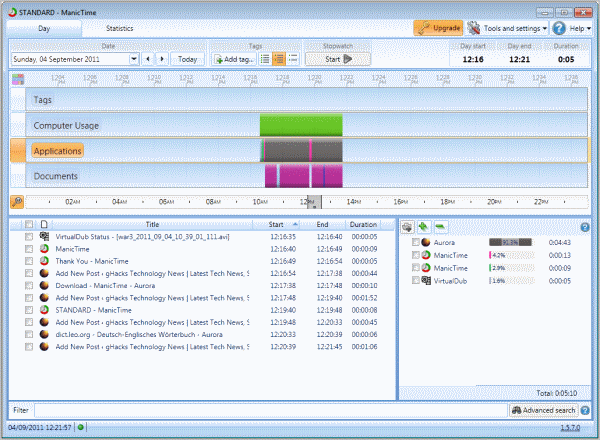
When you start the program for the first time, you will see a tabbed interface that is divided into two main areas. The area at the top of the program window displays the current day and a time bar that visualizes computer, application and document usage on the computer. Different programs and documents are displayed with different color sets. Hovering the mouse over them displays tooltip information about the program, time and duration as well as document titles and related information.


The lower half of the screen displays the active application or document (e.g. browser tab) and totals combined (e.g. how long you spend in the Firefox browser).

The statistics tab displays various information like the top applications and documents, top computer usage or day durations.

You can pause tracking at any time with a right-click on the program’s system tray icon and the selection of “Go off the record”.

The information that ManicTime present can be a real

Wednesday, August 24, 2011

A Website that Ranks your Hacks

So you think you can hack?

Some 700 hackers looking to show off their talents have piled into an upstart Web site called RankMyHack.com in the last month. Emerging from the shadowy underground, they have submitted evidence of more than 1,200 Web site hacks, eager to have their feats measured against those of their peers.

The site was created by a hacker nicknamed Solar to bring a little accountability to the online forums and chat rooms where hackers gather to learn tricks of the trade, buy and sell contraband and form alliances. There, eBay-style ratings systems meant to establish reputations are routinely abused, morality tends to be fluid and anonymous young people often talk big while carrying a small stick.

RankMyHack offers a way to separate the skilled from the so-called script kiddies by verifying hacks using codes that participants must plant somewhere on sites they have compromised. As in a video game, RankMyHack awards points, which are based on the popularity of the hacked site and the technical difficulty of the hack. Total scores determine hackers’ ranks on the “leader board of legends.” Players can even challenge one another to duels.

“So have you got what it takes to be the best?” Solar taunts on the site’s home page, which has a distinctively retro design.

Participants can also win “bo

Friday, August 19, 2011

YouTube adds Google+ Hangout Button to its Videos


Hangout video sharing is one of Google+'s more appealing features -- not that we use it often, but when it comes to things to do in an online social gathering, watching YouTube clips would certainly rank near the top. Now you can launch Hangouts directly from YouTube, rather than heading over to Google+ and pasting in a link. Sure, it's a simple tweak that probably took less than an hour to code, but it's a clever addition nonetheless.

Monday, August 15, 2011

SuperCopier: A Lightning Fast Windows Alternate File Copier


If you’re looking for an alternative to the native Windows file copier, SuperCopier is lightning fast, customizable, and includes features like file prioritization.

The default handler in Windows Vista/7 is light years ahead of the clunk handler found in earlier versions of Windows. It’s still, however, kludgy at best and leaves little room for customization. SuperCopier not only copies files faster between locations but includes really great features like the ability to prioritize a file in the queue. Let’s say you’re copying a huge batch of files from one drive to another and you realize that you need a few of the files to copy first. You can easily jump into the copy queue in SuperCopier and bump them up to the top of the list. SuperCopier also keeps an error log, allows for speed limiting, custom responses to file collisions and copy errors, and the ability to keep the copy window open after the file transfer for review of errors and other information.


SuperCopier is freeware, Windows only.
SuperCopier

Sunday, August 14, 2011

Phones Running Google's Android are Prone to Hacking: Experts

A mobile security expert says he has found new ways for hackers to attack phones running Google Inc's Android operating system.

Riley Hassell, who caused a stir when he called off an appearance at a hacker's conference last week, told Reuters that he and his colleague Shane Macaulay decided not to lay out their research at the gathering for fear criminals would use it attack Android phones.

He said in an interview he identified more than a dozen widely used Android applications that make the phones vulnerable to attack.

"App developers frequently fail to follow security guidelines and write applications properly," he said.

"Some apps expose themselves to outside contact. If these apps are vulnerable, then an attacker can remotely compromise that app and potentially the phone using something as simple as a text message."

He declined to identify those apps, saying he fears hackers might exploit the vulnerabilities.

"When you release a threat and there's no patch ready, then there is mayhem," said Hassell, founder of boutique security firm Privateer Labs.

Hassell said he and Macaulay alerted Google to the software shortcomings they unearthed.

Google spokesman Jay Nancarrow said Android security experts discussed the research with Hassell and did not believe he had uncovered problems with Android.

"The identified bugs are not present in Android," he said, declining to elaborate.

It was the first public explanation for the failure of Hassell and Macaulay to make a scheduled presentation at the annual Black Hat hacking conference in Las Vegas, the hacking community's largest annual gathering.

They had been scheduled to talk about "Hacking Androids for Profit." Hundreds of people waited for them to show up at a crowded conference room.

Hassell said in an interview late on Thursday the pair also learned -- at the last minute -- that some of their work may have replicated previously published research and they wanted to make sure they properly acknowledged that work.

"This was a choice we made, to prevent an unacceptable window of risk to consumers worldwide and to guarantee credit where it was due," he said.

A mobile security researcher familiar with the work of Hassell and Macaulay said he understood why the pair decided not to disclose their findings.

"When something can be used for exploitation and there is no way to fix it, it is very dangerous to go out publicly with that information," the researcher said. "When there is not a lot that people can do to protect themselves, disclosure is sometimes not the best policy."

Hassell said he plans to give his talk at the Hack in The Box security conference in Kuala Lumpur in October.

Monday, July 18, 2011

SMS Backup: An Android App. to Backup your Text Messages on Your Gmail Account

sms backup to Gmail

If your mobile phone has limited capacity for storing SMS text messages or if you are looking to delete all the old text conversations from the phone but still preserve them somewhere, here’s something for you to consider.

SMS Backup, as the name suggests, is a free app for Android mobile phones that can copy all SMS messages from the phone to your Gmail account with a click. It can save both your incoming and outgoing messages to Gmail.

To get started, first enable IMAP in your Gmail account available under Gmail Settings –> Forwarding and POP/IMAP –> Enable IMAP. Next launch the SMS backup app on your phone, enter your Google account credentials and the will immediately copy all existing text messages to a new folder /label in your Gmail account.
 
The best part is that as new text messages arrive, or you send one, the app will automatically save them to Gmail in the background without you having to do anything.