twitter
    Find out what I'm doing, Follow Me :)

Monday, August 15, 2011

PakeVideo.com Hacked By Ap3X Pr3d470r and t@j

According To One The Group Members of Technical Rainbows ,
The Pakevideo.com was hacked before naukriplus.com ,
the most time it took is by the Ap3X Pr3d470r

To Upload The VIDEO………Which Got A Message For The Admins Of The Website …..
According to the sources …
“the video contained a picture of indian soldiers hoisting flag of india on a cliff.
and the background music of the video said ” JAN GAN MAN ” national anthem of india……”


Site Was Completely Made Empty And Everything Else Was Deleted …
Also The sources told that-
“Technical Rainbows are pulling such kinda attacks because the same had been done by the other sources of that country”

Happy Independence Day!!

You Can View The Defacement Proof Here-
http://www.zone-h.com/mirror/id/14673330

[via starthack]

What is HTTP, Role of HTTP in Web and HTTP Status Codes

There are two main modes of transferring file over the World Wide Web, one is FTP (file transfer protocol) and other is HTTP (Hypertext Transfer Protocol) Which is the set of rules for transferring files (text, graphic images, sound, video, and other multimedia files) on the World Wide Web. As soon as a Web user opens their Web browser, the user is indirectly making use of HTTP. HTTP is an application protocol that runs on top of the TCP/IP suite of protocols. Whereas, FTP is used to transfer bulk files
How HTTP works

We submitted URL (universal resource locator) in the URL bar and hits enter, Then our browser send HTTP requests to the web server for the web pages. Web server serves the HTTP request by convert that page in to appropriate form that our web browser can read and send the result via HTTP response. So HTTP is a medium to communicate to the web server. One more thing some server sends HTTP cookies on the web browser, in which all the personal setting and login data of user is stored.
HTTP
There are various HTTP status codes to maintain the internet standards and helpful to sort out the problem. HTTP status codes are divides in to four major categories.
  • 100-101 Intermediate Status
  • 200-206 Successful Response
  • 300-307 Redirects
  • 400-417 Request Errors
  • 500-505 Server Errors
http-server-header-status-codes
The details of these HTTP status codes are:
  • 100-101 Intermediate Status
100 continue The server returns this code to indicate that it has received the first part of a request and is waiting for the rest.
101 switching protocol The requester has asked the server to switch protocols
  • 200-206 Successful Response
200 Successful The server successfully processed the request
201 created the server created a new resource
202 accepted request is accepted and under processing.
203 Non-authoritative information The server processed the request, but is returning information that may be from another source
204 No content Server not returning any content after processing request
205 reset content response requires that the requester reset the document view. after facing 204 status code.
206 Partial content The server successfully processed a partial GET request.
  • 300-307 Redirects
300 Multiple choices There are multiple choices for users.
301 Moved permanently In future user will be redirected to the given url
302 Moved temporarily Temporarily user will be directed to the given url
303 See other location For all requests other than a HEAD request, the server automatically forwards to the other location.
304 Not modified The requested page hasn’t been modified since the last request.
305 Use proxy The requester can only access the requested page using a proxy.
306 Switch Proxy No longer used.
307 Temporary redirect The request should be repeated with another URI, but future requests can still use the original URI.
  • 400-417 Request Errors
400 Bad request The request cannot be fulfilled. because it is inappropriate.
401 not authorized specifically for use when authentication is possible but has failed.
402 Payment Required No longer used
403 forbidden Access decline due to unauthorized.
404 Not found When no results found as per query or URL provided by user
405 method not allowed The method specified in the request is not in the correct form.
406 Not acceptable The requested page can’t respond with the content characteristics requested
407 proxy authentication required Need to authenticate with proxy
408 Request timeout Request is not processed in the appropriate time interval
409 conflict When request conflict occurs
410 Gone Indicates that the resource requested is no longer available and will not be available again
411 length required The server won’t accept the request without a valid Content-Length header field
412 Precondition failed request fails to fulfill the precondition that are required by web server
413 request entity too large Server is not able to process too long request
414 Requested URI is too long Server can’t process long query string.
415 unsupported media type The request is in a format not support by the requested page
416 Requested range not satisfiable The server returns this status code if the request is for a range not available for the page
417Expectation failed server failed to process what ever the request expect by the client

  • 500-505 Server Errors
500 internal server error Server fails to interpreters the HTTP request. 

501 Not implemented When request is partially completed or can’t be send to client

502 bad gateway Server gateway is nor responding

503 Service unavailable server  is temporary out of service

504 gateway timeout Didn’t receive timely response from upstream server.

505 HTTP version not supported The server doesn’t support the HTTP protocol version used in the request.
I hope the concept of HTTP is very clear to you.


SuperCopier: A Lightning Fast Windows Alternate File Copier


If you’re looking for an alternative to the native Windows file copier, SuperCopier is lightning fast, customizable, and includes features like file prioritization.

The default handler in Windows Vista/7 is light years ahead of the clunk handler found in earlier versions of Windows. It’s still, however, kludgy at best and leaves little room for customization. SuperCopier not only copies files faster between locations but includes really great features like the ability to prioritize a file in the queue. Let’s say you’re copying a huge batch of files from one drive to another and you realize that you need a few of the files to copy first. You can easily jump into the copy queue in SuperCopier and bump them up to the top of the list. SuperCopier also keeps an error log, allows for speed limiting, custom responses to file collisions and copy errors, and the ability to keep the copy window open after the file transfer for review of errors and other information.


SuperCopier is freeware, Windows only.
SuperCopier

Sunday, August 14, 2011

What is Network Attached Storage (NAS) server

NAS

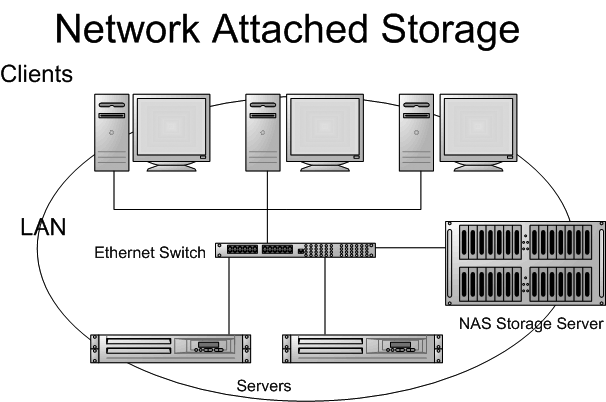
Network-attached storage (NAS) is file-level computer data storage connected to a computer network providing data access to heterogeneous clients.”  If that sounds too technical then in layman’s language a NAS is simply a  server that is dedicated to nothing more than file sharing.
Simply speaking  using a traditional LAN protocol such as TCP/IP over Ethernet, the NAS enables additional storage to be quickly added by plugging it into a network hub or switch.
NAS does not provide any of the activities that a server in a server-centric system typically provides, such as e-mail,authentication or file management,however these services maybe later added as a add-on.

So why do we need a NAS:


Well just consider a business that has more than one employee and that has tonnes of data in its server,if that business decides to move from one location to other,then it has to take all its data with it. It would be really great option if all this data was centralized and could be accessed from anywhere but for a small business that option is not a practical one considering the cost of a file server, or an additional license  of Windows server 2003,or a support license of Linux for that matter. Now this is where the NAS steps in to provide a reliable and cheap solution to your data-storage needs.They often include built-in features such as disk space quotas, secure authentication, or the automatic sending of email alerts should an error be detected.

So how does a NAS work:

Well traditionally like a  file servers, NAS follows a client-server design. A single hardware device, often called the NAS box or NAS head, acts as the interface between the NAS and network clients.These devices run on an embedded OS . Single or multiple hard drives can be connected to a NAS . A client usually connects to the NAS head and not directly to the storage device, a client often connects using Ethernet connection,and thus a NAS  appears as a single ‘node’ in the network often the IP address of the NAS device.With a NAS device, storage is not an integral part of the server. Instead, in this storage-centric design, the server still handles all of the processing of data but a NAS device delivers the data to the user. A NAS device does not need to be located within the server but can exist anywhere in a LAN.

Network Attached Storage Network Attached Storage

Communication with the NAS head occurs with TCP/IP . The two file-based protocols most commonly associated with NAS are Sun Network File System (NFS) and Common Internet File System (CIFS).
NFS was developed for UNIX based systems to transfer files over LAN.
The CIFS was formerly known as Server Message Block (SMB). SMB was developed by IBM and Microsoft to support file sharing in DOS.
Many NAS systems today support HTTP as a protocol to enable you to browse content using the browser.
Other Network protocols used to serve NAS:

Why is NAS cheaper :

Well a NAS is cheaper because of various factors like  it runs a stripped-down operating system,often FreeNAS. And  at the same time it offers very limited services when compared to a full-fledged file-server.
If you are considering to buy a NAS for yourself you may consider paying a visit to following reviews of NAS by PC magazine and CNET.
http://www.pcworld.com/article/125072/top_10_networkattached_storage_devices.html
http://reviews.cnet.com/best-network-attached-storage/

HTTPS Everywhere 1.0: Very Useful Firefox Extension

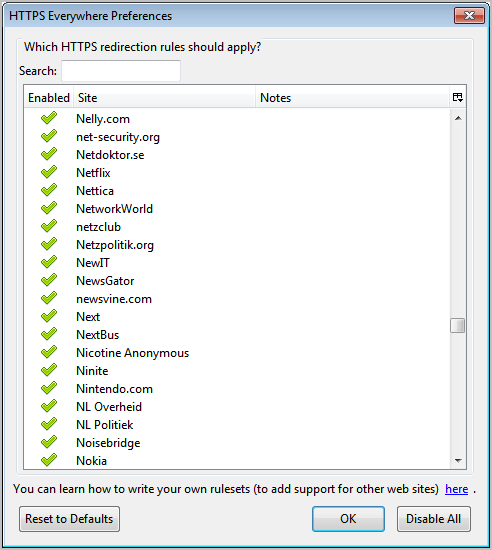
I reviewed one of the first versions of HTTPS Everywhere for the Firefox web browser back in the middle of 2010. The Firefox extension, which forced https connections to a handful of supported web pages, has come a long way since then. The developers today have announced the release of HTTPS Everywhere 1.0 which includes support for over 1,000 web sites. Among the supported websites are previously supported sites like Google Search, Facebook or Wikipedia, and new services and pages like all WordPress.com blogs, Nintendo, Netflix, Dropbox or the UN website.

The extension is useful in situations where websites support both the http and https protocol without a clear distinction between the two protocols, or options to always use https when a user is connecting to the website.

HTTPS Everywhere basically ensures that https is always used when connecting to one of the supported properties. Connections that are initiated by the user via http are automatically switched over to https in this case.

The add-on options list all supported websites and services. It offers a search to find a specific site and a switch to enable or disable the https redirection.
https-everywhere

Web users who know their way around regular expressions can even create their own rulesets to add support for websites and services that are not included in the default site listing.

New users to HTTPS Everywhere should take a look at the extensive FAQ section at the development site over at EFF.org for detailed information about the add-on and how it protects the user.

It may happen that HTTPS Everywhere breaks some part of a website, which can usually be attributed to inconsistent support for HTTPS on those sites. The only option then is to disable the rule and report the problem to the company or individual running the website.

HTTPS Everywhere can be installed directly from the EFF website. Cautious users can look at the source code of the project which is also available on the project site.

Windows 7 on iPhone !!!

Windows 7 is now on iPhone !!!!
Though it doesnot have as many features but its just a starting
just download the app iWindows from cydia and you are set to go !!!!!


Phones Running Google's Android are Prone to Hacking: Experts

A mobile security expert says he has found new ways for hackers to attack phones running Google Inc's Android operating system.

Riley Hassell, who caused a stir when he called off an appearance at a hacker's conference last week, told Reuters that he and his colleague Shane Macaulay decided not to lay out their research at the gathering for fear criminals would use it attack Android phones.

He said in an interview he identified more than a dozen widely used Android applications that make the phones vulnerable to attack.

"App developers frequently fail to follow security guidelines and write applications properly," he said.

"Some apps expose themselves to outside contact. If these apps are vulnerable, then an attacker can remotely compromise that app and potentially the phone using something as simple as a text message."

He declined to identify those apps, saying he fears hackers might exploit the vulnerabilities.

"When you release a threat and there's no patch ready, then there is mayhem," said Hassell, founder of boutique security firm Privateer Labs.

Hassell said he and Macaulay alerted Google to the software shortcomings they unearthed.

Google spokesman Jay Nancarrow said Android security experts discussed the research with Hassell and did not believe he had uncovered problems with Android.

"The identified bugs are not present in Android," he said, declining to elaborate.

It was the first public explanation for the failure of Hassell and Macaulay to make a scheduled presentation at the annual Black Hat hacking conference in Las Vegas, the hacking community's largest annual gathering.

They had been scheduled to talk about "Hacking Androids for Profit." Hundreds of people waited for them to show up at a crowded conference room.

Hassell said in an interview late on Thursday the pair also learned -- at the last minute -- that some of their work may have replicated previously published research and they wanted to make sure they properly acknowledged that work.

"This was a choice we made, to prevent an unacceptable window of risk to consumers worldwide and to guarantee credit where it was due," he said.

A mobile security researcher familiar with the work of Hassell and Macaulay said he understood why the pair decided not to disclose their findings.

"When something can be used for exploitation and there is no way to fix it, it is very dangerous to go out publicly with that information," the researcher said. "When there is not a lot that people can do to protect themselves, disclosure is sometimes not the best policy."

Hassell said he plans to give his talk at the Hack in The Box security conference in Kuala Lumpur in October.

RamMap: List All Files Currently In Windows RAM

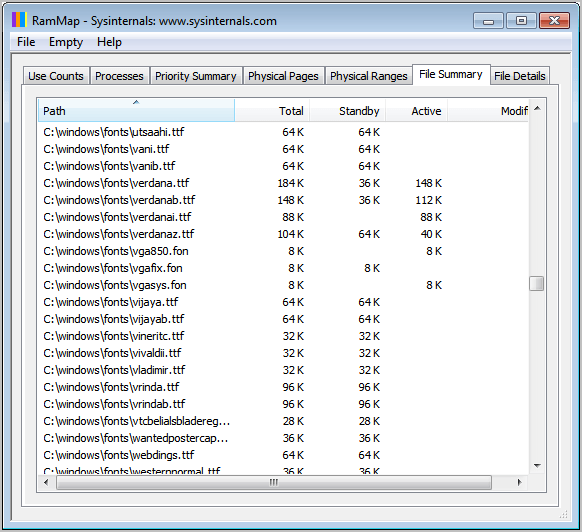
Have you ever wondered about the files that Windows is holding in memory? I’m not talking about the processes or applications, but the actual files that are in computer memory. This includes the list of system fonts that are loaded in memory, the dynamic link libraries or the system drivers.

The free system tool RamMap can be used to display those information, and a lot more. The program is compatible with Windows Vista and Windows 7, and not Windows XP. It is also compatible with the server variants from Windows Server 2008 on.

rammap windows memory

When you start the program for the first time you will see a tab based interface that displays information about processes, use counts, physical pages and a file summary.
Here is a short description of each tab:
  • Use Counts: usage summary by type and paging list
  • Processes: process working set sizes
  • Priority Summary: prioritized standby list sizes
  • Physical Pages: per-page use for all physical memory
  • Physical Ranges: physical memory addresses
  • File Summary: file data in RAM by file
  • File Details: individual physical pages by file
The file summary tab displays the file data that is currently in the memory. When you switch to that tab you will see a large list of files with their paths, file names and memory information. You can click on a header to sort the table. A click on path for instance sorts by file path which is helpful if you are looking for specific files in Ram. You could also look at the biggest files in RAM with a click on Total, Standby or Active.

Why can a file listing like this be helpful? You could for instance use it to determine if certain files or programs use up a lot of memory when they are running. You could find system drivers or fonts that you do not need to see how much space in RAM they use. Could also be very helpful for software developers who need to analyze their program’s memory usage.

RamMap is more of a tool for advanced users. Having said that, it can still be useful for users who are not that tech savvy. Windows users can download RamMap from the Microsoft Technet website.

Saturday, August 13, 2011

Download Your Favorite Security Software With New Free "Security Software Downloader"

The first version of Security Software Downloader was released in 2010. The program allows Windows users to download security software comfortably from the program interface. That’s handy especially on new systems, on systems that need a change in security software and PCs that are infected by malware that the installed antivirus software cannot remove.

Security Software Downloader 2 has just been released by its developers. The program itself is still Open Source and compatible with all 32-bit and 64-bit editions of the Windows XP, Vista and Windows 7 operating system.

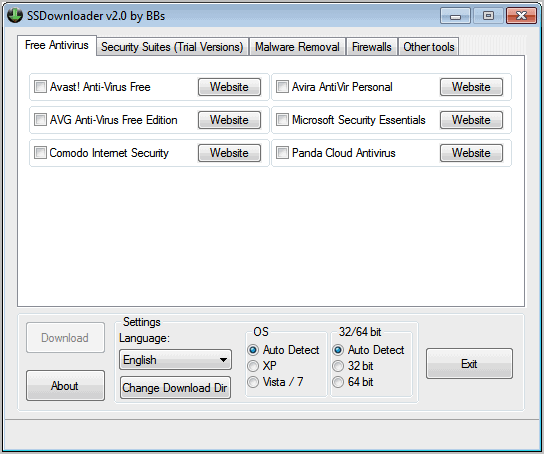
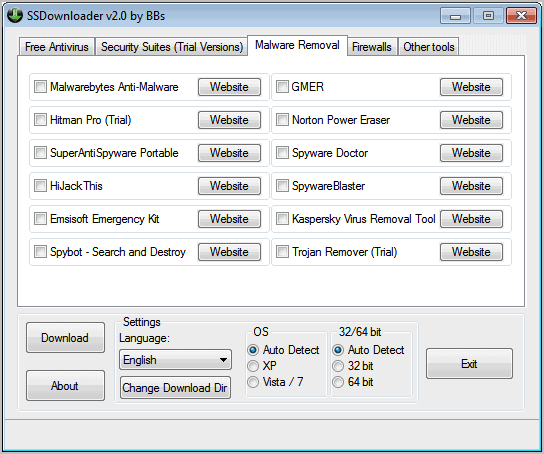
The first change that users will notice is the new and improved user interface which now separates security software in groups like free antivirus, malware removal or firewalls.
That’s better than the all on one page approach of the program’s predecessors.

security software downloader

The program is set to auto detect the operating system and version of the operating system. Users can make the changes manually which is helpful if the auto detection did not detect the correct OS and version.

Software can be selected with a click in the adjacent check box. It is possible to select multiple programs at once. A click on the download button downloads all selected security applications to the operating system. Windows users who do not want the programs to be downloaded to their desktop should click on the 

Change Download Dir button to change the save location.
The program is not providing any information about the security software in its interface. A website button next to each program links directly to the program homepage on the Internet.

So what is new in Security Software Downlader? The developer has added support for additional programs, raising the number of applications to over 50. Among the new tools are Panda Internet Security, the password manager LastPass, Spybot Search & Destroy and CyberGhost VPN.

ssdownloader

Security Software Downloader is still a handy program for users who would like to download multiple security applications at once from the Internet. It can also be handy for users who want to discover and test new products.
SSDownloader can be downloaded from the project website over at Sourceforge.

Wednesday, August 10, 2011

Tricks to Remove PDF Password and other Restriction

DO YOU WANT TO REMOVE PASSWORD, COPYWRITE PROTECTION FROM YOUR PDF FILE HERE IS THE SOLUTION .THANKS TO THESE GREAT WONDERFUL WEBSITES


Freemypdf.com is a free website that allows you to view restricted Pdf files.Use this site to remove passwords and restrictions (such as printing, copying text, etc.) from PDFs.

Note: This only works for PDF FILE that you open and read without any Third party plugins. PDF file that require a password to be viewed cannot be unlocked by this service.
This is because this is not cracking. Viewable PDFs with restrictions are not really protected, no more than a door with a broken lock, as opposed to password-protected PDFs.

Another great site which allows you to hack a Pdf password.To unlock a PDF file, enter it's location in the "PDF file to unlock" field, by either typing it in the field or clicking on the "browse" button, then navigating to it's location.

The unlocked version of the PDF will be displayed in a new browser window, opened in the default PDF application for your system (usually Adobe Acrobat Reader)