twitter
    Find out what I'm doing, Follow Me :)

Sunday, October 23, 2011

iOS 5 comes to Born To Hack!!!!

iOS 5 the most advanced OS is now on born to hack!!!!!

major Changes in iOS:-

1) Notification Center
2) Reminders App
3) inproved Folder opening.
4) on device software update.
5)wifi sync
6)custom vibrations (on call) and also user can make vibrations
7)Assistive touch
8) twitter integration


and much more......

follow us to know about the installation and jailbreak of iOS5

Thursday, October 20, 2011

How to find out everything that Facebook *really* knows about you


Max SchremsMax Schrems, a 24-year-old law student from Vienna, a meticulous document requester and researcher, is now sitting on a pile of 1,200 pages that comprise his personal-data Facebook dossier.

He secured the data by using a European requirement that entities with data about individuals make it available to those individuals if they request it.
After Mr. Schrems made the request, Facebook handed over a CD containing data that’s now fueling 22 complaints that the law student has filed against Facebook with the Irish Data Protection Commissioner (according to Facebook, European users have a relationship with the Irish Facebook subsidiary).

Watch the following German TV news report (with English subtitles) which features Schrems:
The complaints, which Mr. Schrems began to file in August, concern the illegality of these charges (for the full set and PDFs of the filed complaints, go to Kim Cameron’s Identity Weblog):

* Pokes: Retained even after a user removes them.
* Shadow Profiles: Facebook is collecting data about people without their knowledge, using it to substitute existing profiles and to create profiles of non-users.
* Tags: Used without specific user consent. Users have to "untag" themselves (opt-out).
* Synchronizing: Facebook is gathering personal data - e.g., via its iPhone app or the "friend finder" - and using it without the consent of the data subjects.
* Deleted Postings: Postings that have been deleted showed up in the set of data Mr. Schrems received from Facebook.
* Postings on other Users' Pages: Users can't see the settings under which content is distributed that they post on other's pages.
* Messages: Messages, including Chat Messages, are stored by Facebook even after the user deletes them. This means that all direct communication on Facebook can never be deleted.
Facebook not deleting posts - complaint
According to the Europe vs. Facebook website, the complaints have brought about an audit of Facebook’s Irish headquarters, scheduled for the coming week.

"The Irish DPC will go into the premises of Facebook in Dublin and audit the Company for 4 to 5 days," according to the site. "We hope that this will bring more evidence for the complaints we filed before."
News of Schrems’ legal activities, along with demands for users’ own personal dossiers, went viral at the end of last month. Reddit users stampeded, swamping Facebook with requests for personal data after going through the Reddit submission’s four-step tutorial on how to do so.

Here are the steps on how you can request your personal data from Facebook:
1. Open this site: https://www.facebook.com/help/contact.php?show_form=data_requests
Request your personal data from Facebook
2. Enter your personal information
3. Make a reference to the following law:
"Section 4 DPA + Art. 12 Directive 95/46/EG"
4. Click on "Send"
Facebook cried uncle, sending an email claiming that it could not comply with the requests within a 40-day period.

Europe Vs FacebookIn addition to filing the complaints, Mr. Schrems has worked to bring together a crowd of like-minded individuals with the Europe Vs. Facebook website, and setting up a YouTube channel.

Of course, a Facebook page, Europe vs. Facebook, has also been created. The page had 447 members as of this posting.

Remember how Mark Zuckerberg, in the early days of creating Facebook, called users dumb f*cks for trusting him with their private information?
After 7+ years of The Facebook bloating into a private-data behemoth (or boondoggle, depending on your attitude about privacy), one user has finally arisen from the land of dumb f*ckery to strip the label from his own online persona and instead paste it across the data-gobbling gut of Facebook itself.

Monday, October 17, 2011

How to Hack PC in Network (Remote Registry)

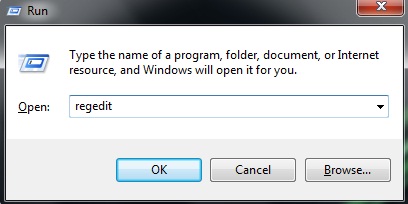
Open Run Dialog Box and Type regedit
1 How to Hack PC in Network (Remote Registry)
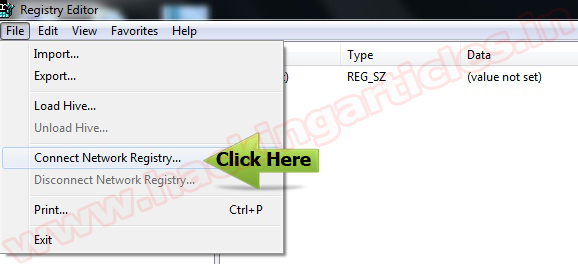
Click on File, and then select Connect Network Registry
rr How to Hack PC in Network (Remote Registry)
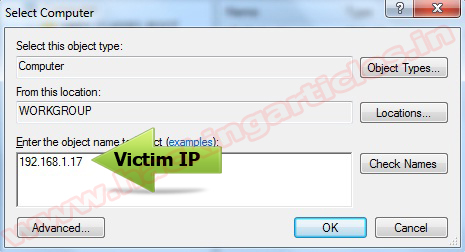
Type the remote computer IP or host name in the Enter the object name to select and the click OK.
rr1 How to Hack PC in Network (Remote Registry)
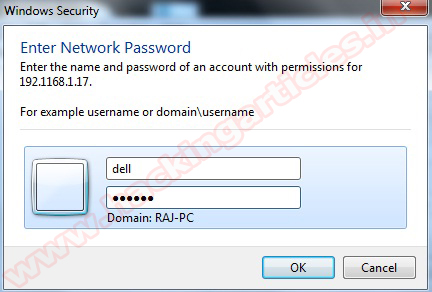
If you don’t have permission to access the remote computer, the logon screen will show up. Type the username and password for the remote computer. Then click OK.
rr2 How to Hack PC in Network (Remote Registry)
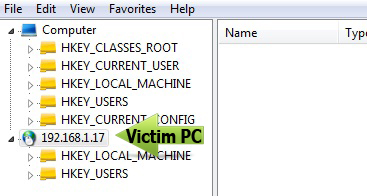
Now, the remote computer is listed in the Registry Editor.
rr3 How to Hack PC in Network (Remote Registry)

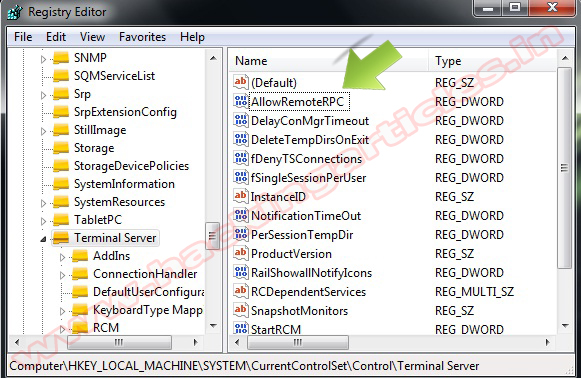
Navigate HKLM\System\CurrentConsolSet\Control\Terminal Server in the Right Panel. Allow Remote PC Change.
1 for (Disabled Remote Desktop) 0 For (Enable Remote Desktop)


rr4 How to Hack PC in Network (Remote Registry)

Wednesday, October 12, 2011

You can now use iCloud: Its free

Apple devices can be addictive: People buy one tiny iPod, fall in love, and end up with three or four other Apple products. Now if only they could see all their data on all those devices simultaneously.

Starting today, they can.


Thanks to iCloud, the iPhone, iPad and iPod Touch all have the same document with no work on the user’s part.

ICloud is designed to store and replicate documents, music, apps and 1,000 photos on PCs, the iPhone, iPod Touch and iPad. It also syncs contacts, calendars and email so all your machines and devices have the same data and content. It will back up five gigabytes of data, but certain types aren’t counted against that total. The best part: It’s free.

I’ve been testing iCloud’s sync ability between a MacBook Pro, iPhone 4S and iPad 3G. I also accessed and added content using iCloud.com. At first, I ran into a few hiccups with syncing photos, but an Apple spokesman explained that the company’s servers were occasionally down while they were being prepared for Wednesday’s iCloud launch. After that, iCloud worked without a hitch—well enough that I stopped thinking about which device held what since they were all updated with the same content.

On the downside, iCloud doesn’t automatically sync videos to other devices. In WiFi, it won’t sync edited photos if edits are made on a device after its camera app is closed. (This includes removing red eye, cropping and auto-enhancing images.) And document sharing on iCloud is focused on sharing with oneself, not with other people, unlike the document-sharing solutions from Google and Microsoft.

I found iCloud’s most useful feature to be Photo Stream, which automatically sends images captured by an iPhone, iPad and iPod Touch up to iCloud and replicates them on all other iCloud devices, one by one. Watching these photos pop onto the screen of my computer, iPad or iPhone was nothing short of delightful.

Photos are pushed via iCloud to the Mac and PC in their full resolution and sent to the iPad, iPod Touch or iPhone in a resolution that’s optimized for those displays.


Photo Stream sends images captured by mobile devices, such as the iPhone and iPad, up to iCloud and replicates them on all other iCloud devices,

By default, any images imported to a PC or Mac are automatically sent into Photo Stream, though this setting can be turned off. Devices need only be powered on and in WiFi to receive images from Photo Stream.

Each photo remains in Photo Stream for

Tuesday, October 11, 2011

Trick to Download Torrents using IDM

Trick to Download Torrents using IDM

Today am going to tell you about an awesome trick that will help you to download torrent files with IDM. As we all know that Internet Download Manager (IDM) is a very great Download Speed Accelerator but it cannot download torrent files.
And we also know that that torrents are very helpful to us as they provide most of our useful downloads such as Games, Movies,etc. and most of the people prefer torrents to download these games,movies,etc. but it requires high speed to download it. But in a normal way,it’s too slow. We mostly use IDM to download huge files in a high speed but IDM cannot download Torrents. Here is this trick comes to rescue.

So, here we have do a little trick to download is we are using a trick to download torrents using IDM.

Download Torrents Using IDM

  • Sign UP with your Email there and you will have a free access to that site.
  • Just grab that torrent that you want to download with IDM or any of your installed download Accelerator.
When you have selected the torrent that you want to download that is grabbed the torrent that you want to download with IDM or any of your installed Download Accelerator, reach to the last step where the option comes to download. Yes, come to that torrent’s page where the Download button Occurs. Right click on that download button and copy link location.

Create Download Torrents link for IDM

  • Now you have the download link of that torrent. Now you have to copy/paste that download link on the torrific site.
  • After pasting the link,click on GET.
  • After clicking on GET, you will be redirected to a page saying initiate bittorent transmission.
Click that button and that torrent will start Caching and it will take time to complete caching. When this procedure gets over that means your torrent is ready to download, it will turn it into blue colour and then just after that click on that download link and your Download will start with IDM or any of the installed Download Accelerators.
One more amazing feature of this trick is that if you think that it is taking too long in the caching procedure then close that website. It will automatically send you the mail including that torrent’s download link. This is where registering on this website is useful.
So, I hope you will enjoy Downloading Torrents using this trick!!!!!

Friday, October 7, 2011

Steve Jobs, father of personal computing, passed away


Steve Jobs died yesterday, aged 56, succumbing to the pancreatic cancer he'd been battling since 2004. The co-founder and chief architect of one of the biggest companies in the world, Apple Inc., Jobs was a visionary who had a large hand in shaping the world we live in today, giving us everything from the personal computer, to digital music distribution and the quintessential smartphone.
Apart from the words (seen below) from Apple's Board of Directors, newly appointed Apple CEO - Tim Cook, and Bill Gates, tributes from the common man are flooding the internet, with people also flocking to Apple's stores and offices to leave mementos, flowers, pictures and post-its in memoriam to the enigmatic futurist.
A creative genius, Steve Jobs' zealful personality was one of the principal driving forces behind personal computing, one of the folks "crazy enough" to change the world, and the sad news of his demise has had a profound effect on all of us - regardless of any of our opinions about Apple and its products. R.I.P Steve Jobs.
Tim Cook in a letter to Apple employees
Team,
I have some very sad news to share with all of you. Steve passed away earlier today.
Apple has lost a visionary and creative genius, and the world has lost an amazing
human being. Those of us who have been fortunate enough to know and work with Steve have lost a dear friend and an inspiring mentor. Steve leaves behind a company that only he could have built, and his spirit will forever be the foundation of Apple.
We are planning a celebration of Steve’s extraordinary life for Apple employees that will take place soon. If you would like to share your thoughts, memories and condolences in the interim, you can simply email rememberingsteve@apple.com.
No words can adequately express our sadness at Steve’s death or our gratitude for the opportunity to work with him. We will honor his memory by dedicating ourselves to continuing the work he loved so much.
Tim
Bill Gates
I'm truly saddened to learn of Steve Jobs' death. Melinda and I extend our sincere condolences to his family and friends, and to everyone Steve has touched through his work.
Steve and I first met nearly 30 years ago, and have been colleagues, competitors and

Thursday, October 6, 2011

Apple co-founder, Chairman Steve Jobs dies

Jobs introducing the iPhone 4 last year.
Steve Jobs introducing the iPhone 4 last year.
(Credit: James Martin/CNET)
 
Apple co-founder and Chairman Steve Jobs died today, Apple said. He was 56.
"Steve's brilliance, passion and energy were the source of countless innovations that enrich and improve all of our lives," Apple said in a statement. "The world is immeasurably better because of Steve." 

Jobs had been suffering from various health issues following the seventh anniversary of his surgery for a rare form of pancreatic cancer in August 2004. Apple announced in January that he would be taking an indeterminate medical leave of absence, with Jobs then stepping down from his role as CEO in late August. 

Jobs had undergone a liver transplant in April 2009 during an earlier planned six-month leave of absence. He returned to work for a year and a half before his health forced him to take more time off. He told his employees in August, "I have always said if there ever came a day when I could no longer meet my duties and expectations as Apple's CEO, I would be the first to let you know. Unfortunately, that day has come." 

Flags fly at half mast at Apple's headquarters in Cupertino, Calif.
Flags fly at half-staff at Apple's headquarters in Cupertino, Calif.
(Credit: Daniel Terdiman/CNET)
 
One of the most legendary businessmen in American history, Jobs turned three separate industries on their head in the 35 years he was involved in the technology industry. 

Personal computing was invented with the launch of the Apple II in 1977. Legal digital music recordings were brought into the mainstream with the iPod and iTunes in the early 2000s, and mobile phones were never the same after the 2007 debut of the iPhone. Jobs played an instrumental role in the development of all three, and managed to find time to transform the art of computer-generated movie-making on the side. 

The invention of the iPad in 2010, a touch-screen tablet computer his competitors flocked to reproduce, was the capstone of his career as a technologist. A conceptual hybrid of a touch-screen iPod and a slate computer, the 10-inch mobile device was Jobs' vision for a more personal computing device. 

Jobs was considered brilliant yet brash. He valued elegance in design yet was almost never seen in public wearing anything but a black mock turtleneck, blue jeans, and a few days worth of stubble. A master salesman who considered himself an artist at heart, Jobs inspired both reverence and fear in those who worked for him and against him, and was adored by an army of loyal Apple customers who almost saw him as superhuman. 

Jobs was born in San Francisco in 1955 to young parents who gave him up for adoption. Paul and Clara Jobs gave him his name, and moved out of the city in 1960 to the Santa Clara Valley, later to be known as Silicon Valley. Jobs grew up in Mountain View and Cupertino, where Apple's headquarters is located. 

He attended Reed College in Oregon for a year but dropped out, although he sat in on some classes that interested him, such as calligraphy. After a brief stint at Atari working on video games, he spent time backpacking around India, furthering teenage experiments with psychedelic drugs and developing an interest in Buddhism, all of which would shape his work at Apple. 

Back in California, Jobs' friend Steve Wozniak was learning the skills that would change both their lives. When Jobs discovered that Wozniak had been assembling relatively (for the time) small computers, he struck a partnership, and Apple Computer was founded in 1976 in the usual Silicon Valley fashion: setting up shop in the garage of one of the founder's parents. 

Wozniak handled the technical end, creating the Apple I, while Jobs ran sales and distribution. The company sold a few hundred Apple Is, but found much greater success with the Apple II, which put the company on the map and is largely credited as having proven that regular people wanted computers. 

It also made Jobs and Wozniak rich. Apple went public in 1980, and Jobs was well on his way to becoming one of the first tech industry celebrities, earning a reputation for brilliance, arrogance, and the sheer force of his will and persuasion, often jokingly referred to as his "reality-distortion field." 

The debut of the Macintosh in 1984 left no doubt that Apple was a serious player in the computer industry, but Jobs only had a little more than a year left at the company he founded when the Mac was released in January 1984. 

By 1985 Apple CEO John Sculley--who Jobs had convinced to leave Pepsi in 1983 and run Apple with the legendary line, "Do you want to spend the rest of your life selling sugared water or do you want a chance to change the world?"--had developed his own ideas for the future of the company, and they differed from Jobs'. He removed Jobs from his position leading the Macintosh team, and Apple's board backed Sculley.

Steve Jobs: A life in technology

Jobs resigned from the company, later telling an audience of Stanford University graduates "what had been the focus of my entire adult life was gone, and it was devastating." He would get the last laugh. 
 
He went on to found NeXT, which set about making the next computer in Jobs' eyes. NeXT was never the commercial success that Apple was, but during those years, Jobs found three things that would help him architect his return. 

The first was Pixar. Jobs snapped up the graphic-arts division of Lucasfilm in 1986, which would go on to produce "Toy Story" in 1995 and set the standard for computer-graphics films. After making a fortune from Pixar's IPO in 1995, Jobs eventually sold the company to Disney in 2006. 

The second was object-oriented software development. NeXT chose this development model for its software operating systems, and it proved to be more advanced and more nimble than the operating system developments Apple was working on without Jobs. 

The third was Laurene Powell, a Stanford MBA student who attended a talk on entrepreneurialism given by Jobs in 1989 at the university. The two wed in 1991 and eventually had three children; Reed, born in 1991, Erin, born in 1995, and Eve, born in 1998. Jobs has another daughter, Lisa, who was born in 1978, but Jobs refused to acknowledge he was her father for the first few years of her life, eventually reconciling with Lisa and her mother, his high-school girlfriend Chris-Ann Brennan. 

Jobs returned to Apple in 1996, having convinced then-CEO Gil Amelio to adopt NeXTStep as the future of Apple's operating system development. Apple was in a shambles at the time, losing money, market share, and key employees. 

Flowers sit near a sign at Apple headquarters in Cupertino, Calif.
(Credit: Daniel Terdiman/CNET)
 
By 1997, Jobs was once again in charge of Apple. He immediately brought buzz back to the company, which pared down and reacquired a penchant for showstoppers, such as the 1998 introduction of the iMac; perhaps the first "Stevenote." His presentation skills at events such as Macworld would become legendary examples of showmanship and star power in the tech industry. 

Jobs also set the company on the path to becoming a consumer-electronics powerhouse, creating and improving products such as the iPod, iTunes, and later, the iPhone and iPad. Apple is the most valuable publicly-traded company in the world, surpassing ExxonMobil's market capitalization in August. He did so in his own fashion, imposing his ideas and beliefs on his employees and their products in ways that left many a career in tatters. Jobs enforced a culture of secrecy at Apple and was an extremely demanding leader, terrorizing Apple employees when he returned to the company in the late 1990s with summary firings if he didn't like the answers they gave when questioned. 

Jobs was an intensely private person. That quality put him and Apple at odds with government regulators and stockholders who demanded to know details about his ongoing health problems and his prognosis as the leader and alter ego of his company. It spurred a 2009 SEC probe into whether Apple's board had made misleading statements about his health. 

In the years before he fell ill in 2008, Jobs seemed to soften a bit, perhaps due to his bout with a rare form of pancreatic cancer in 2004. 

In 2005, his remarks to Stanford graduates included this line: "Remembering that I'll be dead soon is the most important tool I've ever encountered to help me make the big choices in life. Because almost everything--all external expectations, all pride, all fear of embarrassment or failure--these things just fall away in the face of death, leaving only what is truly important." 

Later, in 2007, he appeared onstage at the D: All Things Digital conference for a lengthy interview with bitter rival Bill Gates, exchanging mutual praise and prophetically quoting the Beatles: "You and I have memories longer than the road that stretches out ahead." 

Jobs leaves behind his wife, four children, two sisters, and 49,000 Apple employees.

Tom Krazit, Erica Ogg, and Josh Lowensohn wrote this report.
A bagpiper plays at Apple headquarters.

(Credit: Daniel Terdiman/CNET)

Tuesday, October 4, 2011

How to disable Facebook Timeline

This is for the people who didn't like the new Facebook Timeline and want got back to the old view.


Follow the under given steps:


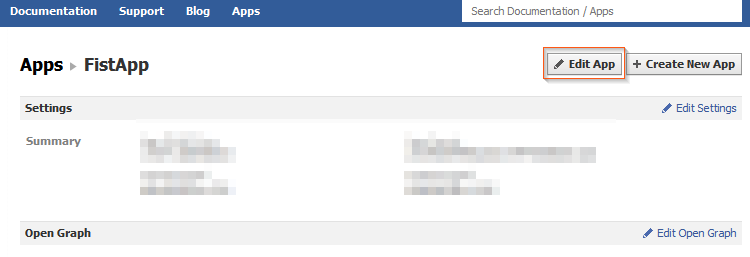
1.  Head over the Facebook developer web page, log in and click on Edit App.

Disable Facebook Timeline - Edit App

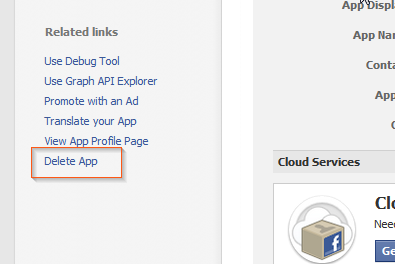
2.  On the left side of the screen, click Delete App.

Disable Facebook Timeline - Delete App

3.  In the dialog box, click

Saturday, October 1, 2011

Reports: Microsoft Anti-Virus Erasing Google Chrome

Mighty funny timing, Microsoft. Reports say that Google’s Chrome browser was threatening to overtake Firefox in the coming months thanks to soaring usage rates caused, in large part, by FF and IE defectors. Then, this morning, Internet forums are awash with rage because a new update to Microsoft’s Security Essentials and ForeFront AV software began calling Chrome a Trojan and erasing it from users machines. Coincidence? Yeah, it probably is. But that still doesn’t change the fact that users are pissed.

Both ZDNet and The Register are reporting that they’ve received numerous complaints about the critical false positive. The AV programs are identifying Chrome as part of the ZeuS Trojan, and users who try to reinstall the browser are finding that the antivirus program won’t let them, citing “PWS:Win32/Zbot” as a severe threat. Register readers are reporting that the beta version of Chrome isn’t affected, nor are browsers that are configured to not send Google any information. Nobody’s saying anything official at the moment – both Google and Microsoft have been mum on the matter.

So, has any of you been affected by the bug? Chime in with your experiences in the comments! I've got Chrome and MSE installed on my laptop, and nothing fishy has gone on yet.

How to Enable the Hidden Windows 7 Admin Account

Lead Image

Imagine you have a Windows PC with a single user account, and you just lost your password. Here’s how to enable the hidden Administrator account with nothing more than the install CD and some registry hacking magic so you can reset your password.
Normally if you wanted to enable the hidden administrator account from within Windows, you’d need access to an Administrator mode command prompt, but that won’t work if you don’t have access, right? This is a great way to quickly enable the hidden admin account so you can reset the password on your main account.
Note: This will require editing the registry which is risky. Proceed only if you know what you are doing and at your own risk.

Enabling the Hidden Administrator Account

Now prepare your Windows 7/Vista DVD and restart the computer with the DVD in the DVD Drive—you’ll want to boot from the DVD so you may need to change the boot order in the BIOS. Depending on your system you will need to press Del, F2, or F12.
After you’ve successfully booted from the DVD you’ll be presented with the language setting of the Windows setup. Click next.

Language Sellection

In the next screen click “Repair your computer” from the bottom left corner of the window. Now the setup will search for Windows installations then display them, choose the Windows you want and click next. The setup may try to search for problems and may ask you if you want to restore your computer, just click no. Finally you’ll arrive at