twitter
    Find out what I'm doing, Follow Me :)

Tuesday, November 29, 2011

How to hide your important data from other users?

Normally when you need to secure your important data from other users, then your first choice is to burn it on CD or put it to removable drive instead of hard drive. But imagine if your data size is more than 100 GB then it is not easy to burn it on CD. No worry, you can save your full drive from other users access using this trick. Check out InfoSec Institute for IT courses including computer forensics boot camp training

Perform the given steps to hide your system data partition:

  • To enable this feature, you will need to be logged into your computer with administrative rights.

  • First click on Start button to open "Run" and type "CMD" (without the quotes) then press Ok button to open Command Prompt.

Now type diskpart on the blinking cursor and wait for 5 seconds to appear diskpart> utility.

To show the list of volume, type list volume command after the diskpart> prompt, this command will show you all system drives detail.

Now first select the volume that you want to hide, for example,

if you need to hide F drive then first type select volume 2 (in this case) and press enter button.

After loading volume, type remove letter F (in this case) to hide F drive.

Now exit from command prompt and open My Computer to verify drives.

But next time, when you want to unhide the D drive, just run assign drive F command after loading volume 2.


Thursday, November 24, 2011

Set a permanent formatting style for composing messages in Gmail

Gmail gives a lot of formatting options for formatting emails. You can change the color of text, change font size, color and more. Some are pretty comfortable with the default formatting in plain style but some may want to change the formatting of text with text colors, font etc. But if you prefer a certain formatting style and want it to use the same style for every email you compose, changing the formatting style every time can be a bit nagging. But with Gmail, you can easily set a default formatting style using a Labs feature.
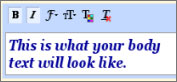
Gmail default formatting style
To set a permanent formatting style for your emails, go to Mail settings on Gmail from the settings button at the top right corner in Gmail. Now click on the Labs tab and Enable the Default Text Styling feature. Now save the settings.

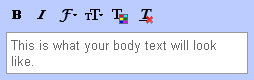
Now go back to the General Tab and you will see the Default Text Style section. You will see the text “This is what your body text will look like.” in the box. Using the buttons for Bold, Itailc, Underline, Text Color, Font, Text Size you can set a formatting for the text. Now save the changes.
Default text style GmailNow click on the Compose button and type in something; you will see the formatting by default. You can revert back to the default formatting style by clicking on the Remove Formatting button on the toolbar while creating a new email message.


Wednesday, November 23, 2011

How to tag a friend or a page on Facebook on mobile devices or with Javascript turned off

Its been long since Facebook let users tag their friends or like pages in status updates or comments. The feature first came to status updates and later on to comments as well. You can simply type the @ symbol and start typing the name of your friend and select one from the autocomplete. But this feature won’t work if you are using Facebook from a mobile browser that doesn’t support Javascript or if Javascript is turned off on your browser. But still, you can tag your friends using an alternate method.


You can tag your friends on browsers that don’t support Javascript as well. But to do this, you need to remember the profile ID of your Facebook friend. On the status update text box type the following:
@ [138558659573745:0]

Replace the number before “:0” with the profile ID of your friend. You can find the profile id of any of your friend by  copying it off their Facebook profile page. The Facebook profile page URL looks something like this:

http://www.facebook.com/profile.php?id=1742756183

But this trick doesn’t work for those who have already set their Facebook usernames. You can also use this trick for tagging Facebook fan pages.

Mobile Devices, Virtualization Are Biggest Security Challenges

http://www.flickr.com/photos/dcmetroblogger/4052573767/
Increased use of mobile devices, especially smartphones, in addition to the transition to virtualization, are key factors weighing on enterprises trying to sort out security strategy and budgets, according to a survey of 688 information and security managers.

According to the Ponemon Institute's "State of the Endpoint" study released this week, there are serious signs that IT operations and IT security often fail to work as a team. Forty percent say collaboration is "poor or non-existent" and 48% call it "adequate, but can be improved." Virtualization, mainly VMware and Microsoft Hyper-V, are increasingly the software platforms their organizations support, and 55% say virtualization does require "additional security measures," with most turning for help with that to the virtualization vendor or vendors with specialized virtualization security components.

But a surprising 41% indicated responsibility for virtualization security isn't clearly defined by department or function. Additionally, 21% said IT security was responsible, 15% said IT operations was and 11% said it was the job for IT compliance. Mobile devices - especially the use of employee-owned devices for work purposes - are also putting new stress on the IT department, according to the survey, which was sponsored by Lumension. The survey shows that mobile devices, especially smartphones, are counted as among "the greatest rise of potential IT security risk."

Tuesday, November 22, 2011

Why do companies backup infrequently?

http://www.flickr.com/photos/brianjmatis/5813845826/
Businesses are on average backing up to tape once a month, with one rather alarming statistic from the same survey showing 10 percent were only backing up to tape once per year, according to a survey by Vanson Bourne.
Although cloud backup solutions are becoming more common, still the majority of companies will do their backups in-house. Sometimes they will have dedicated IT staff to run them, but usually it's done in-house because they have always done it like that, and they have confidence in their own security and safekeeping of data.
Given this fact that IT personal are perhaps creatures of habit, and wouldn't risk a cloud based back-up solution - due to security and/or data integrity - it then seems a little odd that backups are done as infrequently as the survey reveals or even that they are only done once per year by some companies. The likely reason for this infrequency is due to the time factor involved. Many companies would run their backups on Friday evenings, in the hope for it to be completed by Monday business start. But with such large data pools, these backups might not complete in time, and are therefore often postponed for larger time frame windows.

Two top Indian mobile companies under investigation

http://www.flickr.com/photos/42429527@N03/4890115442/
India's top investigation agency has registered a case against two major Indian mobile operators and former government officials in connection with alleged irregularities in the allocation of additional 2G spectrum in January 2002, widening the scope of its investigations into alleged scams in India's telecom sector.
The offices of the two mobile operators, Bharti Airtel, India's largest mobile operator, and Vodafone India, were also raided by the Central Bureau of Investigation (CBI) on Saturday, according to sources.
Vodafone confirmed in a statement that CBI officials had visited the company's offices in Mumbai and Delhi "seeking information related to the spectrum allocation to operators during 2001-02." Airtel was not immediately available for comment. The CBI has been investigating the alleged irregular allocation of spectrum and licenses by the government in 2008, which has led to the arrest of a former communications minister A. Raja, a member of Parliament, business executives, and government officials.


Sunday, November 20, 2011

How to Secure a Wireless Network from Hackers?

The reason we secure a wireless network is to stop people from using the services of our network who don't have permission to utilize them. It is harder to secure a wireless network from hackers as compared to a classic wired network. This is due to the fact that a wireless network can be accessed anywhere inside the range of its antenna.

In order to secure a wireless network from hackers, we should take proper steps to save ourselves against security issues. If you don't secure a wireless network from hackers, you might end up without its service. The consequence might also include the utilization of our network to attack further networks. To secure a wireless network from hackers, you should follow these simple wireless networking tips:

1. Strategic antenna placement:

The first thing you have to do is to position the access point's antenna in a place which restricts the range of its signal to go further than the required area. You should not put the antenna close to a window because glass can't obstruct its signals. Place it in a central location of the building.

2.Use WEP:

WEP stands for Wireless encryption protocol. It's a customary technique for encrypting traffic on a wireless network. You should never skip it as that will allow hackers to get instant access to the traffic over a wireless network.

3. Change the SSID, disable the broadcast of SSID:

SSID stands for service set identifier. It is the recognition thread utilized by the wireless access point due to which the customers are capable of starting connections. For every wireless access point arranged, select an exclusive as well as unique SSID. Also, if it's attainable, hold back the broadcast of the SSID out over the antenna. It won\t appear in the listing of offered networks, while being able to provide services as usual.


4. Disable DHCP:

By doing this, the hackers will have to decode the TCP/IP parameters, subnet mask as well as the IP address in order to hack your wireless network.


5. Disable or modify SNMP settings:

Change the private as well as public community settings of SNMP. You can also just disable it. Otherwise the hackers will be able to utilize SNMP to get significant info regarding your wireless network.


6. Utilize access lists:

For additional security of your wireless network, and if your access point support this feature, employ an access list. An access list lets us determine precisely which machinery is permitted to attach to an access point. The access points which include the access list can employ trivial file transfer protocol (TFTP) now and then in order to download modernized lists to steer clear of hackers.

Sunday, November 13, 2011

Siri hacked to work on iPhone 3GS

http://cultofmac.cultofmaccom.netdna-cdn.com/wp-content/uploads/2011/11/panorama
Credit: Cult of Mac
We recently told you about the hidden panorama mode in the iOS 5 Camera app that could be enabled by editing a .plist file. Since then, a jailbreak tweak called “Firebreak” has been released that automatically enables the feature on any jailbroken iOS 5 device.

Panorama mode in the iOS Camera actually works, and you can get it on your own device right now without jailbreaking.

A simple hack has surfaced that enables the hidden panorama mode on the iPhone 4S, iPhone 4, iPod touch, and iPad 2 running iOS 5. To enable the feature, you’ll need to perform a modified backup of your iOS device in iTunes. You will also need to restore from a new backup, so keep that in mind before continuing.


Saturday, November 12, 2011

Malaysian hacker gets 10 years in US prison

http://www.flickr.com/photos/sercasey/251142094/
A US District judge sentenced a Malaysian to 10 years in prison for hacking into the US Federal Reserve and other banks.

Lin Mun Poo, a Malaysian citizen, had admitted earlier this year to hacking into the US central bank, various private financial institutions and possessing stolen bank card and credit card numbers, officials said.
According to AFP, he also admitted to hacking into a Fed computer server and installing a malicious software code there. Lin, who is from Ipoh, travelled to the United States in October last year “for the purpose of selling stolen credit card and bank card numbers” but a purchaser was in fact an undercover US agent, according to prosecutors. When he was arrested, Lin held over 122,000 stolen bank card and credit card numbers.
 

Friday, November 11, 2011

'Hacked server' claims another certificate authority casualty - KPN

http://i.zdnet.com/blogs/kpn-website-hack-lc-zaw2.jpg
Credit: ZDNet
Dutch certificate authority KPN has issued a statement, confirming that it will cease issuing operations after a security breach was discovered.

KPN, formerly known as Getronics, which issues SSL-certificates to validate the authenticity of secure websites, will cease issuing certificates after one of its servers had been hacked, thought to be as far back as four years ago.

It’s another major blow to the integrity of the web, only a month since Dutch certificate authority Diginotar was hacked, potentially compromising the security of websites belonging to the Dutch government, Google, Facebook and even state intelligence services. In the statement, while “existing certificates already issued remain valid”, it cannot rule out that the production of certificates — including pre-existing certificates — have not been compromised.