Here are list of some useful DOS commands. May be you know some of them and dnt know others. So just go through them.
a
ADDUSERS Add or list users to / from a CSV file.
ARP Address Resolution Protocol
ASSOC Change file extension associations.
ASSOCIAT One step file association.
AT Schedule a command to run at a later time.
ATTRIB Change file attributes.
b
BOOTCFG Edit Windows boot settings.
BROWSTAT Get domain, browser and PDC info.
c
CACLS Change file permissions.
CALL Call one batch program from another.
CD Change Directory - move to a specific Folder.
CHANGE Change Terminal Server Session properties.
CHKDSK Check Disk - check and repair disk problems.
CHKNTFS Check the NTFS file system.
CHOICE Accept keyboard input to a batch file.
CIPHER Encrypt or Decrypt files/folders.
CleanMgr Automated cleanup of Temp files, recycle bin.
CLEARMEM Clear memory leaks.
CLIP Copy STDIN to the Windows clipboard.
CLS Clear the screen.
CLUSTER Windows Clustering.
CMD Start a new CMD shell.
COLOR Change colors of the CMD window.
COMP Compare the contents of two files or sets of files.
COMPACT Compress files or folders on an NTFS partition.
COMPRESS Compress individual files on an NTFS partition.
CON2PRT Connect or disconnect a Printer.
CONVERT Convert a FAT drive to NTFS.
COPY Copy one or more files to another location.
CSCcmd Client-side caching (Offline Files).
CSVDE Import or Export Active Directory data.
d
DATE Display or set the date.
Dcomcnfg DCOM Configuration Utility.
DEFRAG Defragment hard drive.
DEL Delete one or more files.
DELPROF Delete NT user profiles.
DELTREE Delete a folder and all subfolders
DevCon Device Manager Command Line Utility.
DIR Display a list of files and folders.
DIRUSE Display disk usage.
DISKCOMP Compare the contents of two floppy disks.
DISKCOPY Copy the contents of one floppy disk to another.
DISKPART Disk Administration.
DNSSTAT DNS Statistics.
DOSKEY Edit command line, recall commands, and create macros.
DSADD Add user (computer, group..) to active directory.
DSQUERY List items in active directory.
DSMOD Modify user (computer, group..) in active directory.
e
CHO Display message on screen.
ENDLOCAL End localisation of environment changes in a batch file.
ERASE Delete one or more files.
EXIT Quit the current script/routine and set an errorlevel.
EXPAND Uncompress file.
EXTRACT Uncompress CAB files.
f
FC Compare two files.
FIND Search for a text string in a file.
FINDSTR Search for strings in files.
FOR /F Loop command: against a set of files.
FOR /F Loop command: against the results of another command.
FOR Loop command: all options Files, Directory, List.
FORFILES Batch process multiple files.
FORMAT Format a disk.
FREEDISK Check free disk space (in bytes).
FSUTIL File and Volume utilities.
FTP File Transfer Protocol.
FTYPE Display or modify file types used in file extension associations.
g
GLOBAL Display membership of global groups.
GOTO Direct a batch program to jump to a labelled line.
h
HELP Online Help.
i
IF Conditionally perform a command.
IFMEMBER Is the current user in an NT Workgroup.
IPCONFIG Configure IP.
k
KILL Remove a program from memory.
l
LABEL Edit a disk label.
LOCAL Display membership of local groups.
LOGEVENT Write text to the NT event viewer.
LOGOFF Log a user off
LOGTIME Log the date and time in a file
m
MAPISEND Send email from the command line.
MBSAcli Baseline Security Analyzer.
MEM Display memory usage.
MD Create new folders.
MKLINK Create a symbolic link (linkd).
MODE Configure a system device.
MORE Display output, one screen at a time.
MOUNTVOL Manage a volume mount point.
MOVE Move files from one folder to another.
MOVEUSER Move a user from one domain to another.
MSG Send a message.
MSIEXEC Microsoft Windows Installer.
MSINFO Windows NT diagnostics.
MSTSC Terminal Server Connection (Remote Desktop Protocol).
MUNGE Find and Replace text within file(s).
MV Copy in-use files.
n
NET Manage network resources.
NETDOM Domain Manager.
NETSH Configure network protocols.
NETSVC Command-line Service Controller.
NBTSTAT Display networking statistics (NetBIOS over TCP/IP).
NETSTAT Display networking statistics (TCP/IP).
NOW Display the current Date and Time.
NSLOOKUP Name server lookup.
NTBACKUP Backup folders to tape.
NTRIGHTS Edit user account rights.
p
PATH Display or set a search path for executable files.
PATHPING Trace route plus network latency and packet loss.
PAUSE Suspend processing of a batch file and display a message.
PERMS Show permissions for a user.
PERFMON Performance Monitor.
PING Test a network connection.
POPD Restore the previous value of the current directory saved by PUSHD.
PORTQRY Display the status of ports and services.
PRINT Print a text file.
PRNCNFG Display, configure or rename a printer.
PRNMNGR Add, delete, list printers set the default printer.
PROMPT Change the command prompt.
PsExec Execute process remotely.
PsFile Show files opened remotely.
PsGetSid Display the SID of a computer or a user
PsInfo List information about a system.
PsKill Kill processes by name or process ID.
PsList List detailed information about processes.
PsLoggedOn Who's logged on (locally or via resource sharing).
PsLogList Event log records.
PsPasswd Change account password.
PsService View and control services.
PsShutdown Shutdown or reboot a computer.
PsSuspend Suspend processes.
PUSHD Save and then change the current directory.
q
QGREP Search file(s) for lines that match a given pattern.
r
RASDIAL Manage RAS connections.
RASPHONE Manage RAS connections.
RECOVER Recover a damaged file from a defective disk..
REG Registry: Read, Set, Export, Delete keys and values.
REGEDIT Import or export registry settings.
REGSVR32 Register or unregister a DLL.
REGINI Change Registry Permissions.
REM Record comments (remarks) in a batch file.
REN Rename a file or files.
REPLACE Replace or update one file with another.
RD Delete folder(s).
RMTSHARE Share a folder or a printer.
ROBOCOPY Robust File and Folder Copy.
ROUTE Manipulate network routing tables.
RUNAS Execute a program under a different user account.
RUNDLL32 Run a DLL command (add/remove print connections).
s
SC Service Control.
SCHTASKS Create or Edit Scheduled Tasks.
SCLIST Display NT Services.
SET Display, set, or remove environment variables.
SETLOCAL Control the visibility of environment variables.
SETX Set environment variables permanently.
SHARE List or edit a file share or print share.
SHIFT Shift the position of replaceable parameters in a batch file.
SHORTCUT Create a windows shortcut (.LNK file).
SHOWGRPS List the NT Workgroups a user has joined.
SHOWMBRS List the Users who are members of a Workgroup.
SHUTDOWN Shutdown the computer.
SLEEP Wait for x seconds.
SOON Schedule a command to run in the near future.
SORT Sort input.
START Start a program or command in a separate window
SU Switch User.
SUBINACL Edit file and folder Permissions, Ownership and Domain
SUBST Associate a path with a drive letter.
SYSTEMINFO List system configuration.
t
TASKLIST List running applications and services.
TASKKILL Remove a running process from memory.
TIME Display or set the system time.
TIMEOUT Delay processing of a batch file.
TITLE Set the window title for a CMD.EXE session.
TLIST Task list with full path.
TOUCH Change file timestamps.
TRACERT Trace route to a remote host.
TREE Graphical display of folder structure.
TYPE Display the contents of a text file.
u
USRSTAT List domain usernames and last login.
v
VER Display version information.
VERIFY Verify that files have been saved.
VOL Display a disk label.
w
WHERE Locate and display files in a directory tree.
WHOAMI Output the current UserName and domain.
WINDIFF Compare the contents of two files or sets of files.
WINMSD Windows system diagnostics.
WINMSDP Windows system diagnostics II.
WMIC WM I Commands.
x
XCACLS Change file permissions.
XCOPY Copy files and folders.


- Find out what I'm doing, Follow Me :)
Wednesday, August 10, 2011


Internet LOCK.......

Use Internet Lock to control internet access, block or password protect internet connection and internet programs: Internet Explorer, Firefox, Messenger, Outlook… Internet Lock is the access control and password protection solution for your internet connections and programs. With Internet Lock, you can control the internet connections and programs on your computer. Internet Lock can password protect or block any kind of internet programs from accessing internet, for example: password protects all web browsers including Internet Explorer, Firefox etc.[Download]
Sunday, August 7, 2011
War Texting Allows Hackers To Unlock Car Doors Via SMS

Senior iSec researcher Don Bailey has developed an exploit which can allow the attacker to unlock car doors, hack car alarm system and even start their car, this method has been named as "War Texting", it took a time span of less than two hours for Don Bailey to hijack into Car's Alaram system and remotely start the car.
Resources claim that bailey will demonstrate this hack next week in Black Hat Security Conference at Los vegas where he will show the live demonstration of this attack. The presentation is named as "War Texting"

According To ISEC partners
We are seeing more GSM [Global System for Mobile Communications]-enabled systems popping up in consumer culture and industrial control systems. They're not just in Zoombak [Global Positioning System] location devices and personal security control systems, but also in sensors deployed for waste treatment facilities, SCADA [Supervisory Control and Data Acquisition] and call-back systems, physical security systems, industrial control systems
Shaify Mehta - Hacker, Programmer, Cracker.
Black Hole Exploit Kit - A Deadly Russian Crimeware
Russian hackers have a very strong history with Malware development, Infact russians hackers currently own world's most dangerous malwares. One of those dangerous and popular malware's we have is the "Black Hole Exploit Kit". Black hole exploit kit is basically a collection of tons of browser exploit which takes advantage of the vulnerability on user browser in order to infect your computer.

How Does It Works?
When ever a user visits a clean website, the malicious Iframe then redirects the user to the blackhole exploit server, Which then triggers out all the well known exploits on victims browser and gives remote access to the attacker.
Cost
The annual license for blackhole exploit kit costs around 1500$, the semi annual license costs 700$ and the quarterly license costs 700$. The author also gives you option to rent the exploit kit as well as you can host the exploit kit on authors server for a small fee.
Shaify Mehta - Hacker, Programmer, Cracker.
Saturday, August 6, 2011
From A Minor Bug To Zero Day - Exploit Development

While searching on Youtube related to buffer overflow vulnerabilities, I came across an excellent presentation by Math Ahroni on Defcon which explains the complete life cycle of the exploit development, from a simple bug to a Zero day, The presentation explains the whole process of exploit development from the process of fuzzing, location a bug, use of egg hunters etc.
The vulnerability explained in this presentation at Defcon is a HP NNM buffer overflow exploit, however it's not as easy as it looks at first, The author had to go in lots of pain and complications in order to make this exploit working.
Backtrack 5R1 Arriving On 10th August
Well here is another exciting news for all penetration testers and backtrack lovers, Backtrack will launch backtrack r1(release one) on 10th august, According to offensive security team backtrack r1 will come with around 100 bug fixes and in addition to it backtrack 5 rc1 will also include over 30 tools and numerous package updates.

According to offensive security team:
According to offensive security team:
We have a few exciting items to announce in the upcoming month, one of them being BackTrack 5 R1 (Release one) which will be available for download on the 10th of August,2011. This will complete our first 3 month cycle since the last release. With over 100 bug fixes, numerous package updates and the addition of over 30 new tools and scripts – BackTrack 5 R1 will rock. We will have a pre-release event of BackTrack 5 R1 at the BlackHat / Defcon Conference a few days earlier.
Tuesday, August 2, 2011
SiteTrail, The Ultimate Website Analysis Tool
Have you ever wanted to know how much traffic your favorite website was getting? Or how many RSS subscribers a site had?
SiteTrail is a website analysis tool that provides you with data consisting of over 100 different metrics for any given website. All you need to do is simply enter the domain name of the website you want to analyze into a text box and viola!

While there are plenty of other online tools that can help you find analyze details of a website such as who is the owner of a site is, where that site is hosted, what kind of traffic it gets, etc. – SiteTrail performs an even more comprehensive analysis of websites. And the best part is that you get all the details at one place.
You can even find out things like how many diggs you site has received, how many times it has been talked about on MySpace, and more technical info such as the site’s DNS records as well. Very useful!
SiteTrail is a website analysis tool that provides you with data consisting of over 100 different metrics for any given website. All you need to do is simply enter the domain name of the website you want to analyze into a text box and viola!
While there are plenty of other online tools that can help you find analyze details of a website such as who is the owner of a site is, where that site is hosted, what kind of traffic it gets, etc. – SiteTrail performs an even more comprehensive analysis of websites. And the best part is that you get all the details at one place.
You can even find out things like how many diggs you site has received, how many times it has been talked about on MySpace, and more technical info such as the site’s DNS records as well. Very useful!
How to automatically post Google+ updates to Facebook or Twitter
Most bloggers set their Facebook pages to automatically post updates from their blogs. There are lots of applications on Facebook that let you automatically post updates from your blog to Facebook. If you have become an ardent Google+ user, you might want to post your Google+ updates to Facebook and Twitter. This can be done with a combination of a couple of applications.
Facebook applications like RSS Graffiti, Sendible etc. let you push updates from your blog to Facebook pages or your profile page via the RSS feeds of your blog. Plusfeed is a tool that gives you the RSS feeds for any Google Plus profile. We had covered Plusfeed on Techattitude recently. Your feed URL will look like this: “http://plusfeed.appspot.com/1072221639248386151157″.
To post updates to Facebook, go to RSS Graffitti application on Facebook and authorize it to publish updates to your profile. You will see the pages you admin on the left hand menu; select the page you want to post updates to. After authorizing, click on the Add Feed button and add the RSS feed URL of your Google Plus profile onto it. Preview the Feed and finally save it. You can change the settings for the feed like its source name, source URL, Feed style, post type etc. You can also add filters to the feed, schedule it and more.
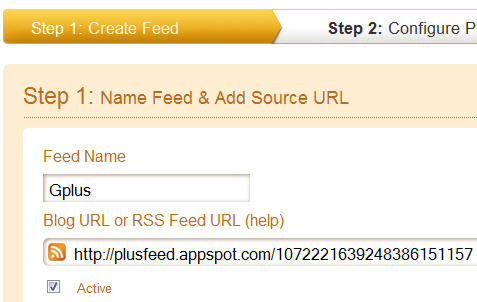
To post Google Plus updates to Twitter, you can use the famous Twitterfeed application. Twitterfeed lets you post updates to Twitter through a feed URL. Sign up for an account on Twitterfeed. Go to the Twitterfeed dashboard and click on the “Create New Feed” button at the top right corner. Now give a name for your Feed(Google Plus for instance) and enter the Google plus feed URL into the RSS feed URL box. Click on the Advanced Settings button to configure options for update frequency, post content and more.
Now go to Step 2 and select Twitter(You can use Twitterfeed to post updates to Facebook as well but it has lesser options and doesn’t post images either). You will need to authenticate your Twitter account. Once your account is authenticated, click on the Create Service Button. Now whenever you post anything to Google Plus, it will automatically be posted to your Twitter account as well.
Thus, using RSS Graffitti and Twitterfeed, you can easily post Google Plus updates to Twitter or Facebook.
Facebook applications like RSS Graffiti, Sendible etc. let you push updates from your blog to Facebook pages or your profile page via the RSS feeds of your blog. Plusfeed is a tool that gives you the RSS feeds for any Google Plus profile. We had covered Plusfeed on Techattitude recently. Your feed URL will look like this: “http://plusfeed.appspot.com/1072221639248386151157″.
To post updates to Facebook, go to RSS Graffitti application on Facebook and authorize it to publish updates to your profile. You will see the pages you admin on the left hand menu; select the page you want to post updates to. After authorizing, click on the Add Feed button and add the RSS feed URL of your Google Plus profile onto it. Preview the Feed and finally save it. You can change the settings for the feed like its source name, source URL, Feed style, post type etc. You can also add filters to the feed, schedule it and more.
To post Google Plus updates to Twitter, you can use the famous Twitterfeed application. Twitterfeed lets you post updates to Twitter through a feed URL. Sign up for an account on Twitterfeed. Go to the Twitterfeed dashboard and click on the “Create New Feed” button at the top right corner. Now give a name for your Feed(Google Plus for instance) and enter the Google plus feed URL into the RSS feed URL box. Click on the Advanced Settings button to configure options for update frequency, post content and more.
Now go to Step 2 and select Twitter(You can use Twitterfeed to post updates to Facebook as well but it has lesser options and doesn’t post images either). You will need to authenticate your Twitter account. Once your account is authenticated, click on the Create Service Button. Now whenever you post anything to Google Plus, it will automatically be posted to your Twitter account as well.
Thus, using RSS Graffitti and Twitterfeed, you can easily post Google Plus updates to Twitter or Facebook.
Monday, August 1, 2011
Samsung D Series @ Secret Codes...
*#1111# S/W Version
*#1234# Firmware Version
*#2222# H/W Version
*#8999*8376263# All Versions Together
*#8999*8378# Test Menu
*#4777*8665# GPSR Tool
*#8999*523# LCD Brightness
*#8999*377# Error Menu
*#8999*327# EEP Menu
*#8999*3825523# Don't Know.
*#8999*667# Debug Mode
*#92782# PhoneModel (Wap)
#*5737425# JAVA Mode
*#2255# Call List
*#232337# Bluetooth MAC Adress
*#5282837# Java Version
#*4773# Incremental Redundancy
#*7752# 8 PSK uplink capability bit
#*7785# Reset wakeup & RTK timer cariables/variables
#*1200# ????
#*7200# Tone Generator Mute
#*3888# BLUETOOTH Test mode
#*#8999*324# ??
#*7828# Task screen
#*5111# ??
#*#8377466# S/W Version & H/W Version
#*2562# Restarts Phone
#*2565# No Blocking? General Defense.
#*3353# General Defense, Code Erased.
#*3837# Phone Hangs on White screen
#*3849# Restarts Phone
#*3851# Restarts Phone
#*3876# Restarts Phone
#*7222# Operation Typ: (Class C GSM)
#*7224# !!! ERROR !!!
#*7252# Operation Typ: (Class B GPRS)
#*7271# CMD: (Not Available)
#*7274# CMD: (Not Available)
#*7337# Restarts Phone (Resets Wap Settings)
#*2787# CRTP ON/OFF
#*2886# AutoAnswer ON/OFF
#*3737# L1 AFC
#*5133# L1 HO Data
#*7288# GPRS Detached/Attached
#*7287# GPRS Attached
#*7666# White Screen
#*7693# Sleep Deactivate/Activate
#*7284# L1 HO Data
#*2256# Calibration info? (For CMD set DEBUGAUTONOMY in cihard.opt)
#*2286# Databattery
#*2527# GPRS switching set to (Class 4, 8, 9, 10)
#*2679# Copycat feature Activa/Deactivate
#*3940# External looptest 9600 bps
#*4263# Handsfree mode Activate/Deactivate
#*4700# Please use function 2637
#*7352# BVMC Reg value (LOW_SWTOFF, NOMINAL_SWTOFF)
#*2558# Time ON
#*3370# Same as 4700
#*3941# External looptest 115200 bps
#*5176# L1 Sleep
#*7462# SIM Phase
#*7983# Voltage/Freq
#*7986# Voltage
#*8466# Old Time
#*2255# Call Failed
#*5187# L1C2G trace Activate/Deactivate
#*5376# DELETE ALL SMS!!!!
#*6837# Official Software Version: (0003000016000702)
#*7524# KCGPRS: (FF FF FF FF FF FF FF FF 07)
#*7562# LOCI GPRS: (FF FF FF FF FF FF FF FF FF FF FF FE FF 01)
#*2337# Permanent Registration Beep
#*2474# Charging Duration
#*2834# Audio Path (Handsfree)
#*3270# DCS Support Activate/Deactivate
#*3282# Data Activate/Deactivate
#*3476# EGSM Activate/Deactivate
#*3676# FORMAT FLASH VOLUME!!!
#*4760# GSM Activate/Deactivate
#*4864# White Screen
#*5171# L1P1
#*5172# L1P2
#*5173# L1P3
#*7326# Accessory
#*7683# Sleep variable
#*8465# Time in L1
#*2252# Current CAL
#*2836# AVDDSS Management Activate/Deactivate
#*3877# Dump of SPY trace
#*7728# RSAV
#*2677# Same as 4700
#*3797# Blinks 3D030300 in RED
#*3728# Time 2 Decod
#*3725# B4 last off
#*7372# Resetting the time to DPB variables
#*7732# Packet flow context bit Activate/Deactivate
#*6833# New uplink establishment Activate/Deactivate
#*3273# EGPRS multislot (Class 4, 8, 9, 10)
#*7722# RLC bitmap compression Activate/Deactivate
#*2351# Blinks 1347E201 in RED
#*4472# Hysteresis of serving cell: 3 dB
#*2775# Switch to 2 inner speaker
#*9270# Force WBS
#*7878# FirstStartup (0=NO, 1=YES)
#*3757# DSL UART speed set to (LOW, HIGH)
#*8726# Switches USBACM to Normal
#*8724# Switches USBACM to Generator mode
#*8727# Switches USBACM to Slink mode
#*8725# Switches USBACM to Loop-back mode
#*3838# Blinks 3D030300 in RED
#*2077# GPRS Switch
#*2027# GPRS Switch
#*0227# GPRS Switch
#*0277# GPRS Switch
#*22671# AMR REC START
#*22672# Stop AMR REC (File name: /a/multimedia/sounds/voice list/ENGMODE.amr)
#*22673# Pause REC
#*22674# Resume REC
#*22675# AMR Playback
#*22676# AMR Stop Play
#*22677# Pause Play
#*22678# Resume Play
#*77261# PCM Rec Req
#*77262# Stop PCM Rec
#*77263# PCM Playback
#*77264# PCM Stop Play
#*2872# CNT
*#8999*283# ???
#*22679# AMR Get Time
*288666# ???
*2886633# ???
*#8999*364# Watchdog ON/OFF
#*8370# Tfs4.0 Test 0
#*8371# Tfs4.0 Test 1
#*8372# Tfs4.0 Test 2
#*8373# Tfs4.0 Test 3
#*8374# Tfs4.0 Test 4
#*8375# Tfs4.0 Test 5
#*8376# Tfs4.0 Test 6
#*8377# Tfs4.0 Test 7
#*8378# Tfs4.0 Test 8
#*8379# Tfs4.0 Test 9
#837837# error=...
*#7465625# = Check the locks
*7465625*638*Code# = Enables Network lock
#7465625*638*Code# = Disables Network lock
*7465625*782*Code# = Enables Subset lock
#7465625*782*Code# = Disables Subset lock
*7465625*77*Code# = Enables SP lock
#7465625*77*Code# = Disables SP lock
*7465625*27*Code# = Enables CP lock
#7465625*27*Code# = Disables CP lock
*7465625*746*Code# = Enables SIM lock
#7465625*746*Code# = Disables SIM lock
*7465625*228# = Activa lock ON
#7465625*228# = Activa lock OFF
*7465625*28638# = Auto Network lock ON
#7465625*28638# = Auto Network lock OFF
*7465625*28782# = Auto subset lock ON
#7465625*28782# = Auto subset lock OFF
*7465625*2877# = Auto SP lock ON
#7465625*2877# = Auto SP lock OFF
*7465625*2827# = Auto CP lock ON
#7465625*2827# = Auto CP lock OFF
*7465625*28746# = Auto SIM lock ON
#7465625*28746# = Auto SIM lock OFF
**********************
#*7878# FirstStartup (0=NO, 1=YES)
#*3838# Blinks 3D030300 in RED
#*2077# GPRS Switch
#*2027# GPRS Switch
#*0227# GPRS Switch
#*0277# GPRS Switch
#*22671# AMR REC START
#*22672# Stop AMR REC (File name: /a/multimedia/sounds/voice list/ENGMODE.amr)
#*22673# Pause REC
#*22674# Resume REC
#*22675# AMR Playback
#*22676# AMR Stop Play
#*22677# Pause Play
#*22678# Resume Play
#*77261# PCM Rec Req
#*77262# Stop PCM Rec
#*77263# PCM Playback
#*77264# PCM Stop Play
#*22679# AMR Get Time
*#8999*364# Watchdog ON/OFF
*#8999*427# WATCHDOG signal route setup
*2767*3855# = Full Reset (Caution every stored data will be deleted.)
*2767*2878# = Custom Reset
*2767*927# = Wap Reset
*2767*226372# = Camera Reset (deletes photos)
*2767*688# Reset Mobile TV
*#1234# Firmware Version
*#2222# H/W Version
*#8999*8376263# All Versions Together
*#8999*8378# Test Menu
*#4777*8665# GPSR Tool
*#8999*523# LCD Brightness
*#8999*377# Error Menu
*#8999*327# EEP Menu
*#8999*3825523# Don't Know.
*#8999*667# Debug Mode
*#92782# PhoneModel (Wap)
#*5737425# JAVA Mode
*#2255# Call List
*#232337# Bluetooth MAC Adress
*#5282837# Java Version
#*4773# Incremental Redundancy
#*7752# 8 PSK uplink capability bit
#*7785# Reset wakeup & RTK timer cariables/variables
#*1200# ????
#*7200# Tone Generator Mute
#*3888# BLUETOOTH Test mode
#*#8999*324# ??
#*7828# Task screen
#*5111# ??
#*#8377466# S/W Version & H/W Version
#*2562# Restarts Phone
#*2565# No Blocking? General Defense.
#*3353# General Defense, Code Erased.
#*3837# Phone Hangs on White screen
#*3849# Restarts Phone
#*3851# Restarts Phone
#*3876# Restarts Phone
#*7222# Operation Typ: (Class C GSM)
#*7224# !!! ERROR !!!
#*7252# Operation Typ: (Class B GPRS)
#*7271# CMD: (Not Available)
#*7274# CMD: (Not Available)
#*7337# Restarts Phone (Resets Wap Settings)
#*2787# CRTP ON/OFF
#*2886# AutoAnswer ON/OFF
#*3737# L1 AFC
#*5133# L1 HO Data
#*7288# GPRS Detached/Attached
#*7287# GPRS Attached
#*7666# White Screen
#*7693# Sleep Deactivate/Activate
#*7284# L1 HO Data
#*2256# Calibration info? (For CMD set DEBUGAUTONOMY in cihard.opt)
#*2286# Databattery
#*2527# GPRS switching set to (Class 4, 8, 9, 10)
#*2679# Copycat feature Activa/Deactivate
#*3940# External looptest 9600 bps
#*4263# Handsfree mode Activate/Deactivate
#*4700# Please use function 2637
#*7352# BVMC Reg value (LOW_SWTOFF, NOMINAL_SWTOFF)
#*2558# Time ON
#*3370# Same as 4700
#*3941# External looptest 115200 bps
#*5176# L1 Sleep
#*7462# SIM Phase
#*7983# Voltage/Freq
#*7986# Voltage
#*8466# Old Time
#*2255# Call Failed
#*5187# L1C2G trace Activate/Deactivate
#*5376# DELETE ALL SMS!!!!
#*6837# Official Software Version: (0003000016000702)
#*7524# KCGPRS: (FF FF FF FF FF FF FF FF 07)
#*7562# LOCI GPRS: (FF FF FF FF FF FF FF FF FF FF FF FE FF 01)
#*2337# Permanent Registration Beep
#*2474# Charging Duration
#*2834# Audio Path (Handsfree)
#*3270# DCS Support Activate/Deactivate
#*3282# Data Activate/Deactivate
#*3476# EGSM Activate/Deactivate
#*3676# FORMAT FLASH VOLUME!!!
#*4760# GSM Activate/Deactivate
#*4864# White Screen
#*5171# L1P1
#*5172# L1P2
#*5173# L1P3
#*7326# Accessory
#*7683# Sleep variable
#*8465# Time in L1
#*2252# Current CAL
#*2836# AVDDSS Management Activate/Deactivate
#*3877# Dump of SPY trace
#*7728# RSAV
#*2677# Same as 4700
#*3797# Blinks 3D030300 in RED
#*3728# Time 2 Decod
#*3725# B4 last off
#*7372# Resetting the time to DPB variables
#*7732# Packet flow context bit Activate/Deactivate
#*6833# New uplink establishment Activate/Deactivate
#*3273# EGPRS multislot (Class 4, 8, 9, 10)
#*7722# RLC bitmap compression Activate/Deactivate
#*2351# Blinks 1347E201 in RED
#*4472# Hysteresis of serving cell: 3 dB
#*2775# Switch to 2 inner speaker
#*9270# Force WBS
#*7878# FirstStartup (0=NO, 1=YES)
#*3757# DSL UART speed set to (LOW, HIGH)
#*8726# Switches USBACM to Normal
#*8724# Switches USBACM to Generator mode
#*8727# Switches USBACM to Slink mode
#*8725# Switches USBACM to Loop-back mode
#*3838# Blinks 3D030300 in RED
#*2077# GPRS Switch
#*2027# GPRS Switch
#*0227# GPRS Switch
#*0277# GPRS Switch
#*22671# AMR REC START
#*22672# Stop AMR REC (File name: /a/multimedia/sounds/voice list/ENGMODE.amr)
#*22673# Pause REC
#*22674# Resume REC
#*22675# AMR Playback
#*22676# AMR Stop Play
#*22677# Pause Play
#*22678# Resume Play
#*77261# PCM Rec Req
#*77262# Stop PCM Rec
#*77263# PCM Playback
#*77264# PCM Stop Play
#*2872# CNT
*#8999*283# ???
#*22679# AMR Get Time
*288666# ???
*2886633# ???
*#8999*364# Watchdog ON/OFF
#*8370# Tfs4.0 Test 0
#*8371# Tfs4.0 Test 1
#*8372# Tfs4.0 Test 2
#*8373# Tfs4.0 Test 3
#*8374# Tfs4.0 Test 4
#*8375# Tfs4.0 Test 5
#*8376# Tfs4.0 Test 6
#*8377# Tfs4.0 Test 7
#*8378# Tfs4.0 Test 8
#*8379# Tfs4.0 Test 9
#837837# error=...
*#7465625# = Check the locks
*7465625*638*Code# = Enables Network lock
#7465625*638*Code# = Disables Network lock
*7465625*782*Code# = Enables Subset lock
#7465625*782*Code# = Disables Subset lock
*7465625*77*Code# = Enables SP lock
#7465625*77*Code# = Disables SP lock
*7465625*27*Code# = Enables CP lock
#7465625*27*Code# = Disables CP lock
*7465625*746*Code# = Enables SIM lock
#7465625*746*Code# = Disables SIM lock
*7465625*228# = Activa lock ON
#7465625*228# = Activa lock OFF
*7465625*28638# = Auto Network lock ON
#7465625*28638# = Auto Network lock OFF
*7465625*28782# = Auto subset lock ON
#7465625*28782# = Auto subset lock OFF
*7465625*2877# = Auto SP lock ON
#7465625*2877# = Auto SP lock OFF
*7465625*2827# = Auto CP lock ON
#7465625*2827# = Auto CP lock OFF
*7465625*28746# = Auto SIM lock ON
#7465625*28746# = Auto SIM lock OFF
**********************
#*7878# FirstStartup (0=NO, 1=YES)
#*3838# Blinks 3D030300 in RED
#*2077# GPRS Switch
#*2027# GPRS Switch
#*0227# GPRS Switch
#*0277# GPRS Switch
#*22671# AMR REC START
#*22672# Stop AMR REC (File name: /a/multimedia/sounds/voice list/ENGMODE.amr)
#*22673# Pause REC
#*22674# Resume REC
#*22675# AMR Playback
#*22676# AMR Stop Play
#*22677# Pause Play
#*22678# Resume Play
#*77261# PCM Rec Req
#*77262# Stop PCM Rec
#*77263# PCM Playback
#*77264# PCM Stop Play
#*22679# AMR Get Time
*#8999*364# Watchdog ON/OFF
*#8999*427# WATCHDOG signal route setup
*2767*3855# = Full Reset (Caution every stored data will be deleted.)
*2767*2878# = Custom Reset
*2767*927# = Wap Reset
*2767*226372# = Camera Reset (deletes photos)
*2767*688# Reset Mobile TV
Auto Logon in Windows XP.....
Windows XP has the ability to store your password and other pertinent information in the registry so that you can automate the logon process. Keep in mind though, while this is a very convenient method, it has its security risks. Anyone using your computer will have access to your account and your network. Only use this setting if the other people within your network are trusted.
Warning: This tweak involves editing the Windows registry. Mistakes made while editing can have serious effects on your Windows installation. Be sure that you have made a backup copy of the registry prior to making any changes.
Here is how to configure Windows XP to auto logon:
Warning: This tweak involves editing the Windows registry. Mistakes made while editing can have serious effects on your Windows installation. Be sure that you have made a backup copy of the registry prior to making any changes.
Here is how to configure Windows XP to auto logon:
- Go to Start>> Run. Type in: regedit [Enter] or click OK.
- Drill down to the following registry key:
HKEY_LOCAL_MACHINE\SOFTWARE\Microsoft\WindowsNT\CurrentVersion\Winlogon - Click the Winlogon entry in the left pane once to empty its contents into the right pane.
- Find the DefaultUserName entry in the right pane and double click it.
- In the Value data test box, type in your user name. Click OK.
- Back in the right pane, locate the entry titled; DefaultPassword. Double click this entry and type in your password in the value data text box. Click OK.
a. Hold your mouse over the right pane and right click an empty area.
b. Click New>> String Value.
c. A new entry at the bottom of the right pane will now appear. Name it DefaultPassword. Press Enter.
d. Now, double click your new DefaultPassword entry and type in your password in the Value Data box.
- Back in the right pane, locate the entry titled AutoAdminLogon. Double click this entry and change the value from 0 to 1. Click OK. The "1" entry turns the feature ON and the "0" turns the feature OFF.
- Exit the Windows Registry and restart your computer.
Subscribe to:
Posts (Atom)



