twitter
    Find out what I'm doing, Follow Me :)

Thursday, December 23, 2010

Bandwidth, What is Bandwidth, What does Bandwidth mean ?

Many a times we hear the word bandwidth and some of us keep wondering that what bandwidth is really. How does it determine our internet speed? Why do many hosting companies provide many bandwidth options In their plans?

Bandwidth can be defined as how much data capacity a particular network segment has to offer or in a layman’s language, it is a data transmission rate; the maximum amount of information (bits/second) that can be transmitted along a channel. Bandwidth determines the amount of data exchange that can take place between your computer and internet.


Think of roads as bandwidth and users traffic as vehicles. If there are more vehicles and fewer roads then the speed of vehicles will be slow. But if there is only one vehicle on the roads then their speed will be very fast. So if there are many users surfing the internet, then each will get a piece of the bandwidth and so your surfing speed will be slow. Even if many people are downloading a same file, download speed will drop to a certain extent.

If u ever wondered that why does sometime your downloads take very much time to complete, it is all about Bandwidth. As the bandwidth increases, so does the amount of data that can flow through in a given amount of time, increases. An Internet connection with a large bandwidth can move a large data (say, a video file) much faster than an Internet connection with a lower bandwidth.

Often a term called bandwidth bottleneck  is used in computing language. A real communications path usually consists of a succession of links, each with its own bandwidth. If one of these is much slower than the rest, it is said to be a bandwidth bottleneck.


To conduct your bandwidth speed test Click Here


.

You are Not Secure Behind Proxies and VPNs

Do you hack?
Do you use a Proxy or VPN server when you're hacking?
Do you think you're secure behind a proxy or VPN?
Do you think that security agencies will never be able to catch you if you use those?

This is how they can track you:

First of all, everyone connects through an IP( Internet Protocol) address which is given to you by your ISP.
This is an identification number which the ISP can identify you by.
When you surf through a website, every website basically logs your ip address, no matter where you go to. Like msn, yahoo, facebook, your IP is logged. No matter if you use a proxy or VPN that server, the proxy or VPN servers are logging your IP address.
All security agencies have to do is get a warrant against you, if they get a warrant they can get the access logs of those VPN and proxy servers you were hiding behind, matching to your IP address and the time you were connected when you committed that crime. Then you're already busted.

My advice would be to hack yourself into some unsecure or secure wireless networks but not doing it on your neighbour's, that way also you can easily get busted, but to go out of town or at least away from your neighbourhood.

Also you might want to spoof your mac address because that can be checked too.

I just wanted to inform you all about this because there are so many of you that use proxies and VPNs and think they are completely safe but that's foolish to think because that is not true. So, Happy Hacking & Good Luck..!!

New USB Wireless File Sharing Stick by iTwin

An innovative invention, the iTwin USB drive, is all set to ship across the United States. It has finally been listed for sale in the US, however, only 50 limited edition builds will roll out prior to Christmas.

iTwin USB Filesharing Solution for US Customers Shipping Ahead of Christmas

This twin-stick solution is meant to transfer files between two USB-enabled devices.

It features a two-part device and is required to plug in one end to a computer while snapping off the second part for another person to use, thereby providing instant access between the two computers.

It works as though there was an actual hard line cable that hooked those two up. It connects almost through all firewalls.

It relies on 256-bit AES encryption to keep things secure. It works without installing any software or using a login ID.

If the user loses the device, they can text iTwin to turn off the other half or can set a password between the two. Thus, it allows simple, safe access to remote data iTwin allows remote data access with no cloud limit or fees.

Unlike rivals, the iTwin is not making any bold promises related to media streaming though. Still the gadget will be considered as an exquisite one that has come out with the new concept of ‘cableless cable’.

The product, available in gunmetal gray and lime green shades are selling for $99 inclusive of the shipping charge of $10 shipping.

Here’s a video that explains how it works:

Mouse for Men

There are a lot of different options out there for people who are looking for a particular mouse accessory for their computer. Touch controls are becoming popular, so here’s a concept design that not only has touch controls, but also a flexible touchscreen, and pressure sensitive controls to boot. Not only that, but the designers made sure that when you look at this Mouse for Men, you realize that a real mouse was used for the inspiration.

While the technology within the concept may be unique enough, there’s the fact that the “tail” of the Mouse for Men is actually detachable. It was conceived by designer Nitin Mane, the Mouse for Men is meant to be comfortable to use over long periods of time, thanks to its ergonomic design. The touch controls, along with the pressure sensitive design elements, are all meant to make sure that the user doesn’t have to exert any extra force to use the mouse.

As for the touchscreen display? It’s an OLED. It’s also meant to inform the user as to what type of “mode” you are in, at any given moment. You can change from a standard mouse controls, or to a multimedia mode as well. The controls on the front of the mouse will change depending on what you need. The Mouse for Men was designed for the LG cube Competition 2010.

Wednesday, December 22, 2010

Apple bans Wikileaks App


The unofficial Wikileaks app made a combined use of the sites Twitter feed and information, allowing users to search both.

Despite the removal of the application this is something that can still be carried out easily using the Twitter and Safari apps.

"Apps must comply with all local laws and may not put an individual or targeted group in harm's way", an Apple spokeswoman told Wired's Threat Level Blog.

The application had donated half of the money it made to the Wikileaks site. Priced at £1.29, the app's description read: "The truth is now available in your iPhone and iPad: the WikiLeaks app gives instant access to the world's most documented leakage of top secret memos and other confidential government documents."

Apple routinely removes application from the App store without public comment. The Guardian however has suggested that it could perhaps have been the in-app donations that led to its dismissal from the application store. Apple has a strict stance on the way that money is donated to charities, only allowing either safari or text messages to make payments.

Transcend launches mSATA and Half-slim Solid State Drives


Transcends new mSATA cards are No bigger than a business card and are cost effective with greater design flexibility


Transcend Information, Inc. (Transcend®), a global leader in storage and multimedia products, today announced the addition of low-profile mSATA and half-slim solid state drives (SSD) to its industrial product line. The new small footprint SSDs are designed especially for applications where a small form factor is desired, such as thin and light notebooks, net books, tablets, GPS, and mobile internet devices (MID).

According to Mr. Gordon Wu, Regional Head - South Asia, Transcend, “Our two new SSD modules offer great design flexibility and are cost savings as compared to other SSDs which typically use the larger 2.5” form factor. Despite their compact size, the mSATA and half-slim SSDs feature a high-bandwidth SATA 3GB/s interface that helps to bring the performance advantages of SSDs to notebooks, mobile devices and other embedded storage applications”

Transcend’s mSATA SSDs leverage the speed and reliability of the SATA interface, yet offer a smaller form factor than 2.5” SSDs—only one twelfth the volume and one seventh the weight. The mSATA SSDs measure 29.85 mm x 50.8 mm x 3.5 mm, and adhere to the MO-300A JEDEC standard for small form-factor SSDs.

Compared to mSATA SSDs, Transcend’s another small footprint half-slim SSD modules are in bigger form factors, 54 mm x 39 mm x 4 mm, but still much smaller than 2.5” SSDs—only one eighth the volume. The half-slim SATA SSD modules use the same SATA connector used on 2.5” hard disk drives and SSDs, making them ideal for applications such as industrial control systems and notebooks designed to use the 2.5” storage form factor. The half-slim SATA SSDs are compliant with the MO-297 JEDEC standard.

Transcend’s mSATA SSDs are offered in 32GB and 64GB capacities, while the half-slim SATA SSDs are available in capacities ranging from 4GB to 64GB.

Price

For mSATA

  • 32GB: Rs.5610
  • 64GB: Rs.10340

For Half-slim Solid State Drives for Small Form-factor Devices

  • 4GB: Rs.1810
  • 8GB: Rs.1950
  • 16GB: Rs.3000
  • 32GB: Rs.5500
  • 64GB: Rs.10340

Availability:

  • Supertron: 91-33-2213-1221 / 23
  • Mediaman: 91-22-23823100/3200

Some Tips & Tricks of Google Talk.

Shortcuts
  • CTRL + Mousewheel up/down over input textbox: Change the font size of the textbox.
  • F9: Open Gmail to send an email to your friend
  • F11: Start a call with your friend
  • F12: Stop the current call
  • ESC: Close the current window
  • ALT + ESC: Minimize the current window
  • TAB: Switch between multiple chat windows
  • CTRL + I: Same as TAB
  • SHIFT + TAB: Same as TAB but in reverse order
  • CTRL + TAB: Same as SHIFT + TAB
  • Windows + ESC: Open Google Talk (if it’s minimized, or in the tray)
Conversation Text
  • A message can be 32767 characters long.
  • Certain smileys are recognized by Google Talk and will be shown in blue.
    :-| :-O :-x :-P :-D ;-) :-( :| :O :x :P :D :) :( ;-| ;-O ;-x ;-P ;-D ;-) ;-( ;| ;O ;x ;P ;D ;) ;( B-| B-O B-x B-P B-D B-) B-( B’( BO Bx BD B) B( B) And you can put a ‘ between the characters to get another one shown in blue.
  • To write text in bold, put it between *asteriks*
  • To write text in italic, put it between _underscores_
  • You can insert special characters like ??? with ‘Start / Programs / Accessories / System Tools / Character Maps’.
Conversation Window
  • Drag a conversation window on top of another and they will dock together.
  • Drag a file onto the chat history and you’ll send the file to the selected contact.
  • When you see a message notification, you can right click it to close it without focusing the conversation window.
Conference Calls
  • What you need to do to have conference calls: Open up a copy of Google Talk on all computers with which you wish to conference. After one copy is opened make a new shortcut for Google Talk but at the end of it add /nomutex. If you installed it to the default folder then your shortcut should read “C:\Program Files\Google\Google Talk\googletalk.exe” /nomutex. Open 2 instances of the software on every user’s computer. After this start a chain: User 1 should connect on one instance to user 2. User 2 will connect on his second instance to user 3. User 3 will connect using his second instance back to user 1. With this chain everyone is connected to everyone.
Nickname & Status Message
  • You can change your name in the Google Account page.
    or To change the nickname need to go to your Gmail account and change the name there. Choose Settings, Accounts, and then Edit info. Click on the second radio button, and enter your custom name.
    As a result all of your emails will have that nick as well, there is no way to seperate the two.
  • You can add a website in your custom message, it will be clickable when someone opens a conversation window with you.
Contacts
  • You don’t need to say Yes or No when someone wants to add you as a friend; you can simply ignore it, the request will go away. (On the other hand, someone with whom you chat often will automatically turn to be your friend, unless you disable this).
  • The Gmail account ‘user@gmail.com’ can’t be invited as your friend.
Sound & Video
  • It’s possible to broadcast music, MP3, etc.. through Google Talk.
    Unplug your microphone. Double click on the speaker icon in the lower right corner. This will open
    up “Volume Control”. Select “Options” and then “Properties”. Then check the button
    next to “Recording” then click OK. You may also have to change your setting under
    Mixer Device. Now the Recording Control screen should be up. On my computer I selected “Wave Out Mix”. Click on the green phone in Google Talk and call your friend.
Secret Startup Parameters
  • /nomutex: allows you to open more than one instance of Google Talk
  • /autostart: when Google Talk is run with this parameter, it will check the registry settings to see if it needs to be started or not. If the “Start automatically with Windows” option is unchecked, it won’t start.
  • /forcestart: same as /autostart, but forces it to start no matter what option was set.
  • /S upgrade: Used when upgrading Google Talk
  • /register: registers Google Talk in the registry, includig the GMail Compose method.
  • /checkupdate: check for newer versions
  • /plaintextauth: uses plain authentication mechanism instead then Google’s GAIA mechanism. Used for testing the plain method on Google’s servers.
  • /nogaiaauth: disables GAIA authentication method. The same as above.
  • /factoryreset: set settings back to default.
  • /gaiaserver servername.com: uses a different GAIA server to connect to Google Talk. Used for debug purposes only, there are no other known GAIA servers.
  • /mailto email@host.com: send an email with Gmail
  • /diag: start Google Talk in diagnostic mode
  • /log: probably has something to do with the diagnostic logging
  • /unregister: ?
  • /embedding: ?

How to Remove thumbs.db

Thumb.db is a cache of the current picture in any directory that contains Picture files for example: .jpeg. To remove it ,navigate to: 

1> open “WINDOWS EXPLORER”.
2>go to “TOOLS”.
3>open “FOLDER OPTIONS”.
4>go to “VIEW”.
5>see 1st section “FILES & FOLDERS”.
6>click on the “DO NOT CACHE THUMBNAILS”.

Now the thumbnail file will be removed from your computer once u do this the file will be never created.

Comment if you like it.

Tuesday, December 21, 2010

Facebook to Offer Face Recognition for Photo Tagging ..!!

2010-12-16-tagfriends.jpg
 
Facebook will employ face recognition software to make tagging easier (Credit: Facebook)


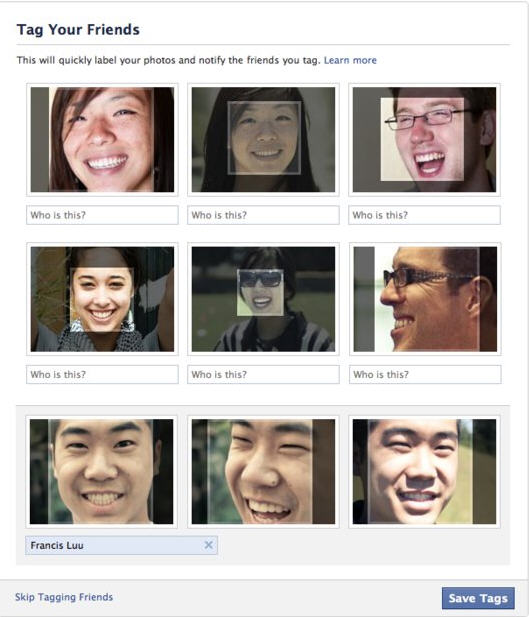
Just a few hours after Time magazine anointed Facebook CEO Mark Zuckerberg "Person of the Year," Zuckerberg's company announced yet another new service that will attempt to recognize pictures of your friends based on their facial characteristics.

Starting next week, Facebook will start using face recognition technology to assist its users in tagging pictures of friends.

Privacy Remains the Same

Facebook officials told me that the new service will not change the privacy settings related to tagging -- users will still get a notice if they are tagged and can remove the tag of any photos. Also, users continue to have control over who tags them.

Another comforting fact about the new tagging service is that it's not automatic. When you upload an album, Facebook will attempt to recognize the people in it. If it finds what it thinks is a match it will ask you to confirm. If you do nothing, the photo won't be tagged.

As has long been the case with photos, you will only be able to tag people you are friends with and, presumably to improve accuracy, Facebook will only compare the pictures against a relatively small sub-set of your friends -- perhaps as few as the 30 people you communicate with most often, which, according to computer scientists who study face recognition, can improve the accuracy.

Facebook will also be allowing users to opt-out of having their name suggested to friends during the photo tagging process. If you disable "Suggest photos of me to friends," your name will "no longer be suggested in photo tags, though friends can still tag you manually," according to the Facebook blog.

From a privacy standpoint this move should have little impact but it is yet one more example of how Facebook is encouraging people to share information, including photos

Hard to Do

Face recognition remain hard to do said Erick Learned-Miller, an associate professor of Computer Science at the University of Massachusetts whose research includes "machine learning" and "computer vision. And it's especially difficult if you're using a very large database. "The larger the number of people you are trying to identify, the more difficult the problem" he said in an interview.

"Up to now the reliability of face recognition is not very good," he said. "if you could be right more than half the time that would be very very good."

Learned-Miller calls Facebook's plan to allow the user to confirm whether the photograph is accurately identified "makes a lot of sense," referring to the process as a "human in the loop method where you don't commit to a particular decision but you try to use the computer as a screen step that improves your own efficiency."

It also helps that Facebook can take advantage of previous tagging. If a person has been tagged in multiple photographs, that improves the chances of it working, according to computer scientists I spoke with.

Rolling Out Gradually
Facebook will roll out the service to a small number of users next week and expand from there. It will initially only be available in the United States.

This announcement follows one in September when Facebook announced group tagging, an improved photo viewer and higher-resolution images. More than 100 million photos are uploaded daily, according to Facebook officials.

..

Access All Your Gmail Accounts With One Log In


Google released a new feature for Gmail last week called Gmail Delegation that lets you merge multiple accounts together.
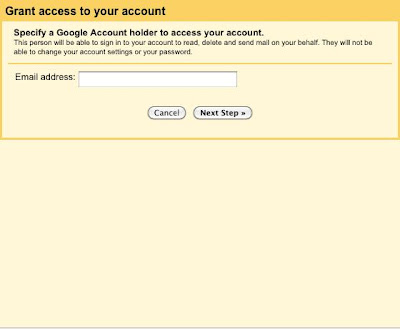
While Google's pitch is that it allows busy executives to share their inbox with assistants, it's actually a perfect feature for people with more than one Gmail account.

You can link your Gmail accounts to one primary account to avoid the hassle of logging in and out of Gmail every time you want to check a different inbox.

The service gives you full access to the shared Gmail account. You can reply to e-mail, view contacts, and add labels to messages as if it were your own account.

We tested Delegation out and it works very well, aside from the fact that you have to wait about 30 minutes for each account to link.

But once you're up and running, you'll never want to go back.

Steps to use this feature:

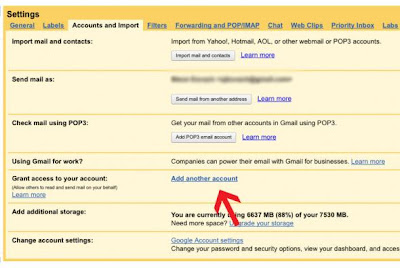
1. Log in to the Gmail account you'd like to merge with your primary account. Click settings and choose the "Accounts and Import" tab. Then click "Add another account."


2. A new window will pop up prompting you to enter the Gmail address you want to merge to. Enter your primary address, then click "Next Step."


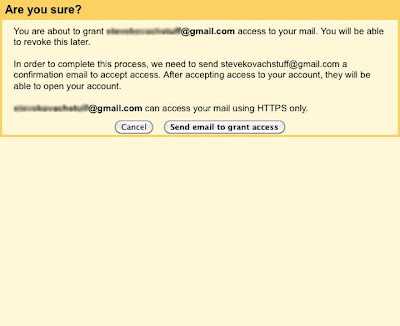
3. You'll be taken to this confirmation window. Verify that you entered the correct e-mail address and click "Send email to grant access."


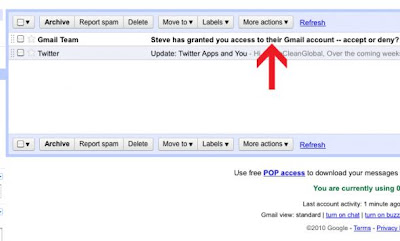
4. Now log off Gmail and sign in again using your primary account. You'll see this confirmation e-mail in your inbox. Open it.


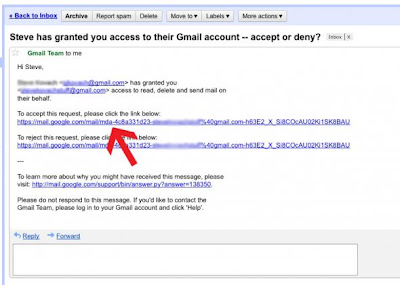
5. Now click the link to accept access to your other Gmail account.


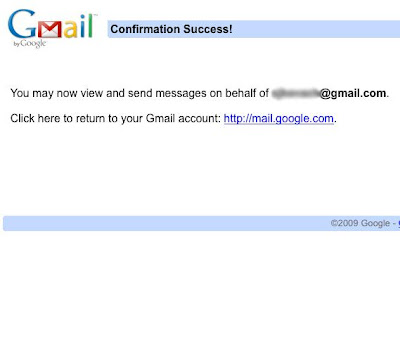
6. If all went well, you'll be taken to this confirmation screen. Now wait for your accounts to sync. Google says this could take up to 30 minutes.

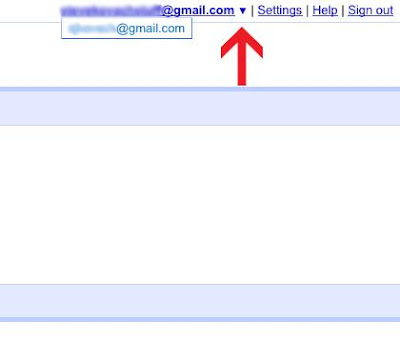
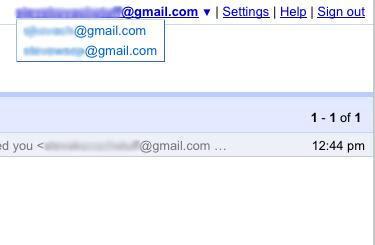
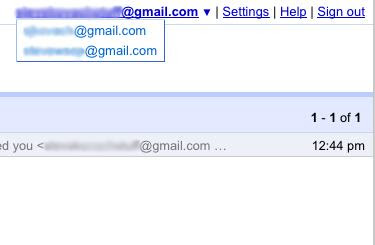
7. After waiting 30 minutes, sign into your primary Gmail account. You'll see a tiny arrow next to your e-mail address. Click it to reveal your linked accounts. Now click the new Gmail account.


8. Your other Gmail inbox will launch in a new tab. No need to enter any log in information. From here you can do everything but change settings to your linked account.


9. Repeat this process for all your Gmail accounts. Each one will appear in the drop down menu at the top right of your Gmail window.