BackTrack 5 R2 has been released. BackTrack is a popular operating system which is used by hackers and security reseachers. This operating system comes with all the penetration testing and hacking tools so it gives an advantage to security researcher. This new updated version added a new kernel with many bug fixes. It also comes with 42 new tools which is a good news for security researchers. his release have included Metasploit 4.2.0 Community Edition, version 3.0 of the Social Engineer Toolkit, BeEF 0.4.3.2, and many other tool upgrades. Backtrack also following new tools to R2:
I saw that many users having problem with Team Viewer commercial use, so i decided to make a post on how to fix this problem
Here are the quick steps to get rid of “Commercial Use Suspected” warning and continue to use the teamviewer as a free version. The instructions specified here, are intended for educational purposes only. Never use teamviewer for commercial purposes without proper license.
Teamviewer Commercial Use Suspected Warning Message :
Step 1 : Close teamviewer if its running on your pc
Step 2 : Click Windows Start > Run and Type %appdata% now find teamviewer folder and delete it.
Step 3 : Beware, This step is very important and you have to follow instructions with caution.
Click Windows Start > Run and enter “regedit” and click OK.
Find the registry entry located at HKEY_LOCAL_MACHINE > SOFTWARE > teamviewer and remove the teamviewer registry folder.
Now restart the computer, run teamviewer and connect with anyone else remotely.
There is no more pop-up's of Commercial Use Suspected warning and its gone now.
Enjoy !!
Getting the ROOT of the rights and removing them to the Galaxy Ace Samsung GT-S5830 IRoot Instructions for obtaining the right:
1. Download the file update.zip
2. We throw it in the root of the memory card
3. Turn off your phone
4. Hold buttons simultaneously and hold until the Recovery: Central + volume up
5. Get into the menu, Recovery, consisting of 4 items:
system reboot now (reboot phone)
apply update from sdcard (install update)
wipe data / Factory reset (reset to factory settings, removed all of the phone
(memory card not touch))
wipe cache partition (format the system partition / cache)
6. Choose item apply update from sdcard
7. Window appears select the update (memory card)
8. We choose our update.zip
9. Next Reboot system now (if, after installing update.zip reboot the phone itself, then this step is not necessary)
10. Done If all goes well, the menu icon should appear superuser
How to remove Root of rights:
1. Download the archive unroot.zip
2. We throw it in the root of the memory card
3. Turn off your phone
4. Hold buttons simultaneously and hold until the Recovery: Central + volume up
5. Get into the menu, Recovery, consisting of 4 items:
system reboot now (reboot phone)
apply update from sdcard (install update)
wipe data / Factory reset (reset to factory settings, removed all of the phone (memory card not touch))
wipe cache partition (format the system partition / cache)
6. Choose item apply update from sdcard
7. Window appears select the update (memory card)
8. We choose our unroot.zip
9. Next Reboot system now (if, after installing the phone itself unroot.zip rebooted, then this step is not necessary)
10. Done If all goes well, the menu icon should disappear superuser
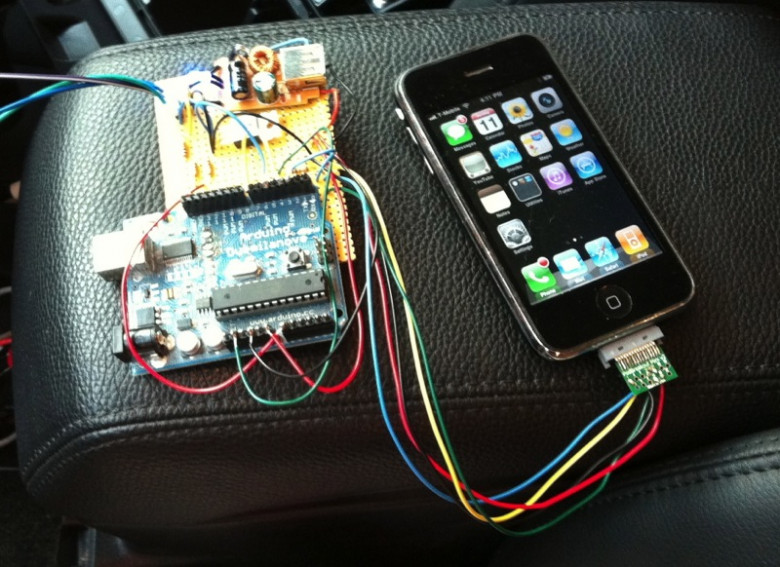
This DIYer had a 1st generation iPhone lying around, so he decided to put it to good use. You can use any phone to accomplish this, even a $10 prepaid phone. An SMS to the iPhone goes through an Arduino which tells yours car to start or stop from anywhere. There’s some custom circuitry and programming which is all included in the instructions. When a text message is sent to the iPhone, the iPhone tells the Arduino to start the engine, and the iPhone sends a message back reporting that the start has commenced.
Requirements:
An old jailbroken iPhone, an Arduino, iphone breakout board (I used a PodBreakout Mini) 4x 10k resistors, 1x TIP120, a 5 volt switching supply cell charger (easier than building one), some wiring ability and a general understanding of unix/perl/arduino.
The code:
You can get the code to make it all work here. (SMSresponder.pl, com.SMSresponder.startup.plist and
SMSresponder is a perl script that runs in a loop. Every 30 seconds it checks for a new message since the last time it ran. place it in /var/root/bin/ (you’ll need to create that directory) as this is where the startup system looks for it. You can put it somewhere else, just edit the plist to match.
The PHP Group released PHP 5.3.10 on Thursday in order to address a critical security flaw that can be exploited to execute arbitrary code on servers running an older version of the Web development platform.
The vulnerability is identified as CVE-2012-0830 and was discovered by Stefan Esser, an independent security consultant and creator of the popular Suhosin security extension for PHP.
SecurityFocus classifies the issue as a design error because it was accidentally introduced while fixing a separate denial-of-service (DoS) vulnerability in early January. It affects a number of Web development platforms including PHP, ASP.NET, Java and Python and can be exploited in a so-called hash collision attack. The PHP development team addressed CVE-2011-4885 in PHP 5.3.9, which was released on Jan. 10.
The vulnerability which we are about to demonstrate in my opinion is the number 1 reason why websites hacked and are exploited further to the server level. When a hacker performs a SQL Injection attack on a website he needs a way to get shell level access and install the PHP backdoor so he can touch other files on server or compromise the server itself if it's vulnerable. If we could secure our uploads and restrict our upload area so that they don't allow it does not allow the upload of other files instead of images we can protect our upload area.
However there is a problem, The PHP files can still be uploaded by various methods. The most common method is by renaming the PHP backdoor to the following and then uploading the shell.
However there is also a method to block the upload of the above files. But there is also another way to bypass it even if the uploading of the files name with the above extension is blocked. We will use tamper data for this purpose.
Step 1
Install http live headers firefox extention, then go to the upload section. Open Live HTTP Headers and upload shell. Now if you try to go to the link where you have your shell uploaded it will give you error (only on some websites) so we will have to change that hidden .php.jpg extension into the .php.
So as we uploaded the shell and opened the Live HTTP Headers you should find where you have uploaded your shell. You will have to find the line where ti writes that you uploaded the shell. Select it and then click on button reply.
Step 2 -
After uploading, find the directory where your fle uploaded, example if you uploaded it in images then it will be in http://website/images/shell.php. The rest of the steps are self explanatory.
How To Protect Your Website from the FileUpload Vulnerability?
That's a separate topic and will be explained in a separate post. However for now I would recommend you to install a third party fileuploading service, Where the file get's uploaded the fileuploading service's server not yours.
Your browser logo shows something other than the IE logo. Maybe you have installed your ISP software and you have a different logo on the top right. How do you remove it?
Close all browser windows
Start -> Run
Type RunDLL32.EXE IEdkcs32.dll,Clear
Click on OK, and start Internet Explorer. You should find the old spinning IE logo.
Local file inclusion is a very popular web application attack, It was very common few years back. However now a days you will rarely find websites vulnerable to this attack. However a single vulnerability can result in getting your website compromised. We have already written an article on Directory transversal attack. Therefore I believe that we need no to go in details about the attack. You might know avinash by now the author of the previous article How Hackers Are Hacking Into Websites On Shared Hosts. However in this article he will demonstrate a local file inclusion vulnerability and he will enhance the attack by uploading a shell on the website.
Here are some of the common parameters which are vulnerable to local file inclusion or remote file inclusion attacks.
The first thing which a hacker will do while finding a LFI vulnerability is to locate the /etc/passwd file. This file indicates that a local file inclusion vulnerability is present in the website. The image below explains the whole story “root” is the username, followed by “x” which happens to be the password, however here it’s shadowed, which means that it’s present is /etc/shadow file. Which is only accessible when you have root privileges.
Next the hacker will check for /proc/self/environ. So change your path to /proc/self/environ/. The /proc/self/environ/ page should look something like this if the file exists, not all sites have it.
Once the local file inclusion vulnerability has been identified , the hacker will try to perform remote code execution and try to some how to further acesss. This can be done by uploading a PHP backdoor. For that purpose a commonly used tool is Useragent switcher. Which can be downloaded from the link above.
The hacker edits the useragent and changes code inside to the user agent to the following:
Select your User-Agent in Tools > Default User Agent > PHP Info (Or whatever you User Agent is called)
After refreshing the website, He then searches for the keyword "disable_functions" (Ctrl+F Search function)
disable_functions | no value | no value
The above function tells us that website is vulnerable to remote code execution and now we can upload the PHP backdoor. On the finding that the website is vulnerable he then tries to upload the shell by using the following command:
Where the above code uploads a PHP backdoor in a text form and later renames it to .php. Now the shell has been successfully uploaded. Once the PHP backdoor has been uploaded it will look like the following:
How To Be Protected?
We will cover it in our upcoming posts. If you are worried about your website's security and would like me to carry out a vulnerability assessment of your website. Feel free to contact me.