- Mozilla Firefox: click on Options-->Privacy Tab --> [?] tell websites I do not want to be tracked
- Google Chrome: click on the wrench menu (changed in updated GC versions) --> Settings --> [scroll down] Show Advanced Settings --> Privacy [Content Settings] --> Location [? Do not allow any site to track my physical location
- Internet Explorer: Get a life and change your browser ... !!


- Find out what I'm doing, Follow Me :)
Friday, July 12, 2013
If you don't want Facebook, Google, Gmail to track you - follow the steps below:


Thursday, July 11, 2013
Disable Delete Confirmation
You can disable the confirmation that pops up whenever you delete something by
- right-clicking the Recycle Bin and selecting Properties.
- Uncheck the delete confirmation box
- click Apply and then OK, and you're done.
- Also, you can bypass the Recycle Bin entirely by holding down the Shift key while deleting files.
Wednesday, July 10, 2013
12 Computer Programming Languages You're Probably Never Heard Of It..
Brainf**k
Developed by : Urban mullar
File name extension : .b,bf.
Year: 1993
Befunge
Developed by : Chris Pressey
Year: 1993
Shakespeare
Developed by : Jos Aslund and Karl Hasselstrom.
Year: 1993
Jos Aslund and Karl Hasselstrom created this programming language in one night.
Whitespace
Developed by : Edwin Brady and Chris Morris
Year : Apr 1st 2003
Official website: compsoc.dur.ac.uk/whitespace
Bliss
Developed by: W.A Wulf, D.B Russel and A.N. Habermann
Year : 1970
Developer : Carnegie Mellon University
Piet
Developed by: David Morgan-Mar
Check out some sample programs of Piet - dangermouse.net/esoteric/piet/
Velato
Developed by: Daniel Temkin
Year: 2009
Inform
Developed by: Graham Nelson
Year: 1993
Support's: Mac OS X, Windows, Linux others
Official website: inform7.com
Go
Developed by: Robert Griesemer, Rob Pike, Ken Thompson
Developer: Google
Supports: Plan 9, Free BSD, Open BSD, Mac OS X, Windows, Linux others
File name extension: .go
Official website: golang.org
Chef
Developed by: Don woods, James M. Lyon
Year: 1972
For More: http://en.wikipedia.org/wiki/
OmgRofl
Developed by: David Morgan-Mar
Developed by : Urban mullar
File name extension : .b,bf.
Year: 1993
Befunge
Developed by : Chris Pressey
Year: 1993
Shakespeare
Developed by : Jos Aslund and Karl Hasselstrom.
Year: 1993
Jos Aslund and Karl Hasselstrom created this programming language in one night.
Whitespace
Developed by : Edwin Brady and Chris Morris
Year : Apr 1st 2003
Official website: compsoc.dur.ac.uk/whitespace
Bliss
Developed by: W.A Wulf, D.B Russel and A.N. Habermann
Year : 1970
Developer : Carnegie Mellon University
Piet
Developed by: David Morgan-Mar
Check out some sample programs of Piet - dangermouse.net/esoteric/piet/
Velato
Developed by: Daniel Temkin
Year: 2009
Inform
Developed by: Graham Nelson
Year: 1993
Support's: Mac OS X, Windows, Linux others
Official website: inform7.com
Go
Developed by: Robert Griesemer, Rob Pike, Ken Thompson
Developer: Google
Supports: Plan 9, Free BSD, Open BSD, Mac OS X, Windows, Linux others
File name extension: .go
Official website: golang.org
Chef
Developed by: Don woods, James M. Lyon
Year: 1972
For More: http://en.wikipedia.org/wiki/
OmgRofl
Developed by: David Morgan-Mar
Tuesday, July 2, 2013
Earn Mobile Recharges and gifts by bidding online.
India's first online destination that offers unlimited free bids and allows users to win mobile recharges, digital photo frames, pen drives, mp3 players, laptops, digital cameras, mobile phones, watches and many more FREE!!!!!.
Click Here To Register
Click Here To Register
Wednesday, June 19, 2013
Wednesday, June 12, 2013
Take advantage of Windows 8 apps
Windows 8 comes included with several apps to help you get the most from your computer. Below are just a few of the included apps.
People
Microsoft touts the People feature in Windows 8 because they understand how many people are using social networks today. In the People feature you'll be able to connect your Windows computer to all the major social networks including Facebook, LinkedIn, and Twitter. Once connected, you can pin the people app and monitor your social network (as shown below), use People in Search to find people, and get an overview of what is happening in all your social networks.
Reader
The Reader app will give you PDF support right out of the box.
SkyDrive
The SkyDrive app will give you access to the Microsoft cloud service SkyDrive, which allows you to store your photos, documents, and other files in the cloud and access or share those files with any computer with Internet access.
Store
Take advantage of the Windows Store and install one or more of the thousands of available apps designed for Windows 8. The Store is found in the Start screen, or use Search to search the Store app for any apps that you are trying to find.
Tuesday, June 11, 2013
Windows 8 Task Manager
The Windows 8 Task Manager has been significantly improved over previous versions of Windows. Some of the new changes include showing a total percent usage at the top of your Processes, which makes it easier to determine total memory and CPU usage, improved Performance graphs, a Startup tab to see startup processes and their impact to system performance, and the App history tab (as shown below) that gives you the total resources an app has used over a period of time. Press Ctrl + Shift + Esc to start exploring the new Task Manager.

Monday, June 10, 2013
Employ the hottest hotkeys of Window 8
In these key combinations, hold down the Windows key (normally located between Alt and Ctrl) and another key, as described on this list.
- Press the Windows key to enter the tiled Start screen.
- The Windows key + M minimizes everything that's showing on the desktop.
- The Windows key + E opens Explorer for quick access to folders.
- On the Start screen, press the Windows key + D to instantly get to the desktop.
- The Windows key + Tab opens a list of currently running programs.
- The Windows key + Print Screen takes a screenshot and saves it in a Screenshots folder nested in your Pictures folder.
- To take a screenshot on a Windows 8 tablet, simultaneously press the Windows button and the volume-down button on the tablet chassis.
- The Windows key + Q opens a global search menu. Type what you're looking for and where you would like to look.
- The Windows key + W opens a search in your system settings to quickly locate and change system properties.
- The Windows key + F opens a file and folder search.
- The Windows key + Pause opens the system properties page to show you a quick rundown of your specs.
- The Windows key + "," (that's the comma sign!) makes all current windows transparent, giving you a peek at the desktop as long as you hold down the Windows key.
- The Windows key + "." (the period) snaps a window to the right or left side (toggling each time you press ".").
- The Windows key + R prompts the Run command—useful for quickly launching apps and other routines with a command prompt.
- The Windows key + X opens the Quick Access Menu, exposing system functionality such as the Command Prompt, Disk Management, File Explorer, Run, and more. Alternatively, you can right-click on the bottom right corner of the screen to spawn the Quick Access Menu.
- The Windows key + I opens the settings menu, giving you quick access to the Control Panel, Personalization, and your Power button, among other features.
- The Windows key + O locks orientation on devices with an accelerometer.
Use a picture password to log into your computer
Windows 8 includes a new feature called Picture password, which allows you to authenticate with the computer using a series of gestures that include circles, straight lines, and taps. Enable this feature if you want a new way to access your computer or have a hard time with passwords.
- Open the Windows Charms.
- Click Settings and then More PC settings
- In the PC settings window click Users and then select Create a picture password
Bonus tip: A four digit pin password can also be created and used to access your computer.
Wednesday, May 15, 2013
New 25 GPU Monster Devours Passwords In Seconds
ditor’s note: I’ve updated the article with some new (and in some cases) clarifying detail from Jeremi. I’ve left changes in where they were made. The biggest changes: 1) an updated link to slides 2) clarifying that VCL refers to Virtual OpenCL and 3) that the quote regarding 14char passwords falling in 6 minutes was for LM encrypted – not NTLM encrypted passwords. Long (8 char) NTLM passwords would take much longer…around 5.5 hours.
There needs to be some kind of Moore’s law analog to capture the tremendous advances in the speed of password cracking operations. Just within the last five years, there’s been an explosion in innovation in this ancient art, as researchers have realized that they can harness specialized silicon and cloud based computing pools to quickly and efficiently break passwords.
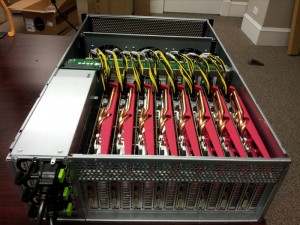
Gosney’s system elevates password cracking to the next level, and effectively renders even the strongest passwords protected with weaker encryption algorithms, like Microsoft’s LM and NTLM, obsolete.
In a test, the researcher’s system was able to churn through 348 billion NTLM password hashes per second. That renders even the most secure password vulnerable to compute-intensive brute force and wordlist (or dictionary) attacks. A 14 character Windows XP password hashed using LM NTLM (NT Lan Manager), for example, would fall in just six minutes, said Per Thorsheim, organizer of the Passwords^12 Conference.
[Note of clarification from Jeremi: "LM Is what is used on Win XP, and LM converts all lowercase chars to uppercase, is at most 14 chars long, and splits the password into two 7 char strings before hashing -- so we only have to crack 69^7 combinations at most for LM. At 20 G/s we can get through that in about 6 minutes. With 348 billion NTLM per second, this means we could rip through any 8 character password (95^8 combinations) in 5.5 hours." ]
“Passwords on Windows XP? Not good enough anymore,” Thorsheim said.
Tools like Gosney’s GPU cluster aren’t suited for an “online” attack scenario against a live system. Rather, they’re used in “offline” attacks against collections of leaked or stolen passwords that were stored in encrypted form, Thorsheim said. In that situation, attackers aren’t limited to a set number of password attempts – hardwareand software limitations are all that matter.
The clustered GPUs clocked impressive speeds against more sturdy hashing algorithms as well, including MD5 (180 billion attempts per second, 63 billion/second for SHA1 and 20 billion/second for passwords hashed using the LM algorithm. So called “slow hash” algorithms fared better. The bcrypt (05) and sha512crypt permitted 71,000 and 364,000 per second, respectively.
Subscribe to:
Posts (Atom)



