Computers are known for their speed and versatility, and also for the various security issues and frustrating glitches. Any simple survey will reveal that most computer users are not happy with their systems at all. Everywhere you turn, there is only one complaint: it doesn’t work well!
The reasons for the poor performance of a computer can be many, but the most important one is the one associated with DLL files. Without going into too much technical detail, let us say that Dynamic Link Libraries (DLLs) are modules that can be shared by computer programs in execution. It should not be difficult to imagine what would happen if a few crucial DLLs went missing! If you find that you are constantly getting DLL error messages related to DLL files, such as vrlogon.dll and owaauth.dll, you need to act on it fast and follow the given steps for a DLL error fix without any further delay:
We have seen, by now, how one can follow some very simple steps and ensure that their PC stays in top shape. The good thing about this whole procedure is that it requires very little expert knowledge about computers. |


- Find out what I'm doing, Follow Me :)
Saturday, April 23, 2011
DLL ERRORS OCCUR@OOOPPPSSS@HOW TO AVOID DLL ERROS......
Why DLL Errors Occur and How to Avoid Them


How to prevent users from writing to USB drives
Today USB drive also known as keychain drive is becoming the most popular removable storage device to move data to different locations. USB drives are available in the market with different features, for example password protected, compatible with all windows versions and extra storage capacity (up to 65 GB).
A common security issue at organizations is how to prevent their workers to write data onto USB drives using their PCs, because a user can easily move confidential data for other location.

if you have windows XP with SP2, then you can disable the writing option to USB drives.
Follow the given steps to disable the USB writing option:
To edit the computer registry, first you should log onto your computer with administrative rights.
First click on Start button and type "Regedit" in Run option.
Here locate the location to:
HKEY_LOCAL_MACHINESYSTEMCurrentControlSetControl
Here in right side panel, click right to create a key with the name "StorageDevicePolicies".

Now in left side panel, select "StorageDevicePolicies" key, again right click to create new DWORD value then label it "WriteProtect".

Set its value to "1". But again enable this option set its values "0"

Now close the registry editor and restart your computer after any changes to go into effect.
Friday, April 22, 2011
How to automatically insert the filename in your Word document
If you need to work with Microsoft Word on a regular basis, you might have felt that archiving a large number of your documents is rather difficult. Generally, the easiest way of finding files is by looking through their file names. It can be even handier to include the filename on the document body itself, generally in the header or the footer. Here is how you can automatically insert the file name of your document in its header or footer.
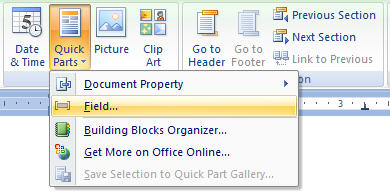
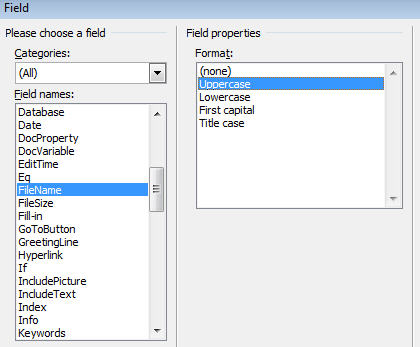
You can basically add the filename to any section of your document but adding it to the header or the footer will enable you to make it appear on all pages throughout the document. To edit your header or footer, go to Insert>Edit Header or Insert>Edit Footer respectively. You’ll now see that the design tab at the top is highlighted. From the ribbon under the Header and Footer tab, click on the Quick Parts Dropdown. Next, choose the “Field” Option. In the Field Names section, scroll down and select Filename. You’ll now get options to insert the FileName in UpperCase, LowerCase, Middle Case etc. If need be, you can also add the path to the file along with the filename by choosing the “add path to filename” option. Once you’re done, click OK. Now the FileName of the document will automatically appear on all pages of your document.
Now what If you want to do this for all future documents that you’ll be working on? Modifying the footer and adding the custom field for the filename for every document can be a bit nagging. But don’t worry; by modifying the default template you can automatically add filenames to all the documents that you’ll create in the future.
Open the default template named Normal.dotm(or Normal.dotx for older version of Word). In the File>Open dialogue box, select “Word Macro-Enabled Templates” from the filetype dropdown. Now, select the Microsoft Word Templates folder from the navigation menu at the left. You’ll now see a normal.dotm file in the files section. Go ahead and open it. Now modify its footer the same way as above and to the filename. Finally save the template file. Once this is done, the filename will be automatically added to all Microsoft Word files that you’ll be creating in the future.
You can basically add the filename to any section of your document but adding it to the header or the footer will enable you to make it appear on all pages throughout the document. To edit your header or footer, go to Insert>Edit Header or Insert>Edit Footer respectively. You’ll now see that the design tab at the top is highlighted. From the ribbon under the Header and Footer tab, click on the Quick Parts Dropdown. Next, choose the “Field” Option. In the Field Names section, scroll down and select Filename. You’ll now get options to insert the FileName in UpperCase, LowerCase, Middle Case etc. If need be, you can also add the path to the file along with the filename by choosing the “add path to filename” option. Once you’re done, click OK. Now the FileName of the document will automatically appear on all pages of your document.
Now what If you want to do this for all future documents that you’ll be working on? Modifying the footer and adding the custom field for the filename for every document can be a bit nagging. But don’t worry; by modifying the default template you can automatically add filenames to all the documents that you’ll create in the future.
Open the default template named Normal.dotm(or Normal.dotx for older version of Word). In the File>Open dialogue box, select “Word Macro-Enabled Templates” from the filetype dropdown. Now, select the Microsoft Word Templates folder from the navigation menu at the left. You’ll now see a normal.dotm file in the files section. Go ahead and open it. Now modify its footer the same way as above and to the filename. Finally save the template file. Once this is done, the filename will be automatically added to all Microsoft Word files that you’ll be creating in the future.
Hidden Quotes In Windows Xp
There is a secret file in Windows XP called "quotes". In order to get there you must be somewhat familiar with how to use Windows, simply open up My Computer (explorer) and double click on your main drive (probably C next navigate to: C:>WINDOWS>SYSTEM32>DRIVERS>etc This is where the quotes file is. Open the file named quotes in your favorite text editor (notepad, MS Word, Emacs:p ) then look at the quotes put there by the MS developers!
**note: I use Windows XP Pro, it might only work in professional edition **
On the screen in Win XP Pro where one logs in initially, there is a tiny little Easter Egg.
Simply leave your computer on that screen long enough for the screensaver to come on. Then move the mouse.
What happened?
Well, look in the bottom left corner. The litte button marked "Turn of computer" now reads "Turn off Banana 2000"!
((For those who don't ge it, in the comic strip Bloom County, one character owned a Banana 2000 computer, which eventually became a character in its own existential right... walking around and everything))
Special Requirements:
Windows XP Pro
Candy Cane Pipes
1.Go to Display Properties
2.Click the Screen saver tab then Click 3D Pipes 3.Click Settings
4.Click Textured
5.Click Choose Texture
6.Click Cancel.
7.Click OK on the Screen Saver Setup
Now The Pipes
should be Candy Cane Colored!
**note: I use Windows XP Pro, it might only work in professional edition **
On the screen in Win XP Pro where one logs in initially, there is a tiny little Easter Egg.
Simply leave your computer on that screen long enough for the screensaver to come on. Then move the mouse.
What happened?
Well, look in the bottom left corner. The litte button marked "Turn of computer" now reads "Turn off Banana 2000"!
((For those who don't ge it, in the comic strip Bloom County, one character owned a Banana 2000 computer, which eventually became a character in its own existential right... walking around and everything))
Special Requirements:
Windows XP Pro
Candy Cane Pipes
1.Go to Display Properties
2.Click the Screen saver tab then Click 3D Pipes 3.Click Settings
4.Click Textured
5.Click Choose Texture
6.Click Cancel.
7.Click OK on the Screen Saver Setup
Now The Pipes
should be Candy Cane Colored!
Thursday, April 21, 2011
Sniffer for iPhone :Pirni
A new sniffer for iPhone has come up which scans the whole network wifi on which you are and see if there is any packet from where you can extract information about users on your network...
just need to go to cydia and then go to search and then type pirni.
if it comes up then its ok otherwise add the repository www.cydia.xsellize.com and then do the first step again and now it will surely come up.


 Enjoy sniffing after starting the software......
just need to go to cydia and then go to search and then type pirni.
if it comes up then its ok otherwise add the repository www.cydia.xsellize.com and then do the first step again and now it will surely come up.


REASONS TO CLEAN YOUR WINDOWS REGISTRY
6 Reasons to Clean Your Windows Registry
The registry is one of the most vital components of your Windows operating system because it stores all software and hardware configuration information of your PC. As your PC gets older, the registry starts getting filled up when you install/uninstall applications, browse the Web, create new files and folders, and perform various other activities on your system. Over time, loads of unwanted, obsolete, incorrect, and malicious data collects in the registry causing registry bloating. A large, bloated registry easily gets corrupted and fragmented and starts generating system errors and causing frequent system freezes. At times, registry errors may become so severe that they may damage your PC beyond repair. Because of this, it is important for you to regularly clean your registry. However, the registry hive is quite complex and it is not possible even for an experienced computer technician to scan and clean the registry manually. Thus, it is recommended that you use a registry cleaner utility to perform registry clean up and repair. Let’s now have a look at the top 6 benefits of cleaning your Windows registry. Reason # 1: Prevent Registry Bloating Regularly cleaning the registry enables you to prevent the accumulation of unwanted junk data within it. This helps you to prevent registry bloating and to maintain a compact registry. A compact and stable registry considerably improves the performance of your PC and helps you enjoy error-free computing for a long time. Reason # 2: Remove Corrupt Registry EntriesBecause the registry is the most accessed and used component of your Windows system, the chances of registry errors are quite high. Registry errors occur due to corrupt and incorrect registry entries and fragmented registry files. Using your registry cleaner tool, you can easily fix these registry errors and also defrag the registry to make registry files contiguous and easier to access, thereby preventing and repairing many registry errors. Registry cleaners also enable you to create registry backups. So, if in spite of all your corrective steps, the registry fails, you can restore it from the registry backup and have your PC up and running in no time. |
SECURITY HABITS@FOR U.....
5 Good Security Habits
How can you minimize the access other people have to your information?
You may be able to easily identify people who could, legitimately or not, gain physical access to your computer—family members, roommates, co-workers, members of a cleaning crew, and maybe others. Identifying the people who could gain remote access to your computer becomes much more difficult. As long as you have a computer and connect it to a network, you are vulnerable to someone or something else accessing or corrupting your information; however, you can develop habits that make it more difficult.
- Lock your computer when you are away from it. Even if you only step away from your computer for a few minutes, it's enough time for someone else to destroy or corrupt your information. Locking your computer prevents another person from being able to simply sit down at your computer and access all of your information.
- Disconnect your computer from the Internet when you aren't using it. The development of technologies such as DSL and cable modems have made it possible for users to be online all the time, but this convenience comes with risks. The likelihood that attackers or viruses scanning the network for available computers will target your computer becomes much higher if your computer is always connected. Depending on what method you use to connect to the Internet, disconnecting may mean ending a dial-up connection, turning off your computer or modem, or disconnecting cables.
- Evaluate your security settings. Most software, including browsers and email programs, offers a variety of features that you can tailor to meet your needs and requirements. Enabling certain features to increase convenience or functionality may leave you more vulnerable to being attacked. It is important to examine the settings, particularly the security settings, and select options that meet your needs without putting you at increased risk. If you install a patch or a new version of the software, or if you hear of something that might affect your settings, reevaluate your settings to make sure they are still appropriate (see Understanding Patches, Safeguarding Your Data, and Evaluating Your Web Browser's Security Settings for more information).
What other steps can you take?
Sometimes the threats to your information aren't from other people but from natural or technological causes. Although there is no way to control or prevent these problems, you can prepare for them and try to minimize the damage.
- Protect your computer against power surges. Aside from providing outlets to plug in your computer and all of its peripherals, some power strips protect your computer against power surges. Many power strips now advertise compensation if they do not effectively protect your computer. During a lightning storm or construction work that increases the odds of power surges, consider shutting your computer down and unplugging it from all power sources. Power strips alone will not protect you from power outages, but there are products that do offer an uninterruptible power supply when there are power surges or outages.
- Back up all of your data. Whether or not you take steps to protect yourself, there will always be a possibility that something will happen to destroy your data. You have probably already experienced this at least once— losing one or more files due to an accident, a virus or worm, a natural event, or a problem with your equipment. Regularly backing up your data on a CD or network reduces the stress and other negative consequences that result from losing important information (see Real-World Warnings Keep You Safe Online for more information). Determining how often to back up your data is a personal decision. If you are constantly adding or changing data, you may find weekly backups to be the best alternative; if your content rarely changes, you may decide that your backups do not need to be as frequent. You don't need to back up software that you own on CD-ROM or DVD-ROM—you can reinstall the software from the original media if necessary.
Wednesday, April 20, 2011
blind SQL
These are some of the SQL query pages for google on which you can do your Blind SQL Attack
trainers.php?id=
article.php?ID=
play_old.php?id=
declaration_more.php?decl_id=
Pageid=
games.php?id=
newsDetail.php?id=
staff_id=
historialeer.php?num=
product-item.php?id=
news_view.php?id=
humor.php?id=
communique_detail.php?id=
sem.php3?id=
opinions.php?id=
spr.php?id=
pages.php?id=
chappies.php?id=
prod_detail.php?id=
viewphoto.php?id=
view.php?id=
website.php?id=
hosting_info.php?id=
gery.php?id=
detail.php?ID=
publications.php?id=
Productinfo.php?id=
releases.php?id=
ray.php?id=
produit.php?id=
pop.php?id=
shopping.php?id=
productdetail.php?id=
post.php?id=
section.php?id=
theme.php?id=
page.php?id=
shredder-categories.php?id=
product_ranges_view.php?ID=
shop_category.php?id=
channel_id=
newsid=
news_display.php?getid=
ages.php?id=
clanek.php4?id=
review.php?id=
iniziativa.php?in=
curriculum.php?id=
labels.php?id=
look.php?ID=
galeri_info.php?l=
tekst.php?idt=
newscat.php?id=
newsticker_info.php?idn=
rubrika.php?idr=
offer.php?idf=
"id=" & intext:"Warning: mysql_fetch_array()
"id=" & intext:"Warning: getimagesize()
"id=" & intext:"Warning: session_start()
"id=" & intext:"Warning: mysql_num_rows()
"id=" & intext:"Warning: mysql_query()
"id=" & intext:"Warning: array_merge()
"id=" & intext:"Warning: preg_match()
"id=" & intext:"Warning: ilesize()
"id=" & intext:"Warning: filesize()
index.php?id=
buy.php?category=
article.php?ID=
play_old.php?id=
newsitem.php?num=
top10.php?cat=
historialeer.php?num=
reagir.php?num=
Stray-Questions-View.php?num=
forum_bds.php?num=
game.php?id=
view_product.php?id=
sw_comment.php?id=
news.php?id=
avd_start.php?avd=
event.php?id=
sql.php?id=
news_view.php?id=
select_biblio.php?id=
humor.php?id=
ogl_inet.php?ogl_id=
fiche_spectacle.php?id=
communique_detail.php?id=
sem.php3?id=
kategorie.php4?id=
faq2.php?id=
show_an.php?id=
preview.php?id=
loadpsb.php?id=
opinions.php?id=
spr.php?id=
announce.php?id=
participant.php?id=
download.php?id=
main.php?id=
review.php?id=
chappies.php?id=
read.php?id=
prod_detail.php?id=
article.php?id=
person.php?id=
productinfo.php?id=
showimg.php?id=
view.php?id=
website.php?id=
hosting_info.php?id=
gery.php?id=
rub.php?idr=
view_faq.php?id=
artikelinfo.php?id=
detail.php?ID=
index.php?=
profile_view.php?id=
category.php?id=
publications.php?id=
fellows.php?id=
downloads_info.php?id=
prod_info.php?id=
shop.php?do=part&id=
collectionitem.php?id=
band_info.php?id=
product.php?id=
releases.php?id=
ray.php?id=
produit.php?id=
pop.php?id=
shopping.php?id=
productdetail.php?id=
post.php?id=
viewshowdetail.php?id=
clubpage.php?id=
memberInfo.php?id=
section.php?id=
theme.php?id=
page.php?id=
shredder-categories.php?id=
tradeCategory.php?id=
product_ranges_view.php?ID=
shop_category.php?id=
transcript.php?id=
channel_id=
item_id=
newsid=
trainers.php?id=
news-full.php?id=
news_display.php?getid=
index2.php?option=
readnews.php?id=
newsone.php?id=
product-item.php?id=
pages.php?id=
clanek.php4?id=
viewapp.php?id=
viewphoto.php?id=
galeri_info.php?l=
iniziativa.php?in=
curriculum.php?id=
labels.php?id=
story.php?id=
look.php?ID=
aboutbook.php?id=
"id=" & intext:"Warning: mysql_fetch_assoc()
"id=" & intext:"Warning: is_writable()
"id=" & intext:"Warning: Unknown()
"id=" & intext:"Warning: mysql_result()
"id=" & intext:"Warning: pg_exec()
"id=" & intext:"Warning: require()
buy.php?category=
pageid=
page.php?file=
show.php?id=
newsitem.php?num=
readnews.php?id=
top10.php?cat=
reagir.php?num=
Stray-Questions-View.php?num=
forum_bds.php?num=
game.php?id=
view_product.php?id=
sw_comment.php?id=
news.php?id=
avd_start.php?avd=
event.php?id=
sql.php?id=
select_biblio.php?id=
ogl_inet.php?ogl_id=
fiche_spectacle.php?id=
kategorie.php4?id=
faq2.php?id=
show_an.php?id=
loadpsb.php?id=
announce.php?id=
participant.php?id=
download.php?id=
article.php?id=
person.php?id=
HOW TO MAKE A VIRUS/TROJAN UNDETECTABLE BY ANTIVIRUS....
Before we start, let me tell u one thing straight. This document is purely intended for educational purposes. I do not want anyone to use this information (or any information on this blog) to actually hack into computers or do other illegal things. So I cannot be held responsible for the acts of other people who took parts of this document and used it for illegal purposes. If you don't agree, then you are not allowed to continue to access this website...so leave this website immediately. Always remember one thing
"HACK TO LEARN, DON'T LEARN TO HACK"...
I am writing this article to inform you about how Hexing is actually done using Dsplit. Dsplit is a software used to detect virus signature. Hexing is very much important for us to evade antivirus detection. If you will learn how to bypass antivirus by hexing, you don't have to search for FUD key loggers and Trojans. You can hex files to make them FUD.
I will be using Dsplit as virus signature detector and Ice Gold Freezer as virus over here. You can use any other virus containing file you want.
Download these two files:1. Avira antivirus (Because I've used it in tute).
2. Ice Gold Freezer and Dsplit.exe programme (used for detecting virus signature).
Fast of all. let me tell you one thing Ice Gold Freezer is detected as "SPR/Tool.Freezer.8" virus (actually malware as Avira.com) by my Avira antivirus which I use on my computer. So, I will be telling you how to bypass Avira detection for Ice Gold Freezer. So, let's start.
STEP 1: Download Avira antivirus, Dsplit and Ice Gold Freezer from links provided above. Extract Dsplit folder to desktop.
STEP 2: Scan Ice Gold Freezer.exe file you have downloaded with antivirus. My Avira says its "SPR/Tool.Freezer.8" malware. So, let's work on it.
BREAKING RESTRICTIONS OF THE ADMINISTRATOR........
Breaking the Restrictions of the Administrator
A Loophole u never knew about it........This works on WIn 2000 & WIN XP.
Dis can be used to gain access to the website you want to for free, and how you can gain access to 'control panel', and the various other tools of Widows that may have been blocked from your grasp like 'regedit' by the administrator. IT can be used in schools & colleges..
When u are at the log on screen, type in your username and password. NOW When you hit enter, and it comes up with the next screen, the rectangle one, immediatly pull out the network cable i.e. the cable wire.
Now u can log on without any restrictions because when the cable is pulled off then it does not download any settings from the server. Now you have access to control panel, & all the other features which had been blocked BUT there will be no
network access. But that's cool because now we can access 'Internet options', click in the 'connections' tab click the LAN settings, click the proxy settings, and in the little white box at the bottom we can specify websites that bypass the proxy server (eg www.yahoo.com) Now once you have changed the settings to what you wish, apply them and restart the computer. Now get someone else to log onto it because if you log in it will load the cached settings from your previous log in, then after the other person logs in, everyone that logs in after them included themselves will have the internet settings you specified.
Its only an 'Unplugging technique' to gain access to a comp. locked by the administrator.
Now you can gain access to msconfig, regedit, command etc disable the virus scanner, or to install a trojan or a virus according to u're will..
XP HOME ADVANCED FILE PERMISSIONS.!!
Access *Advance file Permissions* on NTFS file systems for XP Home simply by booting into *Safe Mode*, rt-clicking any file or folder, and navigating to the *Security tab*. This gives the user the ability to allow or deny read, write, execute, read & write, display contents, full-control, iheritance, and take ownership permissions, with many more options available to apply to different users and groups stored on the computer. Well, you don't have to do this in *Safe Mode* (XP Home). Although it is a little less intuitive, you can simply go to your command prompt - Start>All Programs>Accessories>Command Prompt. Now type "cacls" in the window (without the quotes). This gives you the ability to add, remove or modify file permissions on files and folders through the command prompt. Type "cacls /?" for help on different options and variables. You do not need to be in safe mode to use this so it makes it a little quicker than using the safe mode security tab GUI. Remember - this only applies to NTFS. Here also is a very useful link to find a lot of extras and tweaks straight from the horse's mouth - the Microsoft Resource Center. You will find a lot of very useful web-based extra's here, most of them left unknowing to the general public - such as, "Online Crash Analysis" - a site that looks like Windows Update but you can upload your crash "dump logs" (when you get those system or application crash error reports). Microsoft will then analyze the log file and tell you some more info about WHY the system crashed (ie. faulty hardware/software/conflicts, etc).
Now lets c how to open restricted site on college servers
http://unblockall.net/
- Bypass any filters from work or school and access your favorite community and entertainment sites
- Enjoy a fast and reliable connection. Our dedicated machines have 1Gbps connection and 2 quad processors
- Chat with your friends from work
- Watch videos on Youtube
- Login into Myspace, Facebook and all the popular community sites without losing the proxy
- No traffic redirection
- No PopUp and Annoying Ads!
Subscribe to:
Posts (Atom)



