twitter
    Find out what I'm doing, Follow Me :)

Thursday, February 17, 2011

Better Access To Downloads List In Firefox : Tip

Computer users who want to access a list of recent Firefox downloads need to open the web browser to access that list providing that the download records are stored and not deleted on exit or user request. Downloads are listed under Tools > Downloads or by using the keyboard shortcut Ctrl-j.

Firefox Download View is an alternative for the Windows operating system. The free portable software lists all recent Firefox downloads after launch in its interface. The main advantage of using the software is that it offers better accessibility and processing options.


Each download is listed with its file name, website address that it was downloaded from, the full path on the local drive where it was saved to, the referrer if available, mime type of the file, file size, download duration and average download speed.

Especially a look at the average download speed could provide valuable information about the speed of the Internet connection over time. The average download speed is

Wednesday, February 16, 2011

IPhone Hack Reveals Passwords In Six Minutes


Researchers in Germany say they've been able to reveal passwords stored in a locked iPhone in just six minutes and they did it without cracking the phone's passcode.

The attack, which requires possession of the phone, targets keychain, Apple's password management system. Passwords for networks and corporate information systems can be revealed if an iPhone or iPad is lost or stolen, said the researchers at the state-sponsored Fraunhofer Institute Secure Information Technology (Fraunhofer SIT).

It is based on existing exploits that provide access to large parts of the iOS file system even if a device is locked.

In a video that demonstrates the attack, the researchers first jailbreak the phone using existing software tools. They then install an SSH server on the iPhone that allows software to be run on the phone.
The third step is to copy a keychain access script to the phone. The script uses system functions already in the phone to access the keychain entries and, as a final step, outputs the account details it discovers to the attacker.

The attack works because the cryptographic key on current iOS devices is based on material available within the device and is independent of the  pass-code, the

How to set default locale in Firefox

Many websites seek your location to give you the appropriate page version in your language. For example, if you open Google from Germany, you’ll get Google in Deutsch language with the domain as http://google.de. But lets say you are in another country but want to use Google in your native language. Then you wouldn’t like to do it by choosing your language from language settings but rather get the appropriate page automatically. You can do this by setting your default locale on Firefox.

Set default locale in Firefox
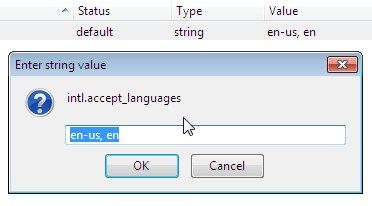
If you set your default locale in Firefox, any website that filters pages based on your location throws you the page matching the language set in your default locale. To do this, open up a new Tab in Firefox and go to “about:config” from the address bar. Don’t get scared by the prompt that appears next. You will now see a list of all the preferences in Firefox.

Now locate, “intl.accept_languages” using the Filter bar at the top. Right click on it and select Modify. You’ll see two parameters separated by a comma which is like this “en-us, en”. Change the first entry as per your language and location. For example, enter “da-dk”  before the comma for Danish Language.
You can also do this by modifying another preference “general.useragent.locale” from about:config in Mozilla Firefox.

This trick will help you set your preferred locale. Upon doing this, your native language will be automatically recognized by concerned websites.

Tuesday, February 15, 2011

How to Make Private Browsing More Private ?

Privacy features such as InPrivate browsing in Internet Explorer 8 and similar features in Chrome and Firefox promise to protect your privacy by not keeping track of page history, temporary files and cookies. This may be enough to hide your tracks from a beginner computer user but there are still traces of what sites you visit within the local DNS cache. An advanced user can run the ipconfig /displaydns command in DOS to view the most recent sites visited. So in order to have more secure follow these steps :-
1. Lets first open Bing in Internet Explorer 8 by using its private browsing facility.
2. Open DOS & run ipconfig /displaydns command.
3. The DNS Cache shows where you have been.

4. The best way to improve the privacy of your InPrivate browsing sessions is to also clear the local DNS cache after closing the browser. Open up an administrative level command prompt and type ipconfig /flushdns and hit Enter.

Swiftkey Android App Knows What You're Going To Type


Typing may never be the same again, thanks to a new mobile phone application that knows what to say before you do. 

Swiftkey, developed by a British company from London, can predict entire messages on the basis of a user’s previous texts and emails. Analysis of what a person has previously written on Google Mail, Facebook or Twitter allows the software can work out what an individual is likely to say in future. As the software continues to be used, its understanding of writing subject and style also evolves. 

The manufacturers of Swiftkey claim that 84 per cent of all words typed are correctly predicted after the user has typed just one or two letters. Approximately a third of all “second words” is predicted without a single character being typed. 

Swiftkey was initially demonstrated at Mobile World Congress 2010 in Barcelona. Its new version incorporates the analysis of a user’s vocabulary and style from Gmail and others, and

Find anyone’s location from their router MAC address (Google Maps API exploit)

These days location based services can tell where you are at any time. Many online services can pretty much tell your location but they don’t generally pinpoint it at the exact GPS co-ordinates. Samy Kamkar has used the undocumented Google Maps API to map a web browser to GPS coordinates via router XSS and Google’s Location based services i.e. using this, one can find the location of any person from their MAC address. The application is called MapXSS.


The router and web browser themselves contain no geolocation/GPS data and is also not IP based Geolocation. This works via Router XSS which obtains the MAC address of the router via AJAX. The MAC address is then sent to the person who is trying to learn your location. The MAC address is then sent to the Google’s Location Based Services which can map the location (approximate GPS co-ordinates) of a user based on his MAC address. The creator of MapXSS says that he determined this protocol by using Firefox’s Location Aware Browsing.

Without Google Maps, this method of knowing one’s location through XSS exploit isn’t possible. Google while collecting data for the Google Street View had also collected data of the wireless networks in the vicinity and the MAC address of those routers. and then mapped them to the GPS co-ordinates. A malicious page you’re visiting might perform an XSS exploit and retrieve the MAC address of your router and then retrieve the GPS co-ordinates corresponding to that MAC address from Google Maps.

This exploit is a really serious thing and it can cause serious crimes as thugs and ruffians can easily know your location.

Monday, February 14, 2011

Permanently Delete Files : Trick

Files are still recoverable after they have been deleted in the Windows operating system. They are moved first to the Windows Recycle Bin where they are recoverable for as long as they are stored inside. Most users do not know that files are even recoverable after the Recycle Bin has been deleted or files have been deleted directly by bypassing the Recycle Bin.

The reason for this is simple. The Windows operating system write protects occupied storage space on the hard drive and a deletion basically removes that write protection and the file reference. Files are fully recoverable for as long as no data is saved into their original storage space on the hard drive. They may be partially recoverable if data has been saved in the location.

A tool like Moo0 FileShredder deletes files securely so that they cannot be recovered by file recovery software. all the tool does is to write over the storage space of the deleted file to delete its data from the hard drive.


The application is easy to use. All it takes is to drag and drop files into the program interface to delete them. It offers multiple methods of deleting files securely which seem to differ in the amount of overwrites. All methods on the other hand make the files unrecoverable.

Recover Videos From CDs and DVDs

The durability of CDs and DVDs depends on several factors. These factors have a direct influence of the longevity of the data which usually ranges between 2 and 15 years. This alone makes CDs and DVDs an unreliable backup medium. Computer users on the other hand do not use recordable CDs and DVDs just for backup purposes. Some like to burn videos on the discs, for instance from holidays to watch them on television.

The limited longevity can be problematic if the CD or DVD becomes unreadable, which it will eventually, especially if no backup is available.

Get My Videos Back has been designed as a video recovery software that offers to restore media found on CDs, DVDs and other optical discs.


The file recovery application can only recovery videos that have been directly burned to disc. It does not support video DVDs or CDs.

The Open Source application supports a variety of media formats, including avi, mkv, mp3, mpg and wmv. A click on Open and start in the program interface opens a file browser to select a video file for recovery. The program can unfortunately process only one video file per recovery session, a queue to select multiple video files for recovery is missing.

How to make a folder with name “con” ?

Folder with Name "con"
Goto command Prompt,
Goto the location where you want to make the folder with name “con”.
write the command: mkdir \\.\location:\con
To remove the folder again: rmdir \\.\location:\con

eg:-

write the command: mkdir \\.\e:\con
To remove the folder again: rmdir \\.\e:\con

How to extract images from Google Docs Document

Google Docs is probably the most popular cloud based Word Processing Application for editing and viewing documents online. With addition of great useful features, one can get all the basic benefits of standalone desktop word processing software on Google Docs. Google Docs lets you insert images into a document as well. But what if you open the document from another computer and need to extract the images inserted into the document? Here are some tricks for doing that.

Google Docs doesn’t allow you to download the image from the document editor window. It only allow you to add hyperlink to the image or remove it. But you can take another approach. You can first publish your document as a web page and then download the image as you would do on a web page. From the “Share” button at the top right hand side of the document editor, select “Publish to the Web”. You’ll then get the URL of the webpage. Open it and download the image as you would do on a normal web page.

Extract images from Google Docs
Another method of extracting images from Google Docs is by downloading the whole document to your desktop. You can download the file in .DOC or .PDF format (In Google Docs, go to File>Download As> Word), open the files with applications like Microsoft Word or Adobe Reader and then drag the image contained in the file to the desktop. This will prompt you to save the file. Go ahead, give it an appropriate name and save it to your hard disk.(Note: This trick may not work on some computers though). But if you have lots of images inserted into the document, this method can be very much time consuming. In such cases, the HTML export format works the best. Go to File> Download As> HTML(Zipped). This will download the HTML file in ZIP format. Now open the ZIP file with WinRar and you’ll see a folder named images. Extract the folder to your hard disk. This folder contains all the images contained in the word document in Google Docs.

Thus you can easily extract images from Google Docs using these techniques.