Use the chrome:// commands to access many hidden features of Chrome. There is a few dozen of these commands available that will allow you to do everything from viewing DNS information, GPU information, look for conflicts, setting flags, and much more. A listing of these commands can be accessed by typing chrome://chrome-urls in the Omnibox.


- Find out what I'm doing, Follow Me :)
Showing posts with label Google Chrome. Show all posts
Showing posts with label Google Chrome. Show all posts
Tuesday, March 12, 2013


Use the Omnibox to do more than just search
The Google Omnibox does more than displaying the URL and allowing you to search. It is also capable of performing mathematical calculations (as shown in the picture) and even answer questions such as "how many cups are in 2 liters?" Try adding any math calculation now in the Omnibox without pressing enter to have the results shown.

Monday, March 11, 2013
Google Chrome keyboard shortcuts
Like any good browser, Google Chrome has several dozen different keyboard shortcuts that can help improve your productivity. Below is just a few of our top favorites.
Ctrl + 1-8 = Pressing Ctrl and any number 1 through 8 will move to the corresponding tab in your tab bar.
Ctrl + 9 = Switch to the last tab.
Ctrl + H = Show history
Ctrl + J = Open Downloads window
Ctrl + K = Move the cursor to the Omnibox (address bar)
Ctrl + T = Open a new tab
Ctrl + 9 = Switch to the last tab.
Ctrl + H = Show history
Ctrl + J = Open Downloads window
Ctrl + K = Move the cursor to the Omnibox (address bar)
Ctrl + T = Open a new tab
Monday, December 19, 2011
Hide All Google Chrome Tabs With A Single Click
If you are working in a multi-user office or in a room that people may enter unannounced, you’d probably like an option to hide what’s shown on the screen when that happens. Maybe you like buying gifts for someone online, like to surf on a site that you are not allowed to access, or do not want your office colleagues to find out that you are into Britney Spears. Whatever it is, a Panic Button application can be the solution.
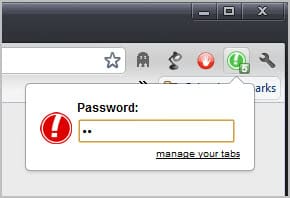 A panic button or boss key application performs one or multiple actions when the button is activated. This usually includes hiding a window, but sometimes other things such as muting the volume.
The Google Chrome Extension PanicButton adds the functionality to the Chrome browser. It basically allows you to hide all open Chrome tabs with a single click.
Here is how it works in detail. The extension adds a single button to the Chrome address bar upon installation. A left-click on the button hides all open tabs and displays a single blank tab instead in the browser interface. A second left-click loads the websites again so that you can continue using them. The extension saves the open tabs to bookmarks. This means that you may lose whatever you have been working on before you have clicked on the button.
A green icon with the number of saved tabs attached to it is displayed when the panic button has been activated.
New users should take a look at the options of the extension by right-clicking on the icon and selecting options from the context menu.
Here it is possible to set a password to protect tabs from being restored. Anyone could theoretically click on the button to recover tabs otherwise.
You can furthermore change the default keyboard shortcut from F4 to another combination. Please note that you can only use the shortcut on http or https pages. It wont work on blank or internal pages.
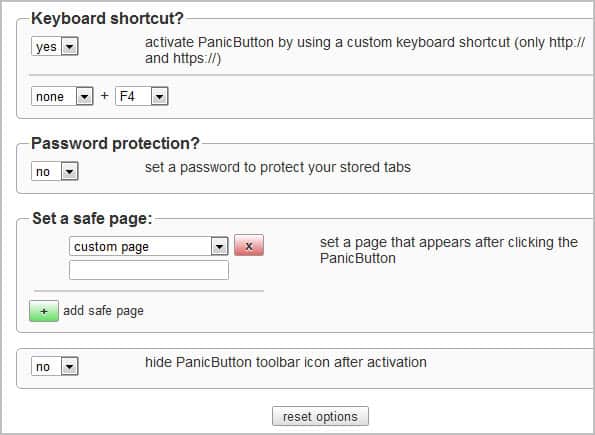
Safe pages, that is pages that are displayed when the panic button is activated, can be configured in the options as well. You can select to display new tab, empty or custom pages. Custom pages are websites that you need to enter. These are then loaded whenever the panic button is activated in the browser.
The hide panic button option finally hides the button once it has been activated. This removes the indication from Chrome’s toolbar.
Chrome users can download the PanicButton extension from the Google Chrome Extension repository.
Saturday, October 1, 2011
Reports: Microsoft Anti-Virus Erasing Google Chrome
 Mighty funny timing, Microsoft. Reports say that Google’s Chrome browser was threatening to overtake Firefox in the coming months thanks to soaring usage rates caused, in large part, by FF and IE defectors. Then, this morning, Internet forums are awash with rage because a new update to Microsoft’s Security Essentials and ForeFront AV software began calling Chrome a Trojan and erasing it from users machines. Coincidence? Yeah, it probably is. But that still doesn’t change the fact that users are pissed.
 Both ZDNet and The Register are reporting that they’ve received numerous complaints about the critical false positive. The AV programs are identifying Chrome as part of the ZeuS Trojan, and users who try to reinstall the browser are finding that the antivirus program won’t let them, citing “PWS:Win32/Zbot” as a severe threat. Register readers are reporting that the beta version of Chrome isn’t affected, nor are browsers that are configured to not send Google any information. Nobody’s saying anything official at the moment – both Google and Microsoft have been mum on the matter.
So, has any of you been affected by the bug? Chime in with your experiences in the comments! I've got Chrome and MSE installed on my laptop, and nothing fishy has gone on yet.
Subscribe to:
Posts (Atom)



